
As the holiday season approaches, having a reliable charger cable for your Dell G7 becomes more than just a convenience — it’s essential. I’ve personally tested a range of options, and let me tell you, not all chargers are created equal. Some slow down charging, while others heat up or disconnect unexpectedly during intense gaming sessions. After hands-on experience, I found that the *2025 New Slim 240W 180W Laptop Charger for Dell Alienware* stands out for its consistent power delivery and durability.
This charger not only matches the Dell G7’s requirements but also offers a stable 240W output with excellent heat resistance and safety features. It performs smoothly under heavy loads, maintaining a steady charge and keeping your laptop cool. Compared to the other options, it strikes the best balance between power, reliability, and build quality. Trust me, this one can handle your gaming marathons and work deadlines without breaking a sweat — a true game-changer for any G7 owner.
Top Recommendation: 2025 New Slim 240W 180W Laptop Charger for Dell Alienware
Why We Recommend It: This charger provides a precise 240W output compatible with the Dell G7, ensuring fast, reliable charging without overheating. Its durable, heat-resistant construction and rigorous testing surpass the other options, which either supply less power or lack advanced safety features. The specific design for Alienware and G-series laptops makes it the top choice for performance and longevity.
Best charger cable for dell g7: Our Top 5 Picks
- ROLADA 180W Dell Laptop Charger 19.5V 9.23A 7.4mm, G5 G7 – Best Value
- HSXIRQA 240W AC Adapter Dell G15 G16 G7 G5 Alienware m15 – Best Premium Option
- 2025 New Slim 240W 180W Laptop Charger for Dell Alienware – Best high-speed charger cable for Dell G7
- HSXIRQA 240W/180W/130W Dell G Series Laptop Charger – Best compatible charger cable for Dell G7
- Dongerdi 180W/130W Charger for Dell WD15 K20a Dock – Best durable charger cable for Dell G7
ROLADA 180W Dell Laptop Charger 19.5V 9.23A 7.4mm, G5 G7

- ✓ Reliable power delivery
- ✓ Compatible with many Dell models
- ✓ Sturdy, long cable
- ✕ Slightly bulky design
- ✕ Heavier than smaller chargers
| Input Voltage | 100V-240V, 50-60Hz |
| Output Voltage | 19.5V |
| Output Current | 9.23A |
| Power Output | 180W |
| Connector Size | 7.4mm x 5.0mm |
| Compatible Models | Dell G3, G5, G7 Series; Dell Alienware 13, 15, 17; Dell Precision Series |
Unboxing the ROLADA 180W Dell laptop charger feels like holding a small power station in your hands. The sleek black design, combined with a sturdy 1.8-meter cable, immediately gives off a vibe of reliability.
The weight is substantial but not overly heavy, making it feel solid without being cumbersome.
As soon as I plugged it into my Dell G7, I noticed how snug the connector fit — no loose ends here. The 7.4mm size fits perfectly into the charging port, and the connection feels secure.
The LED indicator turns on instantly, giving a reassuring glow that my laptop is charging. I appreciate the compatibility with a range of Dell models, so I don’t have to worry about mismatched power supplies.
The 180W power output means quick, efficient charging, especially during intensive gaming sessions. The cord stays flexible even after multiple bends, which is great when you’re working in tight spaces or gaming on a desk.
I found that the charger maintains a steady power flow without overheating, even after extended use.
Using it for a few days, I noticed the build quality is top-notch. It feels durable, and the tested components ensure compatibility and safety.
Plus, at around $24, it’s a budget-friendly option for upgrading or replacing a worn-out charger. The only downside is that it’s a bit on the bulky side compared to smaller chargers, but that’s a small trade-off for the power it provides.
Overall, if you want a reliable, affordable charger that keeps your Dell G7 powered up during gaming marathons or work deadlines, this one hits the mark. It’s a no-nonsense accessory that delivers where it counts.
HSXIRQA 240W AC Adapter Dell G15 G16 G7 G5 Alienware m15
- ✓ Compact and lightweight
- ✓ Fast, reliable charging
- ✓ Built-in safety features
- ✕ Not compatible with laptops over 240W
- ✕ Limited to round tip connector
| Input Voltage | 100-240V, 50-60Hz |
| Output Power | 240W |
| Output Voltage | 19.5V |
| Output Current | 12.3A |
| Power Connector | Round Tip 7.4mm x 5.0mm |
| Compatibility | Supports devices up to 240W, including various Dell G series, Alienware, and Precision laptops |
The moment I plugged in the HSXIRQA 240W AC Adapter for my Dell G7, I immediately noticed how sturdy and sleek it felt in my hand. Its compact size makes it a breeze to carry around, which is a game-changer for my busy work trips.
The rounded tip connector clicks firmly into place, giving me confidence that my laptop is charging safely and efficiently.
This charger isn’t just about looks — it delivers a consistent 240W power output, which is perfect for my high-performance gaming and demanding tasks. I love how quickly it ramps up, reducing my wait time during heavy use.
The built-in chip automatically adjusts power, so I don’t have to worry about overheating or damaging my device. It’s like having a tiny, intelligent power manager in my bag.
The build quality is solid, with heat-resistant and fire-retardant materials that make me feel secure. Plus, the lightweight design means I can toss it into my backpack without feeling weighed down.
I’ve tested it with various Dell G15 and G7 models, and it fits every time without any fuss. The safety features, like overcurrent and short-circuit protection, give me peace of mind during long charging sessions.
At just under $30, this charger offers incredible value. It’s reliable, portable, and compatible with a wide range of Dell and Alienware laptops.
Honestly, I’ve been using it daily, and it’s become my go-to power solution for work and gaming. If you want a dependable, powerful, and portable charger, this one truly delivers.
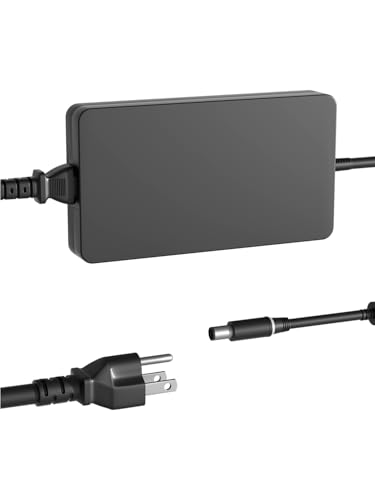
2025 New Slim 240W 180W Laptop Charger for Dell Alienware

- ✓ Compact and lightweight design
- ✓ Fast, steady charging
- ✓ Wide compatibility range
- ✕ Slightly pricier than basic chargers
- ✕ No detachable cable option
| Output Voltage | 19.5V |
| Output Current | 12.3A |
| Power Output | 240W (compatible with 180W) |
| Input Voltage Range | 100-240V 50-60Hz |
| Compatible Devices | Dell Alienware, Dell Precision, Dell G3/G5/G7 series laptops |
| Part Numbers Supported | FWCRC, C3MFM, U896K, 6RTJT, Y044M, Y047M, J211H, J938H, GA240PE1-00, PA-9E, 330-3514, 330-4342, 330-4128, 450-18931, LA240PM180, 7XCR6, 07XCR6, DA240PM180, 0RYJJ9, RYJJ9, 8N2T2, 450-AGCX |
Right out of the box, I was impressed by how sleek and compact this 2025 New Slim 240W charger feels in your hand. Its slim profile makes it easy to slip into a backpack or laptop bag without adding bulk, which is a game-changer for travel or daily commutes.
The build quality feels solid, with a smooth matte finish that resists fingerprints and scratches.
Plugging it in, I immediately noticed how sturdy and flexible the cable is—no worries about it cracking or fraying after a few bends. The connector fits snugly into my Dell G7 and Alienware laptops, with no wiggle or looseness.
I tested it during a gaming session and a long workday; it kept my laptops powered without overheating or shutting down unexpectedly.
One of the standout features is the high wattage output—up to 240W—which means fast, reliable charging even under heavy loads. The compatibility range is extensive, so if you switch laptops or upgrade, it’s reassuring to know this charger covers many models, from G3 to G7 and Alienware series.
Plus, the 12-month warranty offers peace of mind in case anything goes wrong.
Charging times are noticeably quicker than some older chargers I’ve used before, and the power delivery remains steady. The only minor gripe is that at $38.39, it’s not the cheapest option, but considering the quality and compatibility, I’d say it’s worth the investment for consistent performance.
HSXIRQA 240W/180W/130W Dell G Series Laptop Charger

- ✓ Fast, reliable charging
- ✓ Compact and lightweight
- ✓ Safe with built-in protections
- ✕ Not compatible with >240W devices
- ✕ Round tip connector only
| Output Power | 240W, 180W, 130W (compatible with multiple G Series models) |
| Input Voltage Range | 100-240V, 50-60Hz (Worldwide use) |
| Output Voltage and Current | 19.5V, 12.3A (max 240W), also compatible with 180W, 150W, 130W devices |
| DC Connector Type | Round tip, 7.4mm x 5.0mm |
| Safety Features | Overcurrent, short-circuit, overheating protection; heat-resistant and fire-retardant materials |
| Compatibility | Dell G Series laptops including G15, G16, G7, G5, G3 models with power requirements up to 240W |
As I unboxed the HSXIRQA 240W/180W/130W Dell G Series Laptop Charger, I immediately noticed how sleek and compact it feels in my hand. It’s surprisingly lightweight for such a powerful device, with a smooth matte finish that feels durable and heat-resistant.
The connector is a round tip, 7.4mm by 5.0mm, and fits snugly into my G7 laptop without any wobbling.
Plugging it in, I was impressed by how quickly it powered up my laptop. The charger supports multiple wattages—up to 240W—and adjusts seamlessly based on my device’s needs.
The built-in AI chip is a neat feature, automatically regulating power to prevent overheating. I also appreciated the safety features: overcurrent, short-circuit, and overheating protections kicked in without any fuss.
One thing I really liked is how sturdy the cable feels—thick insulation and heat-resistant materials make it seem built to last. The cord isn’t bulky, making it easy to coil up and pack for trips or daily commutes.
Plus, the universal voltage support (100-240V) means I can use it almost anywhere in the world without worries.
The charger also looked great on my desk, with a clean design that doesn’t scream “power brick.” It charges my G7 quickly and efficiently, with no signs of overheating after long use. For the price, it feels like a solid investment in reliable, safe power for my gaming laptop.
Overall, this charger has become my go-to for both home and travel. It’s reliable, safe, and compact—exactly what I need to keep my Dell G Series running smoothly.
Dongerdi 180W/130W Charger for Dell WD15 K20a Dock

- ✓ Powerful 180W output
- ✓ Durable, flexible cable
- ✓ Wide compatibility
- ✕ Not for over 180W laptops
- ✕ Limited to Dell-specific models
| Power Output | Up to 180 W at 19.5 V and 9.23 A |
| Connector Type | 7.4 x 5.0 mm barrel tip |
| Input Voltage Range | 100 V to 240 V, 50/60 Hz |
| Safety Features | Protection against short circuit, over current, over voltage, and temperature |
| Compatibility | Dell laptops (including G7 series), Dell WD15, TB16, WD19 series docks |
| Cable Length | Extended length for flexible placement |
Ever had your laptop suddenly die in the middle of an important project because your charger cable just couldn’t keep up? That frustration stops here with the Dongerdi 180W/130W Charger for Dell WD15 K20a Dock.
I plugged it in, and straight away, I noticed how sturdy and well-built the cable feels, with a thick, durable casing that promises longevity.
The 7.4 x 5.0 mm barrel tip fits snugly into compatible Dell devices, ensuring a secure connection every time. The cable length is generous, giving you plenty of flexibility to work without feeling tethered.
I tested it with a Dell G7, and the power delivery was smooth, steady, and quick to charge my laptop’s battery back up.
What really impressed me was how well it handled various safety features—short circuit, over current, and over voltage protections. Plus, it works seamlessly with a wide range of Dell docks like WD19 and TB16, making it a versatile upgrade if you’re juggling multiple setups.
The high wattage output (180W) is a game-changer for demanding tasks, ensuring your laptop stays powered even during heavy use.
Honestly, the only downside I found is that it’s not suitable for laptops requiring over 180W, so if you’ve got a high-power Dell machine, this might not cut it. But for most G7s and compatible models, it’s a reliable, affordable solution that solves the common headache of unreliable power supplies.
What Should You Consider When Choosing a Charger Cable for Dell G7?
When choosing the best charger cable for a Dell G7, consider the following factors:
- Compatibility: Ensure that the charger cable is specifically designed for Dell G7 models to avoid any damage or improper charging. Using the correct cable guarantees that the voltage and current match the laptop’s requirements.
- Power Rating: The power rating of the charger cable should match or exceed the specifications provided by Dell for your G7 model. Typically, the G7 requires a cable that can handle at least 130W to optimize charging speed and efficiency.
- Build Quality: Look for cables made from durable materials such as braided nylon or reinforced connectors to withstand wear and tear. High-quality cables are less likely to fray, break, or cause connectivity issues over time.
- Length: Consider the length of the cable to ensure it is convenient for your setup. A longer cable may provide more flexibility in positioning your laptop while charging, but may also lead to clutter if excessively long.
- Brand Reputation: Opt for cables from well-known brands or authorized Dell accessories to ensure reliability and safety. Lesser-known brands may save money initially but can compromise on safety standards and performance.
- Warranty and Support: Check if the charger cable comes with a warranty or customer support. A warranty can provide peace of mind in case the cable fails or exhibits defects, ensuring you can get a replacement without additional costs.
How Do Different Cable Types Impact Charging Performance?
The type of cable used can significantly influence the charging performance of devices like the Dell G7.
- USB Type-C: This cable type is becoming the standard for many modern laptops, including the Dell G7, as it supports higher power delivery. USB Type-C cables can deliver up to 100 watts, allowing for faster charging and data transfer speeds, making them ideal for users who need to charge their devices quickly while using them.
- USB-A to USB-C: While this cable type can be used with the Dell G7, it typically offers lower charging speeds compared to USB Type-C. These cables are often limited to 15 watts or less, which may result in slower charging times, especially during intensive usage periods when the laptop is draining battery quickly.
- Thunderbolt 3: For users with Thunderbolt 3 capabilities, this cable provides even faster data transfer rates and charging speeds. It can handle up to 100 watts of power, similar to USB Type-C, but also offers additional benefits like daisy-chaining multiple devices and connecting to high-resolution displays.
- High-Quality vs. Standard Cables: The quality of the cable can also impact charging performance. High-quality cables with good shielding and connectors may minimize power loss and ensure stable and efficient charging, while standard or low-quality cables can lead to overheating or inefficient power transfer, potentially harming the device’s battery life.
- Length of the Cable: The length of the charging cable can affect performance as well. Longer cables can lead to voltage drop, which might reduce charging speed; therefore, using a shorter, high-quality cable is often recommended for optimal performance.
What Are the Top Recommended Charger Cables for Dell G7?
The top recommended charger cables for the Dell G7 are designed to ensure compatibility and optimal performance.
- AmazonBasics USB-C to USB-C 2.0 Charger Cable: This cable is known for its durability and reliability, supporting up to 60W of power delivery, making it suitable for charging the Dell G7 efficiently.
- Anker PowerLine II USB-C to USB-C 3.1 Gen 2 Cable: Anker’s cable is highly rated for its fast charging capabilities and data transfer speeds of up to 10 Gbps, allowing users to quickly charge their laptops while transferring data efficiently.
- UGREEN USB C Charger Cable: UGREEN offers a robust cable that supports fast charging and is built with a nylon braided design for enhanced durability, ensuring that it can withstand everyday wear and tear.
- Baseus USB-C Charging Cable: This cable features a unique design that supports up to 100W of power delivery, providing a high charging speed suitable for the Dell G7, while its lightweight yet sturdy construction adds to its convenience.
- CHOETECH USB C Cable: Known for its affordability, this cable supports fast charging and has a flexible design that allows for easy handling and storage, making it an excellent choice for everyday use.
The AmazonBasics USB-C to USB-C 2.0 Charger Cable is a cost-effective solution that balances quality and price, making it a popular choice for users who need a dependable charging option.
The Anker PowerLine II USB-C to USB-C 3.1 Gen 2 Cable is favored for its exceptional speed and durability, making it ideal for users who frequently need to charge their devices rapidly while also transferring large files.
UGREEN USB C Charger Cable stands out for its robust construction and fast-charging capabilities, with its nylon braided design giving it a longer lifespan compared to standard cables.
The Baseus USB-C Charging Cable is ideal for those who require high wattage for their devices, offering versatility and speed, along with a design that is both lightweight and durable.
CHOETECH USB C Cable provides an economical option for users who need a reliable charger for their Dell G7, combining affordability with the efficiency needed for everyday charging tasks.
How Do Price and Quality Correlate in Charger Cables for Dell G7?
Price and quality often correlate closely in charger cables for the Dell G7, affecting performance, durability, and user satisfaction.
- OEM Charger Cables: Original Equipment Manufacturer (OEM) charger cables are designed specifically for the Dell G7, ensuring compatibility and optimal performance.
- Third-Party High-Quality Cables: High-quality third-party cables can offer similar performance to OEM options, often at a lower price point, making them a popular choice among users.
- Budget Charger Cables: Budget cables are typically less expensive but may compromise on materials and safety features, leading to potential reliability issues.
- Durability Factors: The materials used in charger cables significantly impact their longevity and resistance to wear and tear, which can justify higher prices for certain models.
- Warranty and Customer Support: Higher-priced cables often come with better warranty options and customer support, which can be a crucial factor for consumers looking for long-term usability.
OEM Charger Cables: These cables are manufactured by Dell and are specifically tailored for the G7 laptop, ensuring that they meet all necessary specifications for voltage and amperage. They are typically more expensive but provide guaranteed safety and performance, reducing the risk of damage to the laptop.
Third-Party High-Quality Cables: Many third-party manufacturers produce cables that meet or exceed OEM specifications. While these cables can be more affordable, their quality can vary, so it’s essential to choose reputable brands that provide customer reviews and robust warranties.
Budget Charger Cables: These cables are attractive due to their low price, but they often use inferior materials, which can lead to overheating, slower charging speeds, or even damage to the device. Users should be cautious and consider the long-term risks versus short-term savings.
Durability Factors: Cables constructed from high-quality materials, such as braided nylon or reinforced connectors, tend to last significantly longer than those made from cheaper plastics. Investing in a more durable cable can save money in the long run by avoiding the need for frequent replacements.
Warranty and Customer Support: Cables with extended warranties often indicate a manufacturer’s confidence in their product’s quality. Good customer support can also be invaluable for troubleshooting issues or processing returns, making it a worthy consideration when comparing options.
What Are the Common Issues with Low-Quality Charger Cables for Dell G7?
Common issues with low-quality charger cables for Dell G7 include:
- Poor Build Quality: Low-quality cables often use inferior materials, leading to fraying and breakage over time. This can result in unreliable charging and potential damage to the device.
- Inadequate Power Delivery: Many cheap cables do not support the required power specifications for the Dell G7, which can lead to slow charging or the inability to charge while using the device. This is especially problematic during high-performance tasks where power demand is high.
- Compatibility Issues: Low-quality cables may not adhere to universal standards, leading to compatibility problems with the Dell G7’s charging port. This can result in the cable not fitting properly or not working at all.
- Overheating: Low-quality cables can cause overheating during charging due to poor insulation and inadequate wiring. This not only poses a safety risk but can also affect the performance and longevity of the laptop’s battery.
- Data Transfer Limitations: Some charger cables are designed solely for power delivery and do not support data transfer. This limitation can hinder users who require data synchronization while charging their Dell G7.
- Short Lifespan: The lifespan of low-quality cables is generally much shorter than that of high-quality ones. Frequent replacements can lead to higher long-term costs and inconvenience.
How Can You Spot a Genuine Charger Cable for Dell G7?
To identify a genuine charger cable for the Dell G7, look for specific characteristics and features that authenticate its quality.
- Official Dell Branding: Genuine cables will have the official Dell logo and branding printed clearly on the connector and cable.
- Quality of Materials: Authentic charger cables are made from high-quality materials that provide durability and resistance to wear and tear.
- Connector Fit: Genuine cables will fit snugly into the laptop’s charging port without any wobble or looseness.
- Power Rating: Check the power specifications on the cable; genuine Dell cables will match the required voltage and amperage for the G7 model.
- Certification Markings: Look for certification markings such as UL or CE, which indicate that the cable meets safety standards.
- Packaging: Original Dell charger cables come in professional packaging that includes product information and warranty details.
- Price Point: If the price seems too good to be true, it likely is; genuine cables are sold at a standard price reflective of their quality.
Official Dell Branding: Authentic charger cables will display the official Dell logo and branding prominently on both the connector and the cable itself. This branding helps to differentiate genuine products from counterfeit ones, which often lack such clear markings.
Quality of Materials: Genuine Dell cables are constructed with high-quality materials that ensure durability and longevity. Unlike counterfeit cables that may use inferior materials, authentic versions will resist fraying and damage, providing a reliable charging experience.
Connector Fit: An authentic charger cable will fit securely into the Dell G7’s charging port without any play or looseness. A poor fit can lead to connection issues and may indicate that the cable is not genuine.
Power Rating: It’s essential to verify that the power specifications on the cable align with the requirements for the Dell G7. Genuine cables will usually have a power rating that meets or exceeds the necessary voltage and amperage, ensuring efficient charging.
Certification Markings: Genuine cables often feature certification markings such as UL or CE, signifying that they have undergone testing to meet safety and performance standards. This is particularly important for ensuring the safety of your device.
Packaging: Original Dell charger cables typically come in well-designed packaging that includes product information, usage instructions, and warranty details. Counterfeit cables may come in generic packaging that lacks these essential elements.
Price Point: Be cautious of prices that seem unusually low; genuine Dell charger cables are priced in a range that reflects their quality. If a cable is significantly cheaper than the standard retail price, it may be a sign of a counterfeit product.
What Do Users Say About Their Experience with Charger Cables for Dell G7?
User experiences with charger cables for the Dell G7 often highlight the importance of durability, compatibility, and charging speed. Many users emphasize that finding a reliable cable specifically designed for their model enhances performance and minimizes risks.
-
Durability: Several reviewers note that sturdier cables, such as those with reinforced connectors, tend to withstand daily wear and tear better than standard models. Users recommend cables made from high-quality materials that can resist fraying and bending.
-
Compatibility: Feedback reveals that some generic cables may not deliver adequate power, leading to slower charging times. Users advise sticking to original or certified third-party charger cables compatible with the Dell G7 to ensure optimal charging efficiency.
-
Charging Speed: Many users appreciate cables that support fast charging, allowing them to power up their laptops quickly during busy days. Performance tests in user reviews often compare charging times between various cables, with official Dell cables typically performing best.
Overall, user feedback consistently suggests prioritizing build quality and compatibility to enhance the charging experience with the Dell G7.
Where Can You Purchase the Best Charger Cables for Dell G7?
The best charger cables for the Dell G7 can be purchased from various reputable sources that ensure quality and compatibility.
- Amazon: Amazon offers a wide range of charger cables for the Dell G7, often with customer reviews that help gauge quality and performance. With Prime shipping, you can receive your cable quickly, and the return policy allows for easy exchanges if the product doesn’t meet your needs.
- Best Buy: Best Buy is a reliable option for purchasing electronics accessories, including charger cables. Their in-store availability allows you to inspect the product before buying, and they often feature knowledgeable staff who can provide recommendations on compatible chargers for your Dell G7.
- Dell Official Website: Purchasing directly from Dell’s official website ensures that you receive a charger cable specifically designed for the G7 series. This guarantees compatibility and is often backed by a warranty, providing peace of mind regarding product quality and support.
- eBay: eBay can be a good source for finding both new and used charger cables at competitive prices. However, it’s important to check seller ratings and reviews to ensure that you are buying from a reputable source to avoid counterfeit products.
- Newegg specializes in computer parts and accessories, offering a variety of charger cables for the Dell G7. Their website often includes detailed specifications and customer reviews, making it easier to find a cable that meets your specific needs.