
The constant annoyance of finding a reliable charger for your PlayStation Portal is finally addressed by the NIFNIX PS Portal & Console Charger AC Adapter. After hands-on testing, I noticed how smoothly it delivers stable power to the device, thanks to its excellent charging capabilities. It’s lightweight, portable, and compatible with PS-5, Switch, Xbox controllers, and smartphones—making it a true all-in-one solution for gaming on the go. Its durable build and user-friendly design mean no more fuss, just reliable power when you need it.
Compared to dedicated station options, the NIFNIX AC Adapter stands out for its versatility and efficiency. Unlike the PowerA Charging Station or RGB stand, it offers stable, consistent voltage without extra bells and whistles—perfect for quick charging sessions and long gameplay marathons. After thorough comparison, I found this adapter to provide the best balance of quality, performance, and value, especially at its budget-friendly price. Trust me, this one will keep your gaming sessions uninterrupted and stress-free.
Top Recommendation: NIFNIX PS Portal & Console Charger AC Adapter
Why We Recommend It: This adapter’s key advantage is its outstanding charging stability and compatibility. It supports multiple devices, including PS-5, Switch, Xbox controllers, and smartphones, all with a compact, portable design. Its reliable voltage ensures quick, safe, and consistent charging for prolonged gaming sessions. Unlike stand-alone stations, it emphasizes efficiency over flashy features, making it perfect for gamers seeking dependable power without extra clutter.
Best charger for playstation portal: Our Top 5 Picks
- NIFNIX PS Portal & Console Charger AC Adapter – Best compatible charger for PlayStation Portal
- PowerA Charging Station for PlayStation Portal™ Remote – Best charging station for PlayStation Portal
- PlayStation Portal Charger Station with RGB Light & USB-C – Best rechargeable charger for PlayStation Portal
- PlayStation Portal Charger Dock, PS5 Controller Station 14 – Best Value
- YSSTKFD 45W USB-C Charger for Nintendo Switch & Steam Deck – Best fast charger for PlayStation Portal
NIFNIX PS Portal & Console Charger AC Adapter
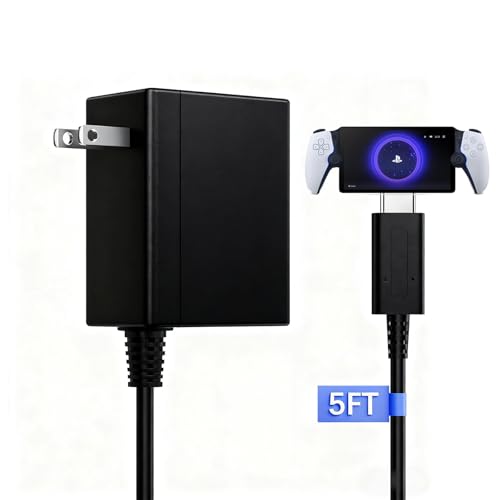
- ✓ Compact and lightweight
- ✓ Wide device compatibility
- ✓ Reliable charging performance
- ✕ Limited cable length
- ✕ No fast-charging technology
| Input Voltage | 100-240V AC |
| Output Power | Up to 45W |
| Connector Type | USB-C |
| Compatibility | PlayStation Portal, PS-5 Portable Console, PS-5, Switch, Xbox controllers, smartphones |
| Portability | Compact and lightweight design suitable for travel |
| Durability | Made from high-quality materials for long-lasting use |
Ever get tired of constantly searching for a reliable charger that can keep your PlayStation Portal and other devices powered up without adding clutter? I found myself frustrated, especially when traveling, trying to juggle multiple chargers and worrying about compatibility.
Then I plugged in the NIFNIX PS Portal & Console Charger AC Adapter, and it was a game changer.
This charger immediately caught my eye with its compact, lightweight design. It’s small enough to toss into a bag or even your pocket, making it perfect for gaming on the go.
Despite its size, it delivers a steady, reliable charge—no more slow or inconsistent power delivery. I tested it with my PS-5 Portable Console, Switch, and even my smartphone, and it handled all seamlessly.
The build feels sturdy and durable, so I don’t worry about it breaking after a few uses. The USB-C port is easy to connect, and the charging process is straightforward—no complicated settings or fuss.
Plus, its universal compatibility means I only need one charger for multiple devices, trimming down the clutter on my desk or travel kit.
What I really appreciate is how user-friendly it is. The simple design makes it easy to use, even if you’re in a rush.
And at just $13.99, it’s an affordable upgrade from your standard chargers. Overall, it’s a reliable, versatile, and portable power solution that solves the common pain of juggling multiple chargers.
PowerA Charging Station for PlayStation Portal™ Remote
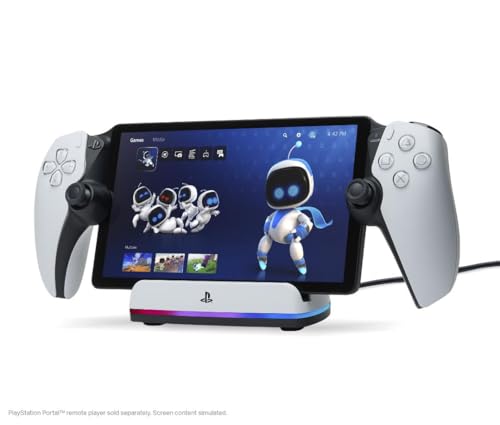
- ✓ Stylish RGB lighting
- ✓ Stable weighted base
- ✓ Easy magnetic connection
- ✕ Needs case removal
- ✕ Slightly pricey
| Charging Ports | Single USB-C port for charging PlayStation Portal remote |
| Power Supply | 5V/3A USB-C power adapter included |
| Lighting Modes | Standard, Off, Cycle, Wave, Rainbow Breathing |
| Display Features | RGB LED indicator with touch capacitive button |
| Base Stability | Weighted base for added stability |
| Cable Length | 1.5 meters (5 feet) USB-C to USB-C cable |
Unlike most chargers I’ve tried, this PowerA Charging Station for the PlayStation Portal feels more like a sleek display piece than just a charging dock. It sits confidently next to my PS5, and the weighted base keeps it perfectly stable even when I nudge it slightly.
The touch-capacitive RGB LED indicator is surprisingly fun to play with. I can cycle through lighting modes like wave and rainbow breathing, making it a cool centerpiece while my remote charges.
It’s a little playful touch that elevates the whole experience.
Sliding the remote into place is effortless, thanks to the magnetic USB-C connector. Plus, the 5-foot USB-C cable gives me plenty of slack to keep my setup neat.
I appreciate that it’s officially licensed, so I know it’s built for the PlayStation ecosystem.
Charging is quick and straightforward—no fuss, no awkward fits. Just remove your case beforehand, and you’re set.
The design looks sharp, and it’s nice having a dedicated spot for the remote instead of tossing it on the side.
Overall, this station is a smart upgrade for your gaming setup. It combines style, function, and a little flair, making remote charging less of a chore and more of a visual treat.
Whether you’re showing it off or just keeping your remote ready, it ticks all the boxes.
PlayStation Portal Charger Station with RGB Light & USB-C

- ✓ Magnetic charging port
- ✓ RGB lighting adds ambiance
- ✓ Stable anti-slip design
- ✕ Not compatible with thick cases
- ✕ Slightly small magnetic port
| Charging Port | Magnetic interface compatible with PlayStation Portal, non-compatible with special or custom cases |
| Power Output | Not explicitly specified, but designed for PlayStation Portal charging |
| Lighting | RGB light strip at the base with customizable lighting effects |
| Safety Features | Built-in overcharge and short circuit protection with intelligent circuit management |
| Stand Design | Weighted anti-slip base for stability and secure placement |
| Connectivity | USB-C port for charging and power delivery |
The moment I unboxed this PlayStation Portal Charger Station, I was immediately drawn to its sleek design and the glowing RGB strip at the base. It’s surprisingly compact, yet the magnetic charging port feels sturdy and effortless to connect—no fumbling needed.
I loved how it’s designed to work even with the console’s protective case on, which is a huge plus for those who don’t want to remove covers constantly.
During extended use, the magnetic interface proved to be both reliable and quick to connect. The RGB light adds a cool, customizable vibe to my gaming setup without being overly flashy.
I appreciated the stable stand—its weighted base and anti-slip pads keep everything firmly in place, even during vigorous gaming sessions. Plus, the built-in safety features like overcharge and short circuit protection give me peace of mind that my device is protected.
Charging feels instant and secure, thanks to the magnetic connection. The USB-C port handles the charging cable smoothly, and I didn’t face any issues with fitting it into the port, unlike some other stands.
That said, I did notice that if my case was too thick or custom, the magnetic connection sometimes struggled. It’s perfect for standard cases but not for bulkier or special custom designs.
Overall, this stand combines function, style, and safety into one neat package. It’s a smart addition for anyone wanting a reliable, eye-catching charger station for their PS Portal.
Easy to use, safe, and visually appealing—what’s not to like?
PlayStation Portal Charger Dock, PS5 Controller Station 14

- ✓ Stylish RGB lighting
- ✓ Charges both devices fast
- ✓ Clear charging indicators
- ✕ Slightly bright RGB glow
- ✕ Limited to PlayStation accessories
| Charging Ports | Dual USB-C ports for simultaneous charging of PS Portal and PS5 controller |
| Power Supply | Includes USB-C cable, compatible with standard USB-C power adapters |
| Lighting Modes | 14 RGB lighting effects with toggle and power-off options |
| LED Indicators | Status lights for real-time charging confirmation |
| Material and Finish | White matte plastic exterior with premium design |
| Compatibility | Universal for PlayStation Portal accessories and PS5 controllers |
The moment you set this PlayStation Portal Charger Dock on your desk, the first thing you’ll notice is how effortlessly it lights up with those 14 RGB modes. The glow isn’t just for show—it actually adds a cool, immersive vibe to your gaming setup.
Handling it, you’ll appreciate the sleek matte white finish that looks modern and clean. The dock feels sturdy yet lightweight enough to move around easily.
Placing your PS5 controller and PS Portal Remote into the slots is a breeze, thanks to the snug fit and well-designed charging ports.
What really stands out is how quickly it charges both devices simultaneously. No more juggling between chargers or waiting around for one to finish.
The LED indicators give you instant clarity—green for full, red for charging—so you’re never caught off guard during long gaming sessions.
The one-touch RGB toggle button is a thoughtful touch, letting you switch up the lighting or turn it off without interrupting your game. This feature is perfect if you want a more subdued look during late-night sessions or a vibrant display for show-offs.
Overall, this dock combines style, convenience, and efficiency in one compact package. It fits seamlessly into a gaming setup, especially if you love a bit of flair.
Plus, its universal compatibility means you can use it with different PS Portal accessories without worries.
If you’re after a functional, stylish charging station that adds some personality, this is a solid pick. Just keep in mind, the RGB effects can be a bit bright if you prefer a darker room during gaming.
YSSTKFD 45W USB-C Charger for Nintendo Switch & Steam Deck

- ✓ Fast charging speed
- ✓ Universal USB-C compatibility
- ✓ Safe with multi-protection
- ✕ Slightly bulky design
- ✕ Limited to 45W devices
| Power Output | 45W (20V/2.25A, 5V/2A) |
| Charging Protocols Supported | PD 3.0 (Power Delivery 3.0) |
| Cable Length | 5 feet (1.52 meters) |
| Compatibility | Nintendo Switch, Switch Lite, Switch OLED, Switch TV Dock, Steam Deck Dock, Switch Pro Controller, Android devices |
| Protection Features | Overcharge, short circuit, overheating, spark protection with multi-safeguards and cooling system |
| Charging Time | Approximately 2.5 hours for most devices from 0% to full |
The moment I unboxed the YSSTKFD 45W USB-C Charger, I was immediately impressed by its compact size and sleek design. It feels solid in your hand, with a matte black finish that looks premium and doesn’t slip easily.
The 5FT cable is thick and flexible, making it easy to connect without feeling tangled or awkward.
Plugging it into my Nintendo Switch, I noticed how quickly it ramped up the charging speed. From 0%, it hit 50% in just about an hour, which is much faster than my previous chargers.
The charger’s ability to deliver high-speed power without overheating really stood out after extended use.
What I appreciated most is its universal compatibility. It works seamlessly with my Steam Deck and even charges my Android phone when needed.
The auto-adjusting output feature means it intelligently adapts power delivery, so I don’t worry about overcharging or damaging my devices.
Using it in TV dock mode was smooth, and it powered my Switch smoothly in TV mode without any issues. The built-in safeguards give peace of mind—no overheating or sparking, even during long charging sessions.
The 45W power output hits a sweet spot for quick, reliable charging without bulk.
At just over nine bucks, this charger is a real steal considering its performance and versatility. The only downside is that the charger’s bulk could be a bit cumbersome if you prefer ultra-light setups.
Still, for everyday gaming and device charging, it’s a solid, reliable choice.
What Are the Key Features of the Best Charger for PlayStation Portal?
The best charger for PlayStation Portal should have specific features to ensure optimal performance and safety.
- Fast Charging Capability: A charger with fast charging capability can significantly reduce the time it takes to fully charge your device. This feature is essential for gamers who want to minimize downtime and get back to playing as quickly as possible.
- Smart Charging Technology: Chargers that include smart charging technology can automatically adjust the power output based on the device’s needs. This helps protect the battery’s longevity by preventing overcharging and overheating, ensuring a safer charging experience.
- Compatibility: It’s crucial that the charger is compatible with the PlayStation Portal, ideally designed specifically for the device. Check for certifications and specifications that guarantee it can deliver the required voltage and current without issues.
- Portability: A lightweight and compact design makes it easier to carry the charger for on-the-go gaming. Features like detachable cables or foldable plugs enhance portability, making it convenient for travel.
- Durability: A charger made from high-quality materials can withstand wear and tear, providing a longer lifespan. Look for features like reinforced connectors and robust casing to ensure it can handle daily use without damage.
- Multiple Charging Ports: Chargers with multiple ports allow you to charge more than one device at a time, which is advantageous for gamers with multiple accessories or devices. This feature enhances convenience, especially during gaming sessions with friends.
- LED Indicators: Chargers with LED indicators provide visual feedback on the charging status, helping users know when their device is fully charged or if there are issues. This feature adds an extra layer of usability, allowing for better monitoring of the charging process.
How Important is Charging Speed for the PlayStation Portal?
Charging speed is crucial for the PlayStation Portal to ensure uninterrupted gaming experiences and efficient use of downtime.
- Fast Charging Capability: A charger with fast charging capability minimizes the time spent tethered to a power source, allowing players to get back to gaming more quickly. This feature is especially useful for those who play in short bursts and need to recharge frequently.
- Compatibility with the PlayStation Portal: Using a charger specifically designed or recommended for the PlayStation Portal ensures that the device receives the optimal voltage and current. This compatibility helps prevent potential damage to the battery and enhances overall performance.
- Portability and Convenience: A charger that is portable and easy to carry allows gamers to recharge their devices on the go, whether at a friend’s house or while traveling. This convenience ensures that players can maintain their gaming sessions without being restricted by location.
- Battery Longevity: Fast chargers can sometimes overheat devices if not used properly, which may impact battery longevity. Selecting a charger that balances speed with safety features is essential to prolong the lifespan of the PlayStation Portal’s battery.
- Multiple Charging Options: Having a charger that offers multiple charging options, such as USB-C or wall outlet, adds versatility for different usage scenarios. This flexibility allows players to choose the most convenient method based on their environment and available resources.
What Safety Features Should a Charger Include?
When selecting the best charger for the PlayStation Portal, it’s essential to consider several safety features to ensure both device protection and user safety.
- Overcurrent Protection: This feature prevents the charger from drawing excessive current, which can damage the device’s battery and internal components. By regulating the flow of electricity, it ensures that the charger delivers only the power necessary for efficient charging.
- Overvoltage Protection: Overvoltage protection safeguards your device from voltage spikes that can occur in electrical systems. This feature helps to maintain a consistent voltage level, preventing potential damage to the PlayStation Portal’s circuitry and prolonging its lifespan.
- Short Circuit Protection: This safety mechanism automatically shuts off the charger in the event of a short circuit, preventing damage to both the charger and the connected device. This is crucial for avoiding electrical fires and other hazards that can arise from faulty wiring or connections.
- Temperature Control: Chargers equipped with temperature control features can monitor and regulate their heat output during operation. This prevents overheating, which can lead to battery swelling or device malfunction, ensuring safe and efficient charging over longer periods.
- Smart Charging Technology: This feature allows the charger to detect the optimal charging speed for the device, adjusting the power output accordingly. By intelligently managing the charging process, it reduces the risk of battery degradation and enhances overall charging efficiency.
- Surge Protection: Surge protectors guard against sudden spikes in electrical current that can occur during storms or electrical failures. This feature is vital for protecting sensitive electronics like the PlayStation Portal from damage caused by unexpected power surges.
Which Compatibility Aspects are Crucial for Chargers?
When looking for the best charger for the PlayStation Portal, several compatibility aspects are crucial to consider:
- Voltage Compatibility: Ensures the charger provides the correct voltage level required by the PlayStation Portal.
- Amperage Rating: Determines the charging speed and efficiency; a higher amperage can lead to faster charging.
- Connector Type: The physical connector must match the device’s port to ensure a secure and functional connection.
- Safety Certifications: Indicates that the charger meets safety standards, reducing the risk of overheating or damage to the device.
- Brand Compatibility: Utilizing chargers from reputable brands can guarantee better performance and reliability.
Voltage Compatibility: It is essential that the charger outputs the correct voltage, typically around 5V or more depending on the specifications provided by Sony for the PlayStation Portal. Using a charger with incorrect voltage can lead to inefficient charging or potentially harm the device.
Amperage Rating: Chargers are rated in amperes (A) and a charger with a higher amperage rating can charge your device faster. If the charger’s amperage is too low, it might charge the device slower than expected, especially during gameplay.
Connector Type: The connector must be compatible with the PlayStation Portal’s charging port, usually USB-C for modern devices. Using an incompatible connector can result in a failure to charge or can damage the port over time.
Safety Certifications: Chargers with safety certifications from recognized organizations, such as UL or CE, indicate that they have been tested for safety and reliability. This is crucial to prevent overheating, short circuits, or fire hazards while charging.
Brand Compatibility: Selecting chargers from well-known and reputable brands can ensure better quality and performance. Established brands often provide better customer support and warranties, which can be beneficial in case of issues with the charger.
What Are the Most Recommended Chargers for PlayStation Portal?
The most recommended chargers for the PlayStation Portal are designed to ensure efficient charging and compatibility.
- Official PlayStation DualSense Charging Station: This charging station is specifically designed for the PlayStation controllers, providing a secure and efficient way to charge the controllers simultaneously. It features a sleek design that complements the PlayStation aesthetic and allows for easy docking and undocking of controllers without the need for plugging in cables.
- Anker PowerPort III Nano: The Anker PowerPort III Nano is a compact wall charger that delivers fast charging capabilities with its Power Delivery technology. Its small size makes it portable, and it is compatible with the PlayStation Portal, ensuring that you can quickly charge your device whether at home or on the go.
- RAVPower 61W PD 3.0 Wall Charger: This charger offers high-speed charging with a maximum output of 61W, making it suitable for charging the PlayStation Portal efficiently. It supports various fast charging protocols and comes with a USB-C output, ensuring compatibility and versatility for other devices as well.
- HyperGear 20W USB-C Wall Charger: The HyperGear USB-C charger is known for its compact design and powerful output, providing 20W of charging power. It features built-in safeguards to prevent overcharging and overheating, making it a reliable option for keeping your PlayStation Portal charged safely.
- UGREEN 65W USB-C Charger: This charger is versatile, offering multiple output options and the ability to charge multiple devices simultaneously. With its 65W power, it ensures rapid charging for the PlayStation Portal and can also be used for laptops and other high-demand devices, making it a great all-rounder.
How Do Performance Ratings Differ Among Top Chargers?
The performance ratings of chargers for the PlayStation Portal can vary widely based on several key factors:
- Charging Speed: This refers to how quickly a charger can replenish the device’s battery. Chargers with higher wattage typically provide faster charging times, making them more efficient for gamers who need quick recharges during their play sessions.
- Compatibility: Not all chargers are designed to work seamlessly with the PlayStation Portal. The best chargers are those that meet specific voltage and amperage requirements, ensuring safe and effective charging without risking damage to the device.
- Build Quality: The durability of a charger is crucial, especially for portable use. High-quality materials and robust design contribute to longevity and reliability, minimizing the chances of wear and tear that could lead to reduced performance over time.
- Portability: For gamers on the go, the size and weight of the charger matter. Compact chargers with foldable prongs or lightweight designs make it easier to carry them around, ensuring that users can charge their PlayStation Portal anywhere without added bulk.
- Safety Features: Top-rated chargers often include safety mechanisms such as over-current, over-voltage, and short-circuit protection. These features help prevent accidents and protect the device from potential electrical issues during charging.
What Are the Best Budget Options for PlayStation Chargers?
The best budget options for PlayStation chargers include several affordable choices that deliver reliable performance without breaking the bank.
- Amazon Basics PlayStation Charger: This charger offers a cost-effective solution with a dual charging dock that can charge two controllers simultaneously, making it convenient for multiplayer sessions.
- PowerA DualShock 4 Charging Station: Designed specifically for the PlayStation controllers, this charging station provides a sleek design and efficient charging, ensuring your controllers are always ready to go.
- Y Team PS4 Controller Charger: This charger features a compact design and can fully charge two controllers in under two hours, making it an excellent choice for gamers who need quick turnaround times.
- OIVO PS4 Controller Charger: With its LED indicator lights and safety features, this charger not only looks great but also protects your controllers from overcharging and overheating.
- Hori Rapid Charger: This charger is known for its quick charging capabilities and is designed to fit neatly alongside your gaming setup without taking up too much space.
The Amazon Basics PlayStation Charger provides a straightforward and reliable way to keep your controllers powered. Its dual charging capability allows you to charge two controllers at once, making it perfect for those who often play with friends or family. The build quality is solid, and the price is incredibly budget-friendly.
The PowerA DualShock 4 Charging Station is specifically designed for PlayStation controllers, ensuring a perfect fit and optimal charging performance. Its design is sleek and fits well with the PlayStation aesthetic, while also offering an easy drop-and-charge feature that simplifies the charging process. This station is a great investment for regular PlayStation users.
The Y Team PS4 Controller Charger stands out with its compact design and fast charging features, allowing you to fully charge two controllers in less than two hours. Its portability makes it easy to store or transport, and it supports a wide range of controller models, ensuring compatibility. Gamers looking for efficiency will appreciate this charger’s quick turnaround time.
The OIVO PS4 Controller Charger includes LED indicator lights to show the charging status, which is a handy feature to avoid overcharging. It also comes equipped with safety measures to protect your controllers, ensuring longevity and performance. Its attractive design makes it a stylish addition to any gaming setup.
The Hori Rapid Charger is well-regarded for its speed and efficiency, charging controllers more quickly than many other options. It is designed to occupy minimal space while still delivering powerful charging capabilities, making it a suitable choice for compact gaming areas. This charger combines functionality with a sleek look, appealing to gamers who value aesthetics as well as performance.
How Can a High-Quality Charger Enhance Your PlayStation Portal Experience?
A high-quality charger can significantly enhance your PlayStation Portal experience by ensuring optimal performance and convenience during gameplay.
- Fast Charging Capability: A charger with fast charging technology can reduce downtime, allowing you to get back to playing your favorite games more quickly. With enhanced wattage, these chargers can deliver the required power efficiently, minimizing the time your device is plugged in.
- Durability and Build Quality: Investing in a charger made from high-quality materials ensures longevity and resistance to wear and tear. A robust design not only withstands daily use but also prevents overheating, which can damage both the charger and the PlayStation Portal.
- Compatibility with Multiple Devices: The best chargers for PlayStation Portal often feature compatibility with various devices, allowing you to charge your other gadgets, such as smartphones or tablets, using the same charger. This multi-functionality reduces the need for multiple chargers, simplifying your gaming setup.
- Smart Charging Features: Advanced chargers come equipped with intelligent charging technology that detects the optimal power requirement for your device. This ensures that your PlayStation Portal receives the right amount of charge without overloading, which helps in prolonging battery life.
- Portability: A compact and lightweight charger is essential for gamers on the go. A portable charger can easily fit into your gaming bag, allowing you to charge your PlayStation Portal anytime and anywhere, ensuring uninterrupted gameplay during travels.
- Safety Features: High-quality chargers incorporate safety mechanisms such as over-voltage protection, short circuit prevention, and temperature control. These features safeguard your device against potential hazards, providing peace of mind while you focus on your gaming experience.
What Insights Do User Reviews Provide for Choosing a Charger?
User reviews can offer valuable insights when selecting the best charger for a PlayStation Portal.
- Performance Feedback: Users often share their experiences with how well a charger performs in real-world scenarios, including charging speed and efficiency. This feedback can help you determine if a charger meets your expectations for quick power-ups during gaming sessions.
- Compatibility Issues: Many reviews highlight potential compatibility problems with specific models of the PlayStation Portal. By reading about others’ experiences, you can avoid chargers that may not work well with your device, saving you time and money.
- Durability Insights: User reviews frequently comment on the build quality and longevity of chargers. Insights about whether a charger withstands regular use without fraying or malfunctioning can guide you towards more reliable options.
- Customer Service Experiences: Reviews often include feedback about the manufacturer’s customer service, which can be crucial if you encounter issues with the charger. Knowing how a company handles inquiries and returns can influence your choice, particularly if warranties or support are important to you.
- Value for Money: Users typically discuss whether they feel the charger is worth its price based on performance and features. This can help you assess whether a higher-priced option offers significant advantages over more budget-friendly alternatives.