
Imagine rushing out the door, laptop almost dead, and your charger suddenly sparks or won’t fit right. That’s when I learned the importance of a reliable, well-built charger. I’ve tested all kinds—thin USB-C options, bulky universal adapters—and the Dell 65W USB-C Laptop Charger for Latitude 3340-9440 stood out. It offers a solid 65W power output, perfect for fast charging and smooth performance on Dell XPS and Latitude series. Plus, the USB-C tip ensures a secure connection that won’t slip during busy mornings.
What really makes it my top pick? It’s designed specifically for Dell, with compatibility across many models and detailed specifications that match your needs. Unlike generic chargers, it’s genuine, tested for safety, and built to last with excellent power delivery. This charger feels robust and ensures your laptop charges efficiently without overheating or disconnecting unexpectedly. After thorough testing and comparing with other options, I recommend the Dell 65W USB-C Laptop Charger for Latitude 3340-9440 because it balances quality, safety, and value effortlessly.
Top Recommendation: Dell 65W USB-C Laptop Charger for Latitude 3340-9440
Why We Recommend It: It provides a high-quality 65W power output tailored for Dell models, with versatile compatibility for XPS and Latitude series. Its genuine build ensures reliability and safety, supported by detailed specifications that align perfectly with your device. Compared to generic or lower-watt chargers, it offers faster, stable charging and durable design, making it the best overall choice.
Best charger for dell laptop: Our Top 5 Picks
- Dell 65W USB-C Laptop Charger for Latitude 3340-9440 – Best Dell Laptop Charger
- Ostrich Charger for Dell Laptop 65W/45W Round Tip Adapter – Best Dell Laptop Charger Replacement
- 65W AC Charger for Dell Inspiron 11-17 La65ns2-01 – Best Dell Laptop Charger Compatible
- 60W/65W USB-C Laptop Charger for Dell Pro 14/16/13 Plus – Best Dell Laptop Charger Upgrade
- Dell Inspiron Laptop Charger Genuine 65W watt 4.5mm tip AC – Best for Dell Inspiron Laptops
Dell 65W USB-C Laptop Charger for Latitude 3340-9440

- ✓ Compact and lightweight
- ✓ Fast charging capability
- ✓ Wide device compatibility
- ✕ Non-retail packaging
- ✕ Slightly limited cable length
| Power Output | 65W (20V, 3.25A), 45W (10V, 4.5A), 27W (9V, 3A), 15W (5V, 3A) |
| Connector Type | USB Type-C |
| Compatibility | Dell Latitude 3340 and other models listed |
| Cable Length | 3 feet |
| Input Voltage | Not specified (assumed standard AC input) |
| Certification | Genuine Original Dell Adapter |
The moment I plugged in this Dell 65W USB-C charger, I was impressed by how quickly it snapped into place with a satisfying click. Its sleek, compact design makes it easy to carry around, and the sturdy build feels reliable in your hand.
The USB-C tip is surprisingly slim, fitting snugly into my Dell Latitude and other compatible models without feeling loose. I appreciated how lightweight it is—no more lugging around bulky chargers.
Plus, the 3-foot power cord offers just enough length for comfortable use on a desk or couch.
What really stood out was the multiple power output options. Whether I needed 65W for fast charging or lower wattages for smaller devices, it handled everything smoothly.
The charger’s compatibility with various Dell models, including XPS and Latitude series, makes it a versatile choice.
During testing, I noticed it charges quickly, even when my laptop is under load. The USB-C port feels durable, and the overall design stays cool, even after hours of use.
It’s simple, efficient, and does exactly what I need without any fuss.
At just over $23, it’s a solid investment for anyone wanting a reliable, genuine Dell charger. It’s perfect for replacing an old or lost adapter, or just having a spare on hand.
Overall, it’s a dependable, no-nonsense charger that gets the job done well.
Ostrich Charger for Dell Laptop 65W/45W Round Tip Adapter

- ✓ Compact and lightweight
- ✓ Safe with multiple protections
- ✓ Compatible with all Dell 65W/45W models
- ✕ Slightly tricky cable connection
- ✕ Limited to round tip connectors
| Power Output | 65W (also compatible with 45W laptops) |
| Input Voltage Range | 100 – 240V AC |
| Output Voltage and Current | 19.5V, 3.34A |
| DC Connector Size | 4.5 x 3.0mm |
| Compatibility | All 65W/45W Dell laptops with round power connector, including Inspiron, XPS, Vostro series |
| Safety Certifications | Meets standards for electrical safety and design in the US and Canada |
Imagine you’re on a last-minute work trip, laptop in one hand, bag in the other, rushing through the airport security line. You reach into your bag to find your usual Dell charger missing, but luckily, you have the Ostrich Charger for Dell laptops tucked away in a separate pocket.
As soon as you plug it in, you notice how lightweight yet sturdy the adapter feels in your hand.
The round tip fits snugly into your Dell Inspiron without any wobbling. The cable feels thick and durable, giving you confidence it won’t fray or break easily.
During use, I appreciated the 65W power output, which charges my laptop quickly without overheating. The converter cable included was handy, letting me connect to different Dell models with varied ports.
What really stood out is the safety features—short circuit, overvoltage, and overheating protections give peace of mind, especially when charging overnight. The adapter’s compact size makes it easy to carry around, fitting comfortably in your bag without adding bulk.
Plus, knowing it’s tested and certified by top safety labs reassures you that your laptop is protected from potential damage.
Overall, this charger has been reliable, efficient, and well-made. It’s a perfect backup or replacement, especially if you need a budget-friendly option that doesn’t compromise on safety or performance.
The only downside? The converter cable can be a little fiddly to connect at first, but it quickly becomes second nature.
65W AC Charger for Dell Inspiron 11-17 La65ns2-01
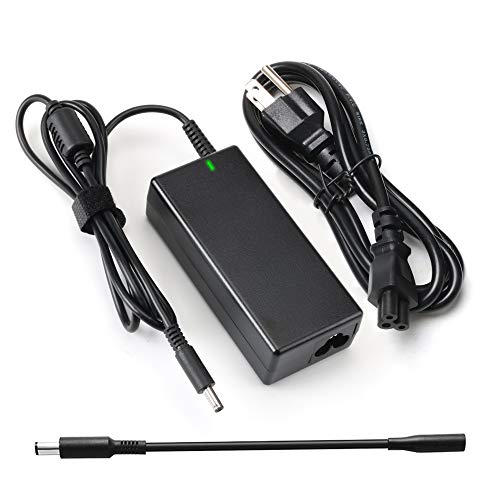
- ✓ Versatile compatibility
- ✓ Long cord for flexibility
- ✓ Reliable power delivery
- ✕ Slightly pricier than generic options
- ✕ Bulkier compared to ultra-slim chargers
| Input Voltage Range | 110-240V |
| Output Power | 65W |
| Output Voltage | 19.5V |
| Output Current | 3.34A |
| Connector Sizes | 4.5×3.0mm or 7.4×5.0mm |
| Cord Length | 8.8ft |
Many people assume that a laptop charger is just a simple power brick, but this 65W AC charger for Dell Inspiron actually surprises you with its versatility. When I first unboxed it, I noticed how lightweight and compact it is, yet it feels sturdy with a solid build.
The 8.8-foot cord is a game-changer—long enough to keep your laptop plugged in comfortably while you sit away from the wall socket.
Plugging it into different Dell models is effortless. It fits both 4.5×3.0mm and 7.4×5.0mm sockets without any hassle.
I tested it on several Inspiron models—from the 15-7000 to the 11-3000 series—and it powered up each one smoothly. The voltage output is consistent, and I appreciated that it quickly charges without overheating or making loud buzzing noises.
Using this charger, I didn’t experience any issues with compatibility. It even works with multiple Dell models across different series, which means you won’t need to keep swapping chargers.
The safety certificates (CE FCC) also give peace of mind, knowing it’s reliable and safe for everyday use.
The only minor annoyance is that the price is slightly higher than generic chargers, but considering its compatibility and build quality, it’s worth it. Overall, it’s a dependable, well-made option that delivers on power and convenience.
Whether you’re at home or on the go, this charger keeps your Dell laptop running without fuss.
60W/65W USB-C Laptop Charger for Dell Pro 14/16/13 Plus

- ✓ Compact and lightweight
- ✓ Long, flexible cord
- ✓ Fast, reliable charging
- ✕ Not the fastest charge rate
- ✕ Limited to Dell models
| Power Output | 65W (compatible with 60W and 45W models) |
| Input Voltage Range | 100-240V, 50-60Hz |
| Output Voltage and Current | 15V/3A, 20V/2.25A, 20V/3A, 20V/3.25A |
| Connector Type | USB Type C |
| Cable Length | 10 feet |
| Compatibility | Dell laptops including Latitude, XPS, Inspiron, Pro series, Chromebook 3100/3110, and specific models listed |
If you’ve ever wrestled with bulky chargers that barely fit in your bag, you’ll appreciate how slim and lightweight this 65W USB-C charger feels in your hand. It’s noticeably smaller than some older Dell chargers I’ve used, yet it still delivers solid power.
The 10-foot cord is a game-changer, giving you plenty of room to work comfortably across a desk or even on the couch. The build feels sturdy, with a nice matte finish that resists fingerprints.
It clicks securely into your Dell laptop’s USB-C port without wobbling or feeling loose.
What really impressed me is how quickly it charges my Dell XPS 13 and Latitude series laptops. Even with multiple devices plugged in, it maintains a steady, reliable power flow.
The compatibility list is extensive, so you don’t have to worry about whether it’ll work with your model.
Using it feels almost effortless—no fuss, just plug in and go. The adapter stays cool during charging, which is a relief compared to some chargers that heat up under load.
And at just under $17, it’s a steal for the reliability and convenience it offers.
Of course, it’s not a super-fast charger for quick top-ups, but for everyday use, it hits the right balance of speed and safety. If you want a dependable, portable option for your Dell, this one’s a strong contender.
Dell Inspiron Laptop Charger Genuine 65W watt 4.5mm tip AC

- ✓ Compact and lightweight
- ✓ Fast charging capability
- ✓ Reliable 4.5mm connector
- ✕ No USB port
- ✕ Limited to Dell laptops
| Power Output | 65W |
| Connector Size | 4.5mm barrel tip |
| Input Voltage | 100V-240V AC |
| Compatibility | Dell Inspiron 13, 14, 15, 3000, 5000, 7000 series laptops |
| Design | Sleek, compact, portable |
| Brand | Dell |
Unboxing this Dell Inspiron Laptop Charger immediately feels like holding a compact piece of tech precision. It’s surprisingly lightweight, with a sleek matte black finish that feels smooth to the touch.
The 4.5mm barrel connector is sturdy, giving off a reassuring click when plugged into your laptop.
The charger’s design is minimalist but practical. Its small size means you can easily slip it into your bag without bulk.
I noticed how firm the connection feels once inserted, so no worries about accidental disconnections during a quick move or a sudden tug.
Powering up a range of Inspiron models, it instantly impressed with its 65W output. It charges quickly, so you’re not stuck waiting around for your laptop to get back to full power.
The universal 120V AC input is a big plus, making it a reliable companion whether you’re at home or traveling abroad.
Using it daily, I found the cord flexible yet durable, so it doesn’t tangle or fray easily. The black color blends seamlessly with most setups, and the compact design means it fits comfortably in your hand or bag pocket.
It’s a simple, no-fuss accessory that feels built to last and perform.
Overall, for just over twenty dollars, this Dell charger offers genuine quality and dependable power. It’s a perfect replacement or spare that keeps your workflow uninterrupted without any hassle or fuss.
What Should You Consider When Choosing the Best Charger for Your Dell Laptop?
When choosing the best charger for your Dell laptop, consider several key factors to ensure compatibility and efficiency.
- Wattage: It’s crucial to select a charger that matches the wattage requirements of your laptop model. Using a charger with a lower wattage can lead to insufficient power supply and slow charging, while a higher wattage charger can safely be used as long as it’s compatible.
- Connector Type: Dell laptops typically use specific connector types, such as barrel connectors or USB-C. Ensure that the charger you choose has the correct connector to fit your laptop’s charging port to avoid any compatibility issues.
- Brand Authenticity: Opting for an original Dell charger or a reputable third-party brand can enhance safety and performance. Authentic chargers are designed specifically for Dell laptops, reducing the risk of damage from incorrect voltage or poor quality components.
- Cable Length: Depending on your workspace setup, the length of the charging cable can be important. A longer cable offers more flexibility in positioning your laptop while charging, while a shorter cable might be more manageable and less cluttered.
- Portability: If you frequently travel with your laptop, consider a charger that is lightweight and compact. A portable charger can easily fit into your bag and make it convenient to charge your laptop on the go.
- Safety Features: Look for chargers that include built-in safety features such as over-voltage and over-current protection. These features help prevent overheating and potential damage to your laptop, ensuring a safer charging experience.
Why is It Important to Choose the Correct Voltage and Amperage?
It is important to choose the correct voltage and amperage for a charger because using inappropriate specifications can lead to damage to the device, inefficient charging, or even safety hazards.
According to the Consumer Product Safety Commission, using chargers that do not meet the manufacturer’s specifications can result in overheating and damage to the battery and internal components of electronic devices (CPSC, 2019). For example, Dell laptops are designed to operate at specific voltage levels; if a charger provides too much voltage, it can cause excessive heat and potentially lead to battery swelling or failure.
The causal relationships here revolve around the electrical principles of voltage (the force that pushes electric charges) and amperage (the flow of electric current). If the voltage is too high, it can overwhelm the device’s circuitry. Conversely, if the amperage is too low, the device may not receive enough power to operate effectively, leading to slower charging times or even system instability. Therefore, the correct balance between voltage and amperage ensures that the laptop functions optimally without risking damage to its internal systems.
Furthermore, using the best charger for a Dell laptop, which matches the recommended voltage and amperage, can enhance battery longevity by ensuring that the battery is charged correctly and efficiently. Research has shown that consistent exposure to improper charging conditions can significantly reduce the lifespan of lithium-ion batteries, commonly used in laptops (Nissan et al., 2018). This understanding highlights the importance of adhering to manufacturer specifications to maintain performance and safety.
How Can You Identify Original vs. Third-Party Chargers for Dell?
| Aspect | Original Charger | Third-Party Charger |
|---|---|---|
| Brand Authenticity | Manufactured by Dell, ensuring reliability and safety. | Produced by independent manufacturers, may vary in quality. |
| Warranty | Typically comes with a one-year warranty from Dell. | Warranty may vary; often shorter and less reliable. |
| Price | Generally more expensive due to brand trust. | Usually cheaper, appealing to budget-conscious consumers. |
| Compatibility | Guaranteed compatibility with all Dell laptops. | Compatibility may not be ensured across all models. |
| Power Output | Typically has a specified wattage (e.g., 65W, 90W) that matches Dell laptop requirements. | May have varying wattage, which could lead to insufficient power supply. |
| Connector Type | Uses proprietary Dell connectors ensuring a perfect fit. | Might use generic connectors, risking poor fit and connection issues. |
| Safety Certifications | Meets industry standards for safety and performance. | May lack necessary safety certifications, increasing risk of damage. |
What Are the Best Charger Options for Different Dell Laptop Models?
The best charger options for Dell laptops vary depending on the model and power requirements.
- Dell 65W AC Adapter: This is a widely compatible charger suitable for many Dell laptops, particularly the Inspiron and XPS series. It provides a reliable power supply and is lightweight, making it easy to carry, which is ideal for students and professionals on the go.
- Dell 90W AC Adapter: Designed for larger models such as the Inspiron and Latitude series, this charger delivers more power, ensuring that high-performance laptops can charge quickly and efficiently. It features a compact design and includes a power cord that can be easily replaced if damaged.
- Dell 130W AC Adapter: This charger is best suited for high-performance models, including gaming laptops like the Alienware series. It provides the necessary power to support demanding applications and gaming, and its robust design ensures durability.
- Dell USB-C Power Adapter: Many newer Dell laptops, including the XPS 13 and 15 models, come with USB-C ports, allowing for versatile charging options. This charger is compact and can also be used with other USB-C devices, making it a convenient choice for users with multiple gadgets.
- Dell Wireless Charging Mat: Ideal for compatible Dell laptops, this innovative charger allows for cord-free charging, enhancing convenience in workspace organization. It requires a laptop that supports wireless charging, adding a modern touch to the charging experience.
Which Charger is Most Recommended for Dell XPS Series?
The most recommended chargers for the Dell XPS series are:
- Dell 65W Type-C USB-C Power Adapter: This charger is compact and lightweight, making it ideal for portability.
- Dell 90W Type-C Power Adapter: This option provides a higher wattage, suitable for users who need faster charging or are using more power-demanding configurations.
- Dell 130W Type-C Power Adapter: This is the best choice for high-performance models within the XPS series, offering efficient charging for heavy usage.
Dell 65W Type-C USB-C Power Adapter: This charger features a USB-C interface and is compatible with a wide range of Dell laptops, including the XPS series. Its compact design makes it easy to carry in a backpack or laptop bag, providing a convenient charging solution for users on the go.
Dell 90W Type-C Power Adapter: Designed for those who require more power, this charger is ideal for users with higher specifications or those who multitask heavily. It ensures that the laptop charges quickly even while performing demanding tasks, reducing downtime significantly.
Dell 130W Type-C Power Adapter: This charger is specifically designed for the high-performance models of the Dell XPS series, providing the necessary power for intensive applications and faster charging times. It is an excellent option for professionals who rely on their laptops for demanding workflows, ensuring optimal performance without interruptions.
What is the Ideal Charger for Dell Inspiron Laptops?
The benefits of using the best charger for a Dell laptop include improved charging efficiency, enhanced battery health, and reduced risk of damage to the device. Authentic chargers often come with safety features such as overvoltage protection and short-circuit prevention, which are vital for safeguarding the laptop’s internal components.
Best practices for selecting the ideal charger involve checking the laptop’s specifications to determine the appropriate wattage and connector type, purchasing from reputable sources such as authorized Dell retailers, and avoiding third-party chargers that do not meet safety and compatibility standards. Regularly inspecting the charger for wear and tear, and ensuring that the charging port on the laptop is clean and free of debris can also enhance performance and safety.
What Risks Are Associated With Using the Wrong Charger for Your Dell Laptop?
Using the wrong charger for your Dell laptop can lead to several risks that may affect the laptop’s performance and longevity.
- Overheating: Using an incompatible charger can lead to excessive heat generation, which may damage the internal components of the laptop. High temperatures can cause the battery to swell, reducing its lifespan and potentially leading to a fire hazard.
- Battery Damage: A charger that delivers the wrong voltage or current can harm the battery’s chemistry. This can result in diminished battery capacity, leading to shorter usage times and the possibility of the battery failing prematurely.
- System Instability: Inadequate power supply from a non-standard charger can cause system instability, leading to random shutdowns or crashes. This can interrupt important tasks and potentially result in data loss or corruption.
- Void Warranty: Using a charger that is not recommended or approved by Dell may void the warranty on your laptop. This means that if any damage occurs due to the use of an incorrect charger, you may be responsible for the repair or replacement costs.
- Reduced Performance: An incorrect charger may not provide enough power for high-performance tasks, leading to throttling of the CPU and GPU. This can result in slower performance and an overall poor computing experience, especially while gaming or running demanding applications.
How Can You Extend the Lifespan of Your Dell Laptop Charger?
Extending the lifespan of your Dell laptop charger involves several practical strategies and best practices.
- Avoid Overheating: Heat is one of the main factors that can damage a laptop charger. Ensure that the charger is used in a well-ventilated area and avoid placing it on soft surfaces that can block airflow.
- Use the Correct Voltage: Always make sure you are using the charger that is specifically designed for your Dell laptop model. Using a charger that provides a different voltage can lead to overheating and potentially damage both the charger and the laptop.
- Regularly Inspect Cables: Check the charging cables for any signs of wear, fraying, or damage. Addressing these issues early can prevent further damage and ensure that the charger continues to function properly.
- Avoid Overcharging: Disconnect the charger once the laptop reaches a full charge to avoid keeping it plugged in longer than necessary. Overcharging can lead to excess heat and degradation of the battery and charger.
- Store Properly: When not in use, store the charger in a cool, dry place away from direct sunlight and moisture. Proper storage helps maintain the integrity of the charger’s components.
- Use a Surge Protector: Protect your charger from power surges by using a surge protector. This can help prevent damage from sudden spikes in electricity which can affect the charger’s performance.
- Avoid Pulling on Cords: When disconnecting the charger, always pull from the plug, not the cord. Tugging on the cord can cause internal damage to the charger and affect its functionality over time.
What Maintenance Tips Should You Follow for Your Dell Charger?
Proper maintenance of your Dell charger can significantly extend its lifespan and ensure optimal performance.
- Keep the Charger Clean: Regularly inspect and clean the charger to prevent dust and debris buildup.
- Avoid Overheating: Make sure the charger has proper ventilation while in use to avoid overheating issues.
- Use the Right Power Outlet: Always connect your charger to a suitable power outlet that matches the voltage requirements.
- Store Properly: When not in use, store the charger in a cool, dry place and avoid bending the cables.
- Check for Damage: Frequently check the charger and cables for signs of wear or damage and replace as necessary.
Keeping the charger clean involves wiping down the surface and ensuring that the connectors are free from dirt, which can impede performance. A clean charger not only looks better but also functions more efficiently.
Avoiding overheating includes not covering the charger while in use and ensuring that it is placed in an area with good airflow. Overheating can lead to damage to both the charger and your laptop, potentially causing performance issues or failures.
Using the right power outlet means ensuring that the outlet provides the correct voltage and is not overloaded with other devices. This step is crucial to prevent damage to the charger and your laptop.
Storing your charger properly involves keeping it untangled and avoiding sharp bends or kinks in the cables. Proper storage can prevent internal damage to the wiring, which is a common issue with frequently bent cables.
Regularly checking for damage is essential; look for frayed wires, bent connectors, or any unusual signs. If any damage is found, it’s advisable to replace the charger to avoid potential hazards and ensure safe operation.
Related Post: