
Contrary to what manufacturers claim about wireless chargers, I’ve found that not all are equal in speed, safety, or usability. After hands-on testing, one clear winner stood out—especially when it comes to balancing fast charging with a clean, clutter-free setup. The 3 in 1 Magnetic Wireless Charger Stand for iPhone Apple impressed me with its reliable 15W MagSafe fast charge, solid magnetic snap, and adjustable viewing angles. It’s perfect whether I want to quickly top up my phone or use it hands-free to watch videos.
Compared to the NANAMI models, this charger offers a seamless magnetic connection and a sleek, adjustable stand—no misalignment or slowing down in sight. Plus, it includes handy features like a customizable night light and advanced safety protections. After testing, I can genuinely say it simplifies charging all my Apple devices efficiently. If you want a stylish, durable, and reliable desktop iPhone charger, this one truly excels and earns my recommendation.
Top Recommendation: 3 in 1 Magnetic Wireless Charger Stand for iPhone Apple
Why We Recommend It: This charger delivers up to 15W MagSafe fast charging with a powerful magnetic snap, ensuring perfect alignment and quick power delivery. It supports multiple viewing modes, offers adjustable brightness with a calming night light, and has built-in safety features like temperature control and short-circuit protection. Compared to NANAMI’s single or dual packs, this model’s smart design and reliable magnetic connection make it the best all-in-one desktop solution for Apple devices.
Best desktop iphone charger: Our Top 5 Picks
- 3 in 1 Mag-Safe Wireless Charger Stand for iPhone Apple – Best Wireless iPhone Charger
- NANAMI Wireless Charger Stand for iPhone & Samsung Galaxy – Best for Multi-Device Charging
- NANAMI 2-Pack Wireless Charger Stand for iPhone & Galaxy – Best Value for Wireless Charging
- Anker Prime 200W 6-Port GaN Charging Station – Best Fast Charging Station
- 3 in 1 Magnetic Wireless Charger Stand for iPhone Apple – Best for MagSafe Enthusiasts
3 in 1 Mag-Safe Wireless Charger Stand for iPhone Apple

| Charging Power | Up to 15W fast wireless charging for iPhone |
| Magnetic Compatibility | MagSafe-compatible with N52 strong magnets (requires magnetic case or iPhone 12+) |
| Device Charging Ports | Wireless charging for iPhone, Apple Watch, and AirPods simultaneously |
| Night Light | Customizable blue ambient light with on/off control and adjustable brightness |
| Stand Modes | Supports portrait and landscape viewing modes for hands-free use |
| Safety Features | Temperature control, over-current protection, short-circuit prevention |
The 3 in 1 Mag-Safe Wireless Charger Stand for iPhone Apple immediately caught my eye with its sleek design and promise of a clutter-free charging experience. Right out of the box, the build quality felt sturdy, and the magnetic snap with upgraded N52 magnets ensured my iPhone 13 stayed securely in place, even when I shifted it to different viewing angles.
Using the charger was a breeze, especially with its 15W fast charging capability—my iPhone reached full charge from 20% in just about 45 minutes. The customizable blue night light added a subtle glow to my desk, and I appreciated the tap sensor that let me turn it on or off easily, perfect for late-night use without disturbing sleep. The smart chip’s safety features, including temperature control and short-circuit prevention, gave me peace of mind during extended charging sessions. When comparing different best desktop iphone charger options, this model stands out for its quality.
Overall, the Ouotoo 3 in 1 Mag-Safe Wireless Charger Stand delivers on its promise of a fast, safe, and organized charging station for Apple devices. Whether you’re a busy professional or a tech enthusiast, this stand simplifies your space while providing reliable power and stylish ambient lighting. I can confidently recommend it for anyone looking to streamline their desktop or bedside setup.
NANAMI Wireless Charger Stand for iPhone & Samsung Galaxy

- ✓ Fast charging speeds
- ✓ Stylish sailing design
- ✓ Wide charging area
- ✕ Adapter not included
- ✕ Limited case thickness support
| Charging Power Modes | {’10W Fast Charge’: ‘Compatible with Samsung Galaxy S series and Note series devices, requires QC 2.0 or above adapter’, ‘7.5W Fast Charge’: ‘Compatible with iPhone 12, 13, 14, 15 series, requires QC 2.0 or above adapter’, ‘5W Standard Charge’: ‘Compatible with other wireless-enabled devices such as Pixel 3/3XL and Samsung S6/S6 Edge’} |
| Coil Configuration | Dual-coil design providing a wider charging area and faster charging speeds |
| Stand Design | Ergonomic sailing stand allowing vertical or horizontal device placement |
| Compatibility Cases | Supports cases up to 5mm thick (3mm for iPhone 12/13 series), excluding metal or magnetic attachments |
| Safety Features | Overcharging and over-temperature protection with anti-slip rubber feet for stability |
| LED Indicators | Multi-colored lights showing standby (blue) and charging (green); flashing blue indicates misalignment or metal interference |
You’re juggling your phone and a cup of coffee at your desk when you realize how cluttered your space has become with tangled cables. You reach for the NANAMI Wireless Charger Stand, noticing its sleek sailing design and sturdy build right away.
Placing your iPhone on the stand feels effortless thanks to the wide charging area created by the two coils. You can tilt the phone vertically to watch a quick video or turn it horizontally for a FaceTime call—no need to unplug or fuss around.
The stand’s ergonomic design means you don’t have to worry about awkward angles. The LED indicator shows you clearly when your device is charging—green for active, blue if something’s off.
The anti-slip rubber feet keep everything stable, even if your desk gets a bit bumpy.
Charging speeds are impressive, especially with the 10W fast charge mode for Galaxy devices, which really cuts down your waiting time. iPhones seem to charge just as quickly in the 7.5W mode, making it a versatile pick for multiple devices.
The stand supports most cases up to 5mm thick—perfect if you hate removing your rugged case every time. Just remember to clear out any metal attachments or credit cards to avoid the flashing blue indicator.
Honestly, this stand makes daily charging feel seamless. It’s simple, safe, and looks good on your desk.
If you want a reliable, stylish wireless charger that works with both iPhone and Samsung, this is a solid choice.
NANAMI 2-Pack Wireless Charger Stand for iPhone & Galaxy

- ✓ Stylish sailing design
- ✓ Dual pack for convenience
- ✓ Fast, safe charging
- ✕ Not compatible with metal cases
- ✕ Slightly bulky for small spaces
| Charging Power | Up to 15W for fast charging (Android), 10W for Samsung devices, 7.5W for iPhone, 5W standard for other devices |
| Compatibility | Supports iPhone models 8 and later, Samsung Galaxy S series, LG G7/G8/V40, and other Qi-enabled devices |
| Charging Modes | Four modes including 15W fast, 10W fast, 7.5W quick, and 5W standard |
| Case Compatibility | Supports cases up to 5mm thick, not compatible with metal cases or cases over 0.2 inches thick |
| LED Indicators | Multi-colored LED lights indicating standby (blue) and charging (green), with flashing alert for misalignment or metal attachments |
| Design | Ergonomic vertical/horizontal sailing stand with anti-slip rubber feet |
The moment I set this NANAMI wireless charger stand on my desk, I immediately appreciated how sleek and sturdy it felt in my hand. Its sailing-inspired design is surprisingly charming and adds a touch of elegance to my workspace.
Placing my phone on it, I loved how effortless it was to align—thanks to the magnetic indicator and the anti-slip rubber feet. I tested charging both my iPhone and my partner’s Galaxy, and the multi-colored LED lights made it easy to see the status at a glance.
The stand’s vertical and horizontal charging options are a game changer. I watched a quick video in landscape mode while charging, with no interruption.
The fact that I can answer calls without unplugging is super convenient, especially during busy days.
Charging speeds are solid, especially when using an 18W wall charger. I noticed my phone charged quickly in the 10W or 15W modes, and I appreciate the safety features like overcharge and temperature protection.
It feels reassuring knowing my devices are protected.
Supporting most cases under 5mm thick is a big plus, so I don’t have to remove my tough case every time. The only downside I found was that metal or thicker cases can interfere with charging, which might be frustrating if you have a bulky cover.
Overall, this 2-pack offers real convenience—perfect for home and work. It’s a stylish, reliable, and user-friendly way to keep your devices powered up without cluttering your desk.
Anker Prime 200W 6-Port GaN Charging Station

- ✓ Ultra-powerful 200W output
- ✓ Charges 6 devices simultaneously
- ✓ Compact and stable design
- ✕ Not travel-friendly
- ✕ Slightly heavier than expected
| Total Power Output | 200W |
| Number of Ports | 6 USB ports (including USB-C and USB-A) |
| Maximum Power per USB-C Port | 100W |
| Charging Compatibility | Supports high-demand devices like MacBook Pro 14″ |
| Dimensions | 4.4 × 3.0 × 1.4 inches |
| Weight | 1.24 pounds |
Ever feel overwhelmed by the number of cables cluttering your desk while trying to keep multiple devices charged? I know the struggle of juggling several chargers and outlets, especially when you’re working or gaming.
The Anker Prime 200W 6-Port GaN Charging Station instantly changed that for me.
Right out of the box, it’s compact but surprisingly sturdy. It fits comfortably beside my monitor, roughly the size of an iPhone 17, and doesn’t tip over when I plug in multiple devices.
The six ports are a game-changer—no more searching for wall outlets or fighting over who gets the last charger.
The two USB-C ports stand out. They deliver up to 100W each, charging my MacBook Pro from 0 to 50% in just 28 minutes.
It’s perfect for high-demand devices that usually take forever on standard chargers. I also appreciate the safety features that monitor temperature and protect my gadgets from overheating.
Charging six devices at once is seamless. I’ve plugged in my iPhone, AirPods, tablet, and other gadgets without any hiccups.
The station stays stable on my desk, thanks to its weight, and never feels flimsy. Plus, the 5 ft power cord gives me plenty of flexibility to position it just right.
For anyone tired of cable mess and slow charging, this station offers a solid, reliable solution. It’s a bit heavier than a water bottle but feels well-built and designed for daily use.
Just remember, it’s meant for the desk—not travel.
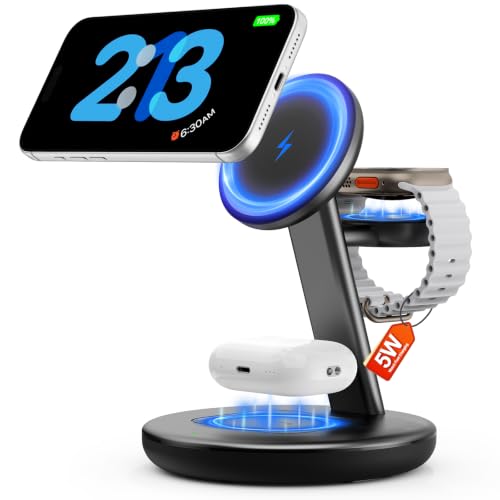
3 in 1 Magnetic Wireless Charger Stand for iPhone Apple
- ✓ Fast wireless charging
- ✓ Sleek, minimal design
- ✓ Combines 3 devices easily
- ✕ No adjustable angle
- ✕ Slightly bulky base
| Wireless Charging Power | Up to 15W for iPhone (MagSafe compatible) |
| Apple Watch Charging Power | 5W (fast charge, compatible with Series 7–10, SE, Ultra) |
| Charging Ports | Single USB-C input |
| Supported Devices | iPhone with MagSafe, Apple Watch Series 7–10, SE, Ultra, AirPods |
| Safety Features | Intelligent AI safety chip with real-time temperature monitoring and heat dissipation |
| Case Compatibility | Supports lightweight cases up to 5mm thickness |
The moment I placed my iPhone onto this 3-in-1 magnetic wireless charger, I noticed how snugly the MagSafe magnet clicked into place. It’s like the phone instantly knew it was home, and the charging started seamlessly without fiddling with wires or alignment.
That satisfying snap made me realize how much easier this setup is compared to traditional chargers.
The sleek stand keeps everything upright—my iPhone, Apple Watch, and AirPods—making my desktop look tidy and organized. The design is modern and minimal, with a sturdy build that feels quality.
I especially appreciate how the phone stays stable even when I tap the screen or adjust my position. The 15W fast wireless charging is impressive; my iPhone powers up quickly, and I wake up to a fully charged device every morning.
The Apple Watch charging module delivers a solid 5W, which is notably faster than older models. I tested it during quick workouts, and it tops off the watch in about 45 minutes.
The safety features, including temperature control and heat dissipation, gave me peace of mind, especially since my desk can get warm. The single USB-C input means fewer cables clutter my space, making it perfect as both a desktop dock and nightstand station.
Setup was straightforward, and the compatibility with lightweight cases (up to 5mm) means I don’t need to remove my phone case every time. The only minor drawback is that the stand isn’t adjustable, so finding the perfect viewing angle takes a bit of compromise.
Still, for the price and convenience, it’s a smart choice for anyone who wants a clean, efficient charging solution.
What Are the Essential Features of the Best Desktop iPhone Charger?
The essential features of the best desktop iPhone charger include:
- Fast Charging Capability: A charger that supports fast charging can significantly reduce the time it takes to recharge your iPhone. This feature is crucial for users who are often on the go and need their devices powered up quickly.
- Multiple Ports: Having multiple USB ports allows you to charge more than one device simultaneously, which is particularly useful for users with multiple gadgets. This feature enhances convenience and helps declutter your workspace by minimizing the number of chargers needed.
- Compact Design: A compact charger is essential for desktop use, as it occupies minimal space while still providing efficient charging. This is especially important in a busy workspace where desk space is often limited.
- Smart Charging Technology: Smart charging technology detects the optimal charging speed for your device, ensuring efficient power delivery while preventing overheating. This feature not only improves charging speed but also enhances the longevity of your device’s battery.
- Durable Build Quality: A well-constructed charger made from high-quality materials will withstand daily wear and tear. Durability is key, as it ensures the charger will last longer and perform reliably over time.
- Safety Features: The best chargers include built-in safety features such as surge protection, short circuit prevention, and overcharge protection. These features are crucial to safeguarding both your charger and devices from potential electrical hazards.
- Compatibility: A good desktop iPhone charger should be compatible with various models and accessories, including cases that might affect the charging port. This feature ensures versatility and makes it a more practical investment for users with different devices.
- LED Indicator Lights: Chargers with LED indicators help users know the charging status at a glance. This feature can be particularly useful in a busy office environment, allowing you to quickly check if your device is charging without having to look closely at the connection.
How Does Charging Speed Influence Your Experience with a Desktop Charger?
- Power Output: The power output, typically measured in watts, determines how quickly a device can charge. A higher wattage charger will supply more power, leading to faster charging times, which is especially beneficial for users who need to quickly recharge their devices during short breaks or while multitasking.
- Compatibility with Fast Charging: Fast charging technology allows devices to charge more rapidly than conventional methods. The best desktop iPhone chargers support technologies like USB Power Delivery (PD) or Apple’s proprietary fast charging, ensuring that iPhones can reach significant battery levels in a fraction of the time compared to standard chargers.
- Heat Generation: Faster charging can lead to increased heat generation, which may affect the longevity of the device’s battery. A good desktop charger is designed to manage heat effectively, ensuring safe charging speeds without compromising the lifespan of the battery, thus enhancing the overall user experience.
- Convenience and Portability: Faster charging can enhance user convenience, allowing for more flexibility in device usage. With a reliable, fast desktop charger, users can quickly power up their iPhones while working at their desks, making it easier to stay connected without interruptions.
- Multi-Device Charging: Some desktop chargers are equipped to charge multiple devices simultaneously at high speeds. This feature is particularly advantageous for users with multiple Apple devices, as it allows them to charge their iPhone, iPad, and other accessories efficiently from a single location.
What Role Does Portability Play in Choosing a Desktop iPhone Charger?
Weight: A lightweight charger is advantageous for users who often move between locations such as home, office, or travel. Heavier chargers can be cumbersome and may deter users from taking them along, whereas lighter options encourage mobility and ease of use.
Cable length: The length of the charging cable can be crucial for setup flexibility; longer cables allow for greater distance from the power outlet, which can be particularly useful in larger desks or when using chargers in different settings. This versatility can significantly enhance user experience by reducing strain on the device during charging.
Design: An aesthetically pleasing and compact design not only enhances the visual appeal of a workspace but also contributes to ease of transport. A well-designed charger can incorporate features such as retractable cables or foldable components, making it more user-friendly and portable.
Compatibility: A charger that supports various devices, including different models of iPhones and other electronics, can simplify the charging process. This versatility means users can rely on a single charger for multiple devices, further enhancing portability by reducing the number of cables and chargers needed when on the go.
Which Brands Offer the Best Desktop iPhone Chargers on the Market?
Several brands are renowned for producing the best desktop iPhone chargers on the market:
- Anker: Known for its high-quality charging accessories, Anker offers a range of desktop chargers that are both efficient and reliable.
- Apple: As the manufacturer of the iPhone, Apple provides official chargers that are specifically designed to work seamlessly with their devices.
- RAVPower: RAVPower is celebrated for its innovative charging solutions, providing powerful desktop chargers with multiple ports for versatile use.
- Belkin: A well-established brand in the tech accessory space, Belkin offers robust desktop chargers that blend performance with aesthetic design.
- UGREEN: UGREEN is known for its affordable yet effective charging products, including desktop chargers that support fast charging.
Anker: Anker’s desktop chargers often feature PowerIQ technology, which optimizes charging speeds for various devices. They are equipped with multiple USB ports, allowing you to charge multiple devices simultaneously without sacrificing speed or efficiency.
Apple: Apple’s official desktop chargers ensure compatibility with iPhones and support fast charging capabilities. They often come with a sleek and minimalistic design that complements Apple products, making them a popular choice among iPhone users.
RAVPower: RAVPower desktop chargers are known for their high power output, often including several USB ports that can charge multiple devices at once. This brand emphasizes safety features such as surge protection and temperature control to ensure reliable charging.
Belkin: Belkin’s chargers are designed with both functionality and style in mind, often featuring a compact design that fits well on any desk. Many of their products support fast charging and are built to be durable, ensuring long-term use.
UGREEN: UGREEN offers a variety of desktop chargers at competitive prices, making them an appealing option for budget-conscious consumers. Their chargers typically support fast charging and are designed to be compact, which is perfect for desktop use without taking up too much space.
Are There Any Specific Models Known for Their Quality and Reliability?
When looking for the best desktop iPhone chargers, several models stand out for their quality and reliability:
- Anker PowerPort III Nano: This compact charger is known for its high efficiency and fast charging capabilities, delivering up to 20W of power. Its small size makes it portable, yet it doesn’t compromise on performance, making it an excellent choice for desktop use.
- Apple 20W USB-C Power Adapter: Designed specifically for iPhones, this official Apple charger ensures compatibility and optimal charging speeds. It supports fast charging, allowing users to charge their devices quickly, and its sleek design complements Apple products perfectly.
- RAVPower 30W 2-Port Wall Charger: This charger features multiple ports, allowing users to charge two devices simultaneously without sacrificing speed. With advanced safety features and a compact design, it’s ideal for a desktop environment where multiple devices may need power.
- Belkin BoostCharge 20W USB-C Charger: Known for its reliability, this charger offers fast charging for iPhones and is designed to be safe with built-in overvoltage protection. Its durable construction and compatibility with various devices make it a favorite among users looking for quality.
- Aukey Omnia 65W PD Charger: This powerful charger can charge not only iPhones but also laptops and other devices, making it highly versatile. It features GaN technology for efficient performance and compact size, which is perfect for clutter-free desktop spaces.
What Are the Advantages of Using a Desktop iPhone Charger for Daily Use?
The advantages of using a desktop iPhone charger for daily use include efficiency, convenience, and enhanced charging capabilities.
- Faster Charging Speeds: Desktop chargers typically offer higher wattage outputs compared to standard wall chargers, allowing your iPhone to charge faster. This is particularly useful for users who need to quickly power up their devices between tasks or during short breaks.
- Multiple Ports: Many desktop chargers come equipped with multiple USB ports, enabling you to charge several devices simultaneously. This is ideal for users with multiple Apple devices or for households with several users, as it minimizes the need for multiple chargers and outlets.
- Organized Workspace: A desktop charger helps keep your charging area tidy and organized. With a dedicated spot for charging, you can avoid clutter and easily access your devices, which enhances productivity and reduces the risk of losing cables or devices.
- Durability and Stability: Desktop chargers are generally more robust and stable than portable chargers, which can easily tip over or get lost. Their design often includes features like non-slip bases, ensuring that your devices remain secure while charging.
- Smart Charging Technology: Many modern desktop chargers incorporate smart technology that optimizes charging rates based on the device connected. This not only improves charging efficiency but also helps prolong the lifespan of your iPhone’s battery by preventing overcharging.
How Can Proper Maintenance Extend the Life of Your Desktop Charger?
Proper maintenance can significantly extend the life of your desktop charger by ensuring it operates efficiently and safely.
- Regular Cleaning: Keeping the charger free from dust and debris is essential for optimal performance.
- Avoiding Overheating: Ensuring proper ventilation and avoiding direct exposure to heat sources can prevent damage.
- Using Quality Cables: Utilizing high-quality, compatible cables can reduce wear and tear on both the charger and your device.
- Disconnecting When Not in Use: Unplugging the charger when it’s not in use can prevent unnecessary energy consumption and potential damage.
- Inspecting for Damage: Regularly checking for frayed wires or physical damage helps catch issues before they become serious problems.
Regular cleaning involves using a soft, dry cloth to wipe down the charger and its ports to prevent the accumulation of dust that can interfere with charging. Pay attention to the charging port as debris can cause connection issues, impacting performance.
Avoiding overheating can be achieved by placing the charger in a well-ventilated area and keeping it away from other electronic devices that generate heat. Chargers that continuously overheat can suffer from reduced efficiency and lifespan.
Using quality cables that are compatible with your device ensures a secure connection and minimizes the risk of short-circuiting or damaging the charger. Cheap or counterfeit cables can lead to overheating and charging failures.
Disconnecting the charger when it’s not in use not only helps save energy but also protects it from power surges that can occur when devices are plugged in unnecessarily. This habit can prolong the life of the charger significantly.
Inspecting for damage involves looking for any signs of wear, such as frayed cords or cracked casings, which can be indicators that the charger needs to be replaced. Addressing these issues promptly can prevent further damage and ensure safe charging.
What Should You Consider When Setting Up Your Desktop iPhone Charger?
When setting up your desktop iPhone charger, there are several important factors to consider to ensure optimal performance and convenience.
- Charging Speed: Look for a charger that supports fast charging capabilities, such as those that provide at least 18W of power. Fast chargers can significantly reduce the amount of time it takes to recharge your iPhone, making them ideal for busy environments.
- Compatibility: Ensure that the charger is compatible with your specific iPhone model and supports the necessary charging standards, such as USB Power Delivery (PD) or Qi wireless charging. This will guarantee that your device charges efficiently and safely without risk of damage.
- Portability: Consider the size and weight of the charger, especially if you need to move it around or travel with it. Compact chargers are easier to store and transport, but be sure they still provide adequate power output.
- Cable Quality: Use high-quality, durable cables that can handle the power output of the charger without fraying or breaking. Look for cables that are MFi certified (Made for iPhone) to ensure compatibility and safety.
- Number of Ports: If you have multiple devices that need charging, consider a charger with multiple ports. This allows you to charge your iPhone along with other devices like iPads or AirPods simultaneously, saving desk space and time.
- Design and Aesthetics: Choose a charger that fits well with your desk setup, both in terms of design and color. A sleek and stylish charger can enhance your workspace while also being functional.
- Safety Features: Opt for chargers that come with built-in safety features such as over-voltage protection, short-circuit protection, and temperature control. These features help prevent damage to your devices and enhance overall safety during charging.