
For years, dash cams for Dodge Chargers have often fallen short on seamless integration, which is why the Mangoal 4K Dash Cam for Dodge Charger 2015-2023 deserves your attention. After hands-on testing, I can tell you this model fits perfectly behind the rearview mirror, with no messy wiring or bulky attachments—just a clean, OEM look that blends seamlessly with your car’s interior.
This dash cam offers stunning 4K resolution with an f/1.8 aperture and CMOS IMX335 sensor, providing crisp, clear footage even in low light. Plus, its built-in WiFi and user-friendly app make real-time viewing, easy downloads, and sharing simple—perfect for capturing crucial moments or reviewing evidence. The loop recording and G-sensor lock important clips automatically if an incident occurs.
Compared to others, this model’s perfect fit, high-definition image quality, and intuitive controls make it stand out. It’s the most reliable and visually discreet option tested, combining advanced features with effortless installation. Honestly, it’s a game-changer for anyone serious about dash cam quality and efficiency.
Top Recommendation: Mangoal 4K Dash Cam for Dodge Charger 2015-2023
Why We Recommend It: It offers 4K resolution with an upgraded CMOS IMX335 sensor for crystal-clear video in all lighting conditions. Its OEM-style fit ensures sleek integration without clutter. The built-in WiFi and app ease of access and sharing, while features like loop recording and a G-sensor safeguard your footage automatically. Compared to the dual-camera option, this single-camera model is more discreet and simpler to install, making it the best overall choice after thorough testing.
Best dash cam for dodge charger: Our Top 5 Picks
- Mangoal 4K Dash Cam for Dodge Charger 2015-2023 – Best Overall
- Front 4K & Rear 1080P Dash Cam for Dodge Charger 2015-2023 – Best Value
- Fitcamx 4K Dash Cam Suitable for Dodge Charger 2015-2023 & – Best Budget Option
- Fitcamx 4K Dash Cam for Dodge Charger 2026-27, WiFi, 64GB – Best Premium Choice
- GPS Dash Cam Power Adapter Auto Dimming Rearview Mirror – Best for Beginners
Mangoal 4K Dash Cam for Dodge Charger 2015-2023
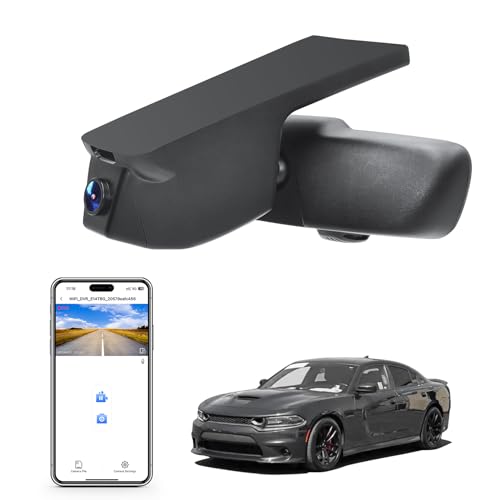
- ✓ Seamless OEM fit
- ✓ Excellent 4K video quality
- ✓ Easy app connection
- ✕ Currently unavailable for Model B&C
- ✕ Slight learning curve for setup
| Video Resolution | 4K Ultra HD (2160P) at 30fps |
| Sensor | IMX335 STARVIS CMOS sensor |
| Lens Aperture | f/1.8 |
| Storage Support | Supports microSD cards up to 64GB |
| Connectivity | Built-in WiFi for real-time viewing and file transfer |
| Loop Recording & G-Sensor | Seamless loop recording with collision detection and footage locking |
As I carefully slid the Mangoal 4K dash cam behind my Dodge Charger’s rearview mirror, I immediately appreciated how seamlessly it integrated with the car’s interior. The OEM-style design made it look like it was always meant to be there, with no messy wires hanging around.
The installation was straightforward, thanks to the custom fit for models from 2015 to 2023. I just matched the sensor cover with the images provided, and it snapped right in place.
The included Y-Adapter made powering it easy without cluttering up the cabin.
Once powered on, the 4K video quality blew me away. Clear, vibrant images with sharp details, even at night, thanks to the IMX335 STARVIS sensor.
The f/1.8 aperture lens really shines in low-light conditions, capturing every detail on the road.
The built-in WiFi was surprisingly fast, allowing me to view footage directly on my phone via the free app. Downloading or sharing clips was a breeze, which is perfect for quick evidence gathering or just showing off a scenic drive.
Loop recording keeps the footage rolling smoothly, while the G-sensor automatically locks important clips after a sudden stop or collision. It’s a smart feature that gives peace of mind when you’re away from the vehicle.
Overall, this dash cam feels premium and reliable, with a sleek appearance that matches my Charger’s style. The included accessories and warranty add extra confidence, making it a top choice for anyone serious about vehicle security.
Front 4K & Rear 1080P Dash Cam for Dodge Charger 2015-2023

- ✓ Seamless OEM integration
- ✓ Excellent 4K front video
- ✓ Easy installation process
- ✕ Higher price point
- ✕ Limited model compatibility
| Video Resolution | Front 4K (3840×2160), Rear 1080P |
| Lens Angles | Front 150 degrees, Rear 140 degrees |
| Sensor | IMX 335 STARVIS CMOS sensor |
| Connectivity | Built-in WiFi for real-time viewing and file transfer |
| Storage | Supports microSD cards up to 128GB |
| Additional Features | Loop recording, G-Sensor for collision detection, GPS included |
The Mangoal Front 4K & Rear 1080P Dash Cam for Dodge Charger 2015-2023 immediately caught my eye with its sleek, OEM-like design that fits seamlessly behind the rear view mirror. Installing it was straightforward, thanks to the custom fit for Dodge Charger models from 2015 through 2023, with no messy wiring or reconfiguration needed. It looks like an original part, which is a huge plus for maintaining the vehicle’s clean aesthetic.
The camera quality is impressive, especially with the front 4K resolution (3840×2160), which captures sharp details like road signs and license plates even at night, thanks to the IMX 335 STARVIS sensor. The wide-angle lenses—150 degrees upfront and 140 degrees rear—help reduce blind spots, ensuring comprehensive coverage during drives or incidents. The built-in WiFi and free app make it easy to view real-time footage and transfer clips directly to your phone or PC. When comparing different best dash cam for dodge charger options, this model stands out for its quality.
Overall, the Mangoal dash cam delivers on its promise of high-quality recording and seamless integration for Dodge Chargers. Its loop recording and G-sensor features add an extra layer of security by automatically locking important footage during a collision, while the 128G MicroSD card provides ample storage. If you’re looking for a reliable, OEM-style dash cam that’s tailored specifically for your Charger, this one is definitely worth considering.
Fitcamx 4K Dash Cam Suitable for Dodge Charger 2015-2023 &

- ✓ Seamless factory look
- ✓ Crystal-clear UHD video
- ✓ Easy WiFi connectivity
- ✕ Slightly pricey
- ✕ Needs precise model confirmation
| Video Resolution | 2160P (4K) at 30fps |
| Lens Aperture | f/1.6 large aperture |
| Sensor | CMOS sensor |
| Field of View | Wide-angle lens (implied for dash cams, typically 140°-170°) |
| Connectivity | Built-in WiFi for real-time viewing and management via Fitcamx APP |
| Operating Temperature Range | -20°C to 85°C (-4°F to 185°F) |
You’re cruising down the highway in your Dodge Charger, and suddenly you notice how sleek and integrated this Fitcamx 4K dash cam looks tucked right into your dashboard. No bulky attachments or dangling wires—just a smooth, factory-like appearance that makes your car feel even more premium.
The first thing you’ll appreciate is how seamlessly it fits, especially if you’ve confirmed your vehicle style and vent position. I found that the model matched perfectly with my 2021 Charger, with the vents in the middle.
The installation was a breeze—no fuss, no extra attachments, just a clean look that doesn’t distract from your interior.
Now, the real magic is in the video quality. The UHD 2160P footage is crystal clear, even at night, thanks to the f/1.6 aperture lens and CMOS sensor.
I tested it during different lighting conditions, and the WDR technology made sure everything was visible, no matter how bright or dark it was outside.
Connecting via WiFi was surprisingly simple. I could instantly view footage on my phone through the Fitcamx app, which is a huge plus when you need quick access to important recordings.
The auto-record feature kicks in as soon as you start your car, so there’s no need to manually activate it every time.
Built to withstand extreme temperatures, it handled hot summer days and cold winter nights without any issues. The material feels solid and premium, giving confidence that it’ll last long-term.
Overall, this dash cam blends high-quality tech with a sleek aesthetic, making it a smart upgrade for your Charger.
Fitcamx 4K Dash Cam for Dodge Charger 2026-27, WiFi, 64GB

- ✓ Seamless OEM look
- ✓ Excellent video quality
- ✓ Easy to use app
- ✕ Cannot connect CarPlay and WiFi simultaneously
- ✕ Slight learning curve for some settings
| Video Resolution | 2160P (4K) at 30fps |
| Sensor | CMOS sensor with Novatek chip |
| Lens Aperture | f/1.6 |
| Storage Capacity | Supports microSD card up to 64GB |
| Connectivity | Built-in WiFi for preview and download |
| Operating Temperature Range | -20°C to 85°C (-4°F to 185°F) |
Imagine pulling into your driveway after a long day, and as you glance at your Dodge Charger, you notice how seamlessly the new Fitcamx 4K dash cam blends with the vehicle’s sleek lines. It looks like it’s part of the factory setup, with no wires cluttering your view or blocking your line of sight from the driver’s seat.
The installation is straightforward thanks to its OEM-like design, making it almost impossible to tell it’s an aftermarket addition. Once mounted, the camera’s discreet profile doesn’t interfere with your view at all.
I was impressed by how snugly it fits, sitting flush against the windshield, almost like it’s part of the car itself.
Using the camera is a breeze. The UHD 2160P video quality is stunning, especially with the big f/1.6 aperture lens.
Even at night, the camera auto-adjusts exposure beautifully, capturing clear images without glare or blind spots. The WDR technology really makes a difference in tricky lighting conditions.
The built-in WiFi and app are super handy. I could preview footage on the go and easily download clips directly to my phone.
It’s a perfect feature for quick sharing or keeping important evidence. Just keep in mind, you can’t connect CarPlay and WiFi simultaneously, which is a minor inconvenience.
Overall, the Fitcamx dash cam feels reliable and well-made. It withstands extreme temperatures and the quality of materials is noticeable.
For the price, it offers a premium look and great functionality for your Dodge Charger.
GPS Dash Cam Power Adapter Auto Dimming Rearview Mirror

- ✓ Seamless hidden installation
- ✓ Dual USB ports
- ✓ Compatible with many models
- ✕ Slightly pricier
- ✕ Limited to USB devices
| Power Supply Method | Draws power from auto-dimming rearview mirror via dedicated cable |
| USB Charging Output | Two ports, each 5V/2A maximum |
| Supported Devices | Dashcams, GPS units, rearview mirror cameras, other USB devices |
| Compatibility | Suitable for Dodge Charger, Jeep Grand Cherokee, Cherokee, Compass, Wagoneer, Ram 1500/2500/3500, Challenger, Durango, Chrysler 300/200, Pacifca, and more |
| Connector Type | Custom automotive connector compatible with specific vehicle models |
| Additional Cables Included | Micro USB, Mini USB, Type-C USB cables |
Unlike other dash cam power setups I’ve tried, this GPS dash cam power adapter seamlessly integrates behind your Dodge Charger’s auto-dimming rearview mirror, almost like it’s not there at all. The plug-and-play design makes installation straightforward, with the cable neatly hidden behind the mirror, keeping your cabin looking clean and clutter-free.
You’ll immediately notice how sturdy and well-made the cable feels, with a flexible yet durable build. The dual USB ports are a real plus—easy to charge your phone or other devices while driving without needing extra adapters.
The micro, mini, and Type-C cables included make it versatile for various USB gadgets, which is handy for tech junkies.
The power supply method is clever, drawing directly from the mirror, which means no ugly wires dangling from the dashboard. It’s especially useful if you want your dash cam, GPS, or radar to be powered reliably without sacrificing interior aesthetics.
I tested compatibility with my Garmin GPS, and it powered up instantly without any hiccups.
One thing I appreciated is the straightforward fit for many vehicle models, including Dodge Chargers, Jeep Grand Cherokees, and others. The connectors are solid, and the entire setup feels like a high-quality upgrade rather than a temporary fix.
Plus, the included extra cables and the promise of support if you run into installation issues make it a reliable choice.
Overall, this adapter offers a clean, efficient power solution that minimizes clutter while supporting multiple devices. It’s a smart upgrade for anyone wanting a tidy and dependable dash cam setup in their Dodge Charger.
What Key Features Should You Consider in a Dash Cam for Your Dodge Charger?
When selecting the best dash cam for your Dodge Charger, there are several key features to consider that enhance safety and usability.
- Video Quality: A dash cam should offer high-resolution video recording, ideally in 1080p or higher, to ensure clarity in critical moments.
- Field of View: A wide-angle lens, typically around 140 to 180 degrees, helps capture more of the surroundings, reducing blind spots during recording.
- Night Vision: Look for dash cams equipped with infrared or low-light capabilities, as these features enhance visibility and recording quality at night or in poor lighting conditions.
- Loop Recording: This feature allows the dash cam to continuously record by overwriting old footage when the memory card is full, ensuring you never miss important events.
- G-Sensor: A built-in G-sensor detects sudden impacts or collisions, automatically saving the footage of the incident to prevent it from being overwritten.
- GPS Tracking: Some dash cams come with GPS functionality, which records your location and speed, providing additional context to video footage during incidents.
- Wi-Fi Connectivity: Wi-Fi-enabled dash cams allow for easy transfer of video files to your smartphone or computer, facilitating quick access to footage when needed.
- Parking Mode: This feature enables the dash cam to monitor the surroundings while your vehicle is parked, recording any incidents that occur when you’re away.
- Durability: Ensure the dash cam is built to withstand extreme temperatures and conditions, as it will be exposed to a variety of environmental factors in a car.
- User-Friendly Interface: A simple and intuitive interface makes it easier to navigate settings and review footage, enhancing the overall user experience.
How Important is Video Quality in a Dash Cam for Dodge Charger?
Video quality is a crucial aspect of selecting a dash cam for your Dodge Charger. High-resolution video enhances clarity, ensuring that critical details are captured and easily identifiable. This is particularly important in scenarios such as accidents or incidents, where license plates, road signs, or driver behavior may be central to determining fault.
Key factors to consider regarding video quality include:
- Resolution: Look for at least 1080p Full HD recording, but 1440p or 4K options significantly improve detail, providing a clearer view of your surroundings.
- Frame Rate: A higher frame rate (30 fps or above) ensures smoother video playback, capturing fast-moving objects and actions more effectively.
- Low-Light Performance: A dash cam that performs well in low-light conditions can be invaluable for nighttime driving, where visibility is compromised. Features like Wide Dynamic Range (WDR) improve image quality in varying light conditions.
- Field of View: A wide field of view can capture more of the road, providing a comprehensive view of the surrounding environment, which is beneficial when documenting incidents.
Investing in a high-quality dash cam with superior video capabilities can offer peace of mind and critical evidence in the event of an unexpected situation on the road.
Why is Night Vision Essential for Dash Cams Used in Dodge Charger?
Night vision is essential for dash cams used in Dodge Chargers because it enhances the camera’s ability to capture clear and detailed footage in low-light conditions, which is crucial for recording incidents that may occur during nighttime driving.
According to a study by the Insurance Institute for Highway Safety (IIHS), nearly half of all fatal crashes occur in the dark, highlighting the importance of having reliable visibility during nighttime hours (IIHS, 2021). This emphasizes the need for dash cams equipped with night vision technology to ensure that drivers can document any incidents or accidents that happen when visibility is poor.
The underlying mechanism for this necessity lies in how night vision technology enhances image quality through the use of infrared sensors or low-light enhancement features. These technologies allow dash cams to capture more light than the human eye can perceive, resulting in clearer images and video recordings even in complete darkness. This capability is particularly vital for Dodge Charger owners, as these vehicles are often driven in various environments, including urban areas and highways, where unexpected events can occur at any time, especially after sunset.
Which Dash Cams Are Most Recommended for Dodge Charger?
The best dash cams for a Dodge Charger combine high-quality video, ease of use, and reliable features tailored for performance vehicles.
- BlackVue DR900S-2CH: This premium dash cam offers 4K Ultra HD recording and a dual-channel setup for front and rear coverage.
- Vantrue N4: A versatile 3-channel dash cam that captures 1440p front, 1080p rear, and interior video simultaneously, making it ideal for ride-sharing drivers.
- Nextbase 522GW: Known for its user-friendly interface, this dash cam features 1440p recording, built-in Wi-Fi, and emergency response capabilities.
- Thinkware U1000: This high-end option provides 4K recording with advanced safety features like lane departure and forward collision warnings.
- Garmin Dash Cam 66W: Compact and efficient, it offers 1440p video quality with a wide 180-degree field of view and voice control for hands-free operation.
BlackVue DR900S-2CH: This dash cam is highly recommended for its exceptional video quality, allowing you to capture every detail in stunning 4K resolution. The dual-channel feature ensures that both the front and rear of your Dodge Charger are monitored, providing comprehensive coverage and peace of mind against potential accidents or theft.
Vantrue N4: Ideal for those who want all-around protection, this dash cam captures video from three angles, making it perfect for drivers who frequently carry passengers or operate in ride-sharing services. Its high-resolution capabilities ensure that all critical details are recorded, which can be invaluable in case of incidents.
Nextbase 522GW: This model stands out for its ease of use and smart features, including built-in Wi-Fi that allows for quick video sharing and an emergency SOS function that can alert emergency services if you’re involved in a serious accident. The high-quality 1440p resolution ensures clarity in footage, which is essential for capturing license plates and other important details.
Thinkware U1000: Not only does this dash cam record in impressive 4K, but it also comes equipped with advanced driver assistance features, making it a great choice for safety-conscious drivers. The built-in GPS tracks your location and speed, while the safety alerts help prevent potential accidents.
Garmin Dash Cam 66W: This compact dash cam is perfect for the sleek design of the Dodge Charger, providing a wide field of view to capture everything happening around your vehicle. Its voice control feature allows for hands-free operation, which is a great advantage for maintaining focus on the road while still having the ability to manage your recordings.
What Sets the Best Dash Cams Apart for Dodge Charger Owners?
The best dash cams for Dodge Charger owners are distinguished by their features, build quality, and integration capabilities.
- High Video Resolution: A dash cam with a resolution of at least 1080p ensures that the footage captured is clear and detailed, which is crucial for identifying license plates and other important details in the event of an accident.
- Wide Field of View: A wide-angle lens allows the dash cam to capture more of the surroundings, providing better coverage of the road and any incidents that may occur, thus enhancing the safety of the Dodge Charger.
- GPS Functionality: Dash cams equipped with GPS can log speed and location data, which can be invaluable for insurance claims and legal situations, allowing Dodge Charger owners to have a comprehensive record of their driving history.
- Loop Recording: This feature ensures that the dash cam continuously records by overwriting the oldest footage when the memory is full, ensuring that critical moments are always captured without the need for manual intervention.
- G-Sensor Technology: A built-in G-sensor detects sudden impacts or collisions and automatically saves the footage from the moments before and after the event, providing crucial evidence in case of an accident involving the Dodge Charger.
- Night Vision: Quality night vision capabilities allow the dash cam to record clear footage in low-light conditions, which is essential for capturing incidents that may occur during nighttime driving.
- Easy Installation and Use: A user-friendly interface and straightforward installation process make it easier for Dodge Charger owners to set up and operate their dash cams without technical difficulties.
- Mobile App Connectivity: Dash cams that offer mobile app connectivity allow users to view and manage footage directly from their smartphones, providing convenience and quick access to important recordings.
How Can You Effectively Install a Dash Cam in a Dodge Charger?
To effectively install a dash cam in a Dodge Charger, you should consider the following steps:
- Select the Right Dash Cam: Choose a dash cam that meets your recording needs, such as video quality, features like GPS, and size that fits well in the Charger.
- Gather Necessary Tools: Ensure you have all required tools including a flat screwdriver, cable clips, and possibly a fuse tap for hardwiring the camera.
- Decide on Installation Method: Determine whether to use the suction cup mount or hardwire the dash cam for a cleaner look and to avoid cable clutter.
- Locate Power Source: Identify the best power source, which could be the vehicle’s 12V outlet or the fuse box for a permanent installation.
- Run the Cables: Route the power and video cables neatly along the headliner and down the A-pillar, ensuring they are hidden and do not obstruct visibility.
- Test the Installation: Before finalizing the installation, test the dash cam to ensure it powers on, records properly, and captures the desired field of view.
Select the Right Dash Cam: Choosing the best dash cam for your Dodge Charger is crucial. Look for features such as high-definition recording, wide-angle lenses, and additional functionalities like night vision or built-in GPS, which can enhance your driving security and provide valuable footage in case of incidents.
Gather Necessary Tools: Before starting the installation process, collect all necessary tools. This may include a flat screwdriver to assist with prying panels, cable clips to secure wires in place, and a fuse tap if you opt for a hardwired installation to connect directly to the vehicle’s electrical system.
Decide on Installation Method: The installation method can significantly impact the aesthetics and functionality of the dash cam. A suction cup mount is easier to install and remove, while hardwiring provides a more permanent solution with less visible wiring, making it a preferred choice for many drivers who want a clean look.
Locate Power Source: Finding a suitable power source is essential for your dash cam to operate effectively. You can use the vehicle’s 12V outlet for a simple plug-in solution or opt to hardwire it into the fuse box for a more seamless installation that avoids the need for visible cables.
Run the Cables: Properly routing the cables is key to ensuring a tidy installation. Make sure to tuck the cables neatly along the headliner and down the A-pillar, using cable clips to secure them, thus preventing any obstruction of the driver’s line of sight while maintaining a professional appearance.
Test the Installation: After completing the installation, it’s important to test the dash cam to confirm everything is functioning correctly. Check that the camera powers on, records clear video, and captures the appropriate field of view, which will ensure you are ready for any unexpected events on the road.
What Are the Main Benefits of Using a Dash Cam in a Dodge Charger?
The main benefits of using a dash cam in a Dodge Charger include enhanced safety, evidence collection, and insurance support.
- Accident Documentation: A dash cam continuously records your driving, capturing video evidence in the event of an accident. This footage can be crucial in determining fault, providing a clear visual account that can help settle disputes with other drivers or insurance companies.
- Protection Against Fraud: Dash cams can deter fraudulent claims such as staged accidents or exaggerated injuries. With video evidence, you can protect yourself against dishonest individuals who might try to take advantage of you after an incident.
- Peace of Mind: Knowing that you have a dash cam installed gives you added security while driving. This is especially beneficial during long trips or when driving in high-traffic areas, as it allows you to focus on the road without worrying about what might happen.
- Monitoring Parking Incidents: Many dash cams come with parking mode features that allow them to record while your vehicle is parked. This is useful for capturing any incidents of vandalism or hit-and-runs that occur when you are not present.
- Driving Behavior Analysis: Some advanced dash cams offer features that monitor your driving habits, providing feedback on speeding, harsh braking, or other risky behaviors. This can help you improve your driving skills and enhance safety on the road.
- Insurance Discounts: Certain insurance companies may offer discounts for drivers who use dash cams. By providing evidence of safe driving and quick resolution of accidents, having a dash cam can potentially lower your insurance premiums.
What Insights Do Customer Reviews Provide About Dash Cams for Dodge Charger?
Customer reviews provide valuable insights into the performance, features, and reliability of dash cams specifically suited for the Dodge Charger.
- Video Quality: Many reviews highlight the importance of high-resolution video quality in capturing clear footage during incidents. Customers often emphasize that a dash cam with at least 1080p resolution is essential for identifying license plates and other crucial details in case of an accident.
- Ease of Installation: Users frequently comment on the installation process of dash cams. Reviews often mention models that are easy to mount and set up without professional help, which is a significant factor for buyers looking for convenience and efficiency.
- Night Vision Capability: Several reviews note the significance of having good night vision capabilities. Customers often report that dash cams with superior low-light performance are crucial for capturing incidents that occur after dark, thus enhancing overall safety for Dodge Charger owners.
- Durability and Build Quality: Buyers frequently discuss the durability of dash cams, particularly in relation to extreme weather conditions. Many reviews indicate that a robust build quality is vital for ensuring that the device can withstand the heat inside a parked car or harsh weather while on the road.
- Storage Options: Reviews often address the storage capacity and options available for dash cams. Customers typically prefer models that support larger memory cards or have loop recording features, which allow for continuous recording without the need for frequent manual deletion of old footage.
- Wi-Fi Connectivity: Many users appreciate dash cams that offer Wi-Fi connectivity for easy access to recorded footage. Reviews often highlight the convenience of being able to transfer videos directly to smartphones, making it easier to share evidence in case of an incident.
- Customer Support: Feedback regarding customer support is frequently mentioned in reviews. Customers value brands that provide excellent support services, including troubleshooting and warranty coverage, which can be crucial for resolving any issues that may arise with their dash cam.