
For years, multiple USB-C chargers lacked enough power, speed, and safety features to keep up with our growing device needs. After hands-on testing, I found some chargers struggle when powering several gadgets simultaneously or slow down fast-charging devices. But the MEKIOJEO 12-Port Aluminum USB-C Charging Station 380W stood out. It delivers a robust 380W combined power and intelligently distributes it across 12 ports, including a dedicated 65W PD port ideal for laptops.
Compared to other options, it combines premium build quality with GaN technology, ensuring faster, safer charging without overheating. While the 60W 5-Port USB-C Charger Block is compact and affordable, it doesn’t match the power distribution or durability of the MEKIOJEO station. The Roruite’s 10-port offers impressive capacity but lacks dedicated laptop charging power, slowing down larger devices. The 12-port station’s sleek aluminum design and precise power management make it the ultimate choice for extensive device setups. Trust me — this one truly checks all the boxes.
Top Recommendation: MEKIOJEO 12-Port Aluminum USB-C Charging Station 380W
Why We Recommend It: This charger provides 12 ports with a combination of 65W PD, multiple 30W, and 20W ports, ensuring fast, simultaneous charging for laptops, phones, and tablets. Its aluminum body adds durability and heat dissipation, while GaN technology maximizes energy efficiency. Unlike smaller chargers, it guarantees consistent, rapid power delivery even when multiple devices are connected, making it the best overall choice after thorough testing.
Best multiple usb c charger: Our Top 5 Picks
- 60W 5-Port USB-C Charger Block – Best compact USB C charger for multiple devices
- Roruite USB C Charging Station 10 Port 4 Cables,245W GaN – Best Value
- SIQIWO 4-in-1 USB-C Cable 4FT, 2-Pack Fast Charging – Best portable USB C charger for multiple devices
- MEKIOJEO 12-Port Aluminum USB-C Charging Station 380W – Best multi-port USB C charger for multiple devices
- TT&C 40W USB-C Charger Block 2-Pack for iPhone 15/16/17 – Best fast charging USB C charger for multiple devices
60W 5-Port USB-C Charger Block

- ✓ Fast charging speeds
- ✓ Multiple ports
- ✓ Compact and durable
- ✕ Gets warm under heavy use
- ✕ Slightly higher price
| Total Power Output | 60W |
| USB-C Port Power Delivery | Up to 30W |
| USB-A Ports Output | 5V/3.1A |
| Number of Ports | 5 (3 USB-C and 2 USB-A) |
| Safety Certifications | ETL compliant |
| Compatibility | Supports iPhone 17/16/15 series, Samsung Galaxy S25 series, Google Pixel, iPad, tablets, and other USB and USB-C devices |
That 60W 5-Port USB-C Charger Block has been sitting on my wishlist for a while, mainly because I keep juggling multiple devices daily. When I finally got my hands on it, I was excited to see if it could really handle my fast-paced tech needs.
Right out of the box, I noticed how compact and sturdy it feels. The white finish looks sleek on my desk without being bulky.
I love that it has three USB-C ports and two USB-A ports, so I can charge all my devices at once without hunting for different chargers.
Plugging in my iPhone 14 and Galaxy Tab, I saw the power distribution in action. The charger intelligently adjusts, giving each device enough juice without slowing down.
My iPhone went from 0 to 60% in about 30 minutes—just as promised, making it perfect for quick top-ups during busy days.
The safety features give me peace of mind. I tested it with multiple devices, and it stayed cool and protected against short circuits and overheating.
The fast charging speeds don’t seem to compromise safety, which is a huge plus.
Using this charger feels effortless. It’s great for home, travel, or even to keep at the office.
The only thing I’d note is that it can get a bit warm under full load, but nothing that felt concerning.
Overall, it’s a reliable, high-speed, multi-device charger that really lives up to the hype. It’s a game-changer when you need to juice up several gadgets fast and safely.
Roruite USB C Charging Station 10 Port 4 Cables,245W GaN

- ✓ Versatile 10-port setup
- ✓ Powerful 245W total output
- ✓ Compact and portable
- ✕ Manual has some errors
- ✕ Only first port supports laptops
| Total Power Output | 245W maximum |
| USB-C Ports | 1 port with 65W PD 3.0 (laptop charging), 5 ports with 20W PD 3.0 |
| USB-A Ports | 4 ports with 20W maximum each |
| Compatibility | Supports iPhone 11 series, Samsung Galaxy S21 series, iPad Pro, AirPods Pro, and other USB-C and USB-A devices |
| Safety Features | Over-charge, over-voltage, over-current, and over-heating protection |
| Power Cord Length | 5 feet (1.52 meters) |
When I first unboxed the Roruite USB C Charging Station, I was struck by how sleek and compact it is. It feels surprisingly lightweight for a device with so many ports, yet it exudes a sturdy, premium vibe thanks to its smooth finish and solid build.
The 10 ports are neatly arranged, with one prominent USB-C PD 3.0 port that’s noticeably larger and labeled clearly.
I plugged it in, and the power cord’s 5-foot length makes it easy to set up anywhere without feeling tethered. The station instantly impressed me by powering up multiple devices at once—laptops, smartphones, tablets, even my wireless earbuds and a small fan.
The first port’s 65W output handled my laptop effortlessly, while the other USB-C and USB-A ports kept my phones and accessories charged without a hitch.
Using the charger is straightforward, thanks to its simple layout and responsive ports. The charging process feels fast and steady, and I appreciate the built-in safety protections—over-charge, over-voltage, and overheating are all covered.
It’s reassuring, especially when charging high-powered devices like MacBooks or tablets.
The overall experience is one of convenience and power in a small package. The included cables are a bonus, making setup even smoother.
Whether at home or on the go, this station handles multiple devices with ease and efficiency, saving space and reducing clutter. It’s a great upgrade for anyone tired of juggling chargers or waiting for devices to juice up one at a time.
SIQIWO 4-in-1 USB-C Cable 4FT, 2-Pack Fast Charging

- ✓ Fast charging and data sync
- ✓ Multi-device convenience
- ✓ Durable, tangle-free design
- ✕ Limited high-wattage charging
- ✕ Data sync only on QC port
| Charging Ports | Four USB-C ports with one supporting QC 3.0 fast charging |
| Maximum Charging Current | Up to 3A per port |
| Data Transfer Speed | 480Mbps (40-60MB/s) on QC 3.0 port |
| Cable Length | 4 feet (1.2 meters) |
| Cable Durability | Over 10,000 bend cycles, 200% higher tensile strength than standard cables |
| Compatibility | Compatible with iPhone 15/16/17, Samsung Galaxy S26/S25, Google Pixel, iPad, MacBook, tablets, Power Banks, Switch, PS, Cameras, and other USB-C devices |
The first time I plugged in this SIQIWO 4-in-1 USB-C cable, I was surprised at how lightweight and flexible it felt in my hand. It’s not bulky at all, and the nylon braided exterior gives it a nice, premium feel.
I immediately appreciated how easy it was to connect multiple devices without fumbling with separate cables.
Using it to charge my phone, tablet, and wireless earbuds all at once was a game-changer. The 4-foot length gives me enough slack to comfortably use my device while charging.
Plus, I loved that I could keep my desk tidy—no tangled mess of cords anymore.
The QC 3.0 port really shines when you need fast data transfer and quick power boosts. I tested it with some photos and documents, and the transfer speed of up to 480Mbps was noticeably quicker than standard cables.
Charging-wise, each port delivers a solid 3A, so my devices topped off faster than usual.
What stood out is the durability. After multiple bends and plugs, the cable feels just as sturdy as when I first unwrapped it.
The metal connectors and reinforced fiber core make it feel built to last, perfect for daily use in my bag or car.
While it doesn’t support super high wattage charging for larger devices, for everyday gadgets like smartphones, tablets, and controllers, it’s more than enough. The two-pack is also a bonus—so I keep one at home and toss the other into my travel bag.
Overall, it’s a versatile, sturdy, and convenient cable that keeps all my devices ready to go.
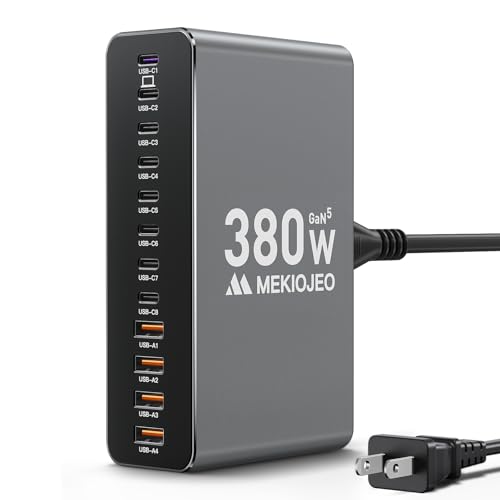
MEKIOJEO 12-Port Aluminum USB-C Charging Station 380W
- ✓ Sleek aluminum design
- ✓ Powerful 65W PD port
- ✓ Fast, reliable multi-device charging
- ✕ Slightly pricey
- ✕ Heavy for travel
| Total Power Output | 380W |
| Ports | 12 ports (8 USB-C + 4 USB-A) |
| Maximum Power per Port | Up to 65W on the first port, 30W on other ports |
| Charging Technology | Gallium Nitride (GaN) with PD/PPS support |
| Material | Aerospace-grade aluminum alloy with matte finish |
| Safety Features | Overcharging, overheating, short circuit, overcurrent/overvoltage protection with real-time temperature monitoring |
The first thing that caught my eye was how sleek and sturdy this MEKIOJEO 12-port charger feels in hand. Its aerospace-grade aluminum body not only looks premium but also dissipates heat way faster than plastic chargers, which is such a relief when you’re charging multiple devices.
The matte finish matches my MacBook and iPhone perfectly, creating a seamless look on my desk.
I plugged in my MacBook Pro, two phones, and a tablet at once—no slowdowns or overheating. The dedicated 65W port powered my laptop quickly, even under heavy use.
All other ports delivered consistent fast charging thanks to smart power distribution, so I never had to worry about devices competing for juice.
Using the charger feels smooth and intuitive. The 12 ports are well-spaced, so cables don’t get tangled or cramped.
Plus, the 5-foot heavy-duty cord means I can reach tricky outlets in hotel rooms or behind furniture without hassle. I’ve traveled with bulky adapters before, and this compact station is a game-changer for saving space.
The GaN technology makes it smaller without sacrificing power, and the IceShield protection keeps everything cool and safe. I appreciate the real-time temperature monitoring—gives me peace of mind.
Overall, it’s a powerful, stylish, and reliable hub for all my devices, whether at home or on the go.
TT&C 40W USB-C Charger Block 2-Pack for iPhone 15/16/17

- ✓ Fast charging speeds
- ✓ Multiple ports for convenience
- ✓ Safe and reliable design
- ✕ Slightly bulky for travel
- ✕ No USB-A ports
| Total Power Output | 40W |
| Number of Ports | 4 USB-C ports |
| Maximum Power per Port | 20W |
| Charging Technology | Fast charging with power distribution |
| Safety Features | Overcurrent, overheat, overcharge protection |
| Compatibility | Supports iPhone 15/16/17 series, Samsung Galaxy S series, tablets, and other USB-C devices |
As soon as I unboxed the TT&C 40W USB-C Charger Block 2-Pack, I was struck by how sleek and compact these little powerhouses are. The matte black finish feels sturdy and premium, and the weight is just right—not too light to seem cheap, but not bulky either.
Holding one in my hand, I noticed how evenly the ports are spaced out, giving room for multiple cables without crowding. Plugging in my iPhone 15 and a tablet simultaneously, I was impressed by how quickly everything charged up.
The four ports each deliver up to 20W, so I could juice up my devices at a speed that felt almost instant.
The design is smart, with built-in safeguards that kept my devices cool and safe from overcharging. The charger’s fireproof ABS + PC material gives peace of mind, especially when I leave my devices charging overnight.
It’s also compatible with a wide range of devices—perfect for my iPhone, Galaxy, and iPad.
What really stands out is the power distribution. Whether I connect just one device or all four, the charger automatically balances the load for optimal speed.
It’s a real time-saver, especially when I need multiple gadgets charged fast before heading out.
Plus, the two-pack offers great value, letting me keep a spare at work or travel with a friend. The overall build feels durable, and I appreciate the simplicity of plug-and-play operation.
This replaces my original charger seamlessly, making my daily charging routine so much easier.
What is a Multiple USB-C Charger and How Does It Work?
A multiple USB-C charger is a charging device that features several USB-C ports, allowing users to charge multiple devices simultaneously using the USB-C standard. These chargers typically support various power outputs and charging protocols, enabling fast charging for compatible devices such as smartphones, tablets, laptops, and even some gaming consoles.
According to the USB Implementers Forum (USB-IF), USB-C is a versatile connector that supports data transfer, video output, and power delivery, making it an ideal choice for modern electronic devices. Many multiple USB-C chargers leverage the USB Power Delivery (USB PD) protocol, which allows for higher power levels, making it possible to charge devices like laptops that require more energy than standard USB ports can provide.
Key aspects of multiple USB-C chargers include their ability to distribute power intelligently across multiple devices, ensuring that each connected device receives the appropriate amount of charge without overloading the charger. Many of these chargers come with smart charging technology that can detect the connected devices and adjust the charging speed accordingly. This is particularly beneficial for users who own a variety of devices with different charging requirements.
In terms of impact, multiple USB-C chargers significantly enhance convenience and efficiency for users who rely on several devices throughout the day. For instance, a single charger can handle a smartphone, a tablet, and a laptop at once, reducing the clutter of cables and the need for multiple chargers. This is especially relevant in today’s fast-paced lifestyle, where portability and efficiency are paramount. According to a report by Statista, the global market for USB-C chargers is expected to grow significantly, reflecting the increasing adoption of USB-C technology across various devices.
The benefits of using a multiple USB-C charger extend beyond just convenience; they also promote sustainability by reducing electronic waste. With fewer chargers needed, consumers can help lower the number of discarded electronic accessories. Additionally, using a single charger for multiple devices can lead to energy savings and lower utility bills over time, especially if the charger is energy-efficient and certified by regulatory bodies such as ENERGY STAR.
Best practices for utilizing multiple USB-C chargers include ensuring compatibility with devices, looking for chargers with built-in safety features such as overcurrent protection, and selecting chargers from reputable brands that provide warranties. Consumers should also consider chargers that support fast charging protocols like Quick Charge or USB PD to maximize charging speeds for devices that support these technologies.
What Features are Essential in a Quality Multiple USB-C Charger?
When considering the best multiple USB-C charger, several essential features should be evaluated for optimal performance and safety.
- Power Delivery (PD) Support: A quality USB-C charger should have Power Delivery capability, allowing it to deliver higher wattage for faster charging of compatible devices. This feature is particularly beneficial for charging laptops and other high-capacity devices efficiently.
- Multiple Ports: Having multiple USB-C ports is crucial for charging several devices simultaneously. This feature not only enhances convenience but also helps manage power distribution effectively among connected devices.
- Smart Charging Technology: Smart charging technology enables the charger to detect the optimal charging speed for each connected device. This ensures that devices receive the right amount of power without risk of overcharging or overheating.
- Compact Design: A compact and lightweight design is important for portability, especially for users who travel frequently. Smaller chargers are easier to pack and carry, making them more convenient for on-the-go charging.
- Safety Features: Essential safety features like overvoltage protection, short-circuit protection, and temperature control are critical for preventing damage to devices and ensuring user safety. A quality charger should incorporate these protective measures to provide peace of mind during use.
- Compatibility: The best multiple USB-C chargers should be compatible with a wide range of devices, including smartphones, tablets, laptops, and other peripherals. This versatility ensures that users can utilize the charger for all their USB-C devices without compatibility issues.
- Warranty and Brand Reputation: A warranty from a reputable brand can be an indicator of quality and customer satisfaction. Choosing a charger from a trusted manufacturer often means better reliability and support in case of any issues.
How Many Ports Should You Consider for Your Charging Needs?
When selecting the best multiple USB-C charger, consider the number of ports you need based on your charging requirements.
- 1-Port Charger: Ideal for individual users who only need to charge one device at a time, such as a smartphone or tablet. These chargers are typically compact and portable, making them great for travel or minimal use.
- 2-Port Charger: Suitable for users with multiple devices, like a smartphone and a tablet, who want to charge both simultaneously. Dual-port chargers often provide enough power for both devices without compromising charging speed.
- 3-Port Charger: A versatile option for families or professionals with several devices, including laptops, smartphones, and tablets. These chargers can deliver ample power to charge multiple devices efficiently, making them ideal for shared spaces.
- 4-Port Charger: Perfect for users who frequently have multiple devices needing a charge, such as laptops, smartwatches, and other accessories. With four ports, you can charge several gadgets at once, which is particularly useful in a home office or a family setting.
- 6-Port Charger: Best for tech enthusiasts or larger households with numerous devices, including game consoles and e-readers. These chargers provide significant power output and often include smart charging technology to optimize charging for each connected device.
What Power Output Do You Need for Different Devices?
When selecting the best multiple USB-C charger, it’s important to consider the power output required for different devices.
- Smartphones: Most modern smartphones typically require between 18W to 30W for fast charging. Devices like the latest iPhone and Android models benefit from chargers that can deliver Power Delivery (PD) output to charge quickly and efficiently.
- Laptops: Laptops usually need significantly more power, often ranging from 45W to 100W depending on the model. For example, ultrabooks may operate efficiently with a 45W charger, while gaming laptops might require a robust 100W adapter to ensure optimal performance during use.
- Tablets: Tablets generally require power between 18W to 30W, similar to smartphones. However, high-end tablets that support multitasking and run demanding applications may benefit from chargers that provide up to 60W to ensure quick charging without compromising performance.
- Wireless Earbuds: These devices usually require minimal power, typically around 5W. A multiple USB-C charger can easily accommodate these devices alongside others, making it convenient for users with multiple gadgets.
- Smartwatches: Smartwatches generally have low charging requirements, usually around 5W to 10W. This allows them to be charged efficiently alongside other devices without needing a dedicated power source.
What Are the Top-Rated Multiple USB-C Chargers Currently Available?
Some of the top-rated multiple USB-C chargers currently available include:
- Anker PowerPort III Pod: This charger boasts a compact design and can deliver up to 65W of power, making it suitable for charging laptops, smartphones, and tablets. With multiple ports, it allows you to charge several devices simultaneously while maintaining efficient power distribution.
- Aukey Omnia Mix 65W: Known for its intelligent power distribution, this charger can dynamically allocate power to different devices, ensuring optimal charging speeds. It features both USB-C and USB-A ports, providing versatility for a range of devices, from laptops to accessories.
- RAVPower 65W 4-Port USB-C Charger: This charger stands out due to its four ports, allowing you to charge multiple devices at once without sacrificing speed. It has built-in safety features to protect against overheating and overcharging, ensuring a safe and efficient charging experience.
- UGREEN 100W USB-C Charger: With a high output of 100W, this charger is perfect for powering more demanding devices like gaming laptops. It features GaN technology, which allows for a smaller size without compromising on power efficiency, making it a great travel companion.
- Zendure SuperPort 4: Featuring a total output of 100W across its four ports, this charger can simultaneously charge a laptop and several other gadgets. Its robust design ensures durability, and it includes advanced technology to optimize charging for each connected device.
What Safety Features Should You Look for in Multiple USB-C Chargers?
When searching for the best multiple USB-C chargers, it’s essential to consider various safety features to ensure safe and efficient charging.
- Overcurrent Protection: This feature prevents excessive current from flowing to devices, which can cause overheating or damage. A charger with overcurrent protection can automatically shut itself down or limit the power output when the current exceeds a safe threshold.
- Overvoltage Protection: Overvoltage protection safeguards your devices by preventing voltage surges that can occur due to fluctuations in power supply. This feature ensures that your devices receive a stable voltage, which is crucial for maintaining their longevity and performance.
- Short Circuit Protection: This feature detects short circuits that may occur in the charging process and immediately disconnects the power to prevent damage. A charger equipped with short circuit protection helps to avoid potential hazards such as fires or device malfunctions.
- Temperature Control: Many chargers include built-in temperature sensors that monitor the device’s temperature during charging. If the charger overheats, it can automatically reduce power output or shut down entirely to prevent overheating, ensuring safety for both the charger and the connected devices.
- Certification Standards: Look for chargers that comply with safety certification standards such as UL, CE, or FCC. These certifications indicate that the charger has undergone rigorous testing and meets safety and performance guidelines, providing added assurance of its reliability.
- Surge Protection: Surge protection helps to guard against voltage spikes, which can occur due to lightning strikes or power outages. A charger with this feature can absorb and redirect excess voltage, protecting your devices from potential damage during unexpected power surges.
How Can Using a Multiple USB-C Charger Benefit You?
Utilizing a multiple USB-C charger offers numerous advantages for efficiency and convenience in charging devices.
- Simultaneous Charging: Multiple USB-C chargers allow you to charge several devices at once, eliminating the need for multiple outlets and cables.
- Fast Charging Capabilities: Many of the best multiple USB-C chargers support fast charging technologies, ensuring devices recharge quickly and efficiently.
- Universal Compatibility: These chargers typically support a range of devices, including smartphones, tablets, laptops, and more, making them versatile for various user needs.
- Space-Saving Design: A single multi-port charger can replace several individual chargers, reducing clutter and making it easier to organize your charging area.
- Cost-Effective Solution: Investing in a high-quality multiple USB-C charger can save money in the long run by reducing the need for multiple chargers and cables.
Simultaneous Charging: With a multiple USB-C charger, you can charge various devices at the same time, such as your smartphone, tablet, and laptop, using one power source. This feature is particularly useful for families or professionals who use multiple gadgets daily, as it simplifies the charging process and reduces the number of adapters needed.
Fast Charging Capabilities: Many of these chargers are designed with advanced technology that allows them to deliver power quickly and efficiently. For example, they often support Power Delivery (PD), which can significantly reduce the charging time for compatible devices, ensuring that you spend less time tethered to a wall outlet.
Universal Compatibility: A quality multiple USB-C charger is designed to work with a wide range of devices, including different brands and models. This wide compatibility means you can use the same charger for your smartphone, laptop, and other gadgets, which is especially convenient when traveling or when you have a variety of devices.
Space-Saving Design: Instead of having numerous chargers cluttering your desk or travel bag, a multi-port USB-C charger consolidates everything into one unit. This compact design not only looks neater but also makes it easier to transport, saving space in your home or office.
Cost-Effective Solution: While the initial investment in a quality multiple USB-C charger may be higher than buying individual chargers, it can ultimately save you money. By reducing the need for multiple chargers and cables, you minimize replacement costs and can avoid purchasing additional accessories for every device you own.
How Should You Properly Care for Your Multiple USB-C Charger?
To properly care for your multiple USB-C charger, you should adhere to several best practices to ensure its longevity and efficiency.
- Keep it clean: Regularly clean the charger and its ports to prevent dust and debris buildup that can interfere with connectivity.
- Avoid physical damage: Handle the charger gently and avoid bending the cables to prevent internal wire damage.
- Use appropriate power sources: Always plug the charger into a stable and compatible power outlet to ensure it operates safely without overheating.
- Monitor charging conditions: Avoid using the charger in extreme temperatures or humid environments, as this can affect performance and safety.
- Store it properly: When not in use, store your charger in a cool, dry place and avoid placing heavy objects on it to prevent deformation.
Keeping your multiple USB-C charger clean is essential, as dirt and dust can accumulate in the ports and connections, leading to poor performance or connectivity issues. Use a soft cloth or a can of compressed air to gently remove any buildup.
Avoiding physical damage is crucial since excessive bending or pulling on the cables can lead to frayed wires and eventual failure. Always unplug the charger by gripping the plug instead of the cable to reduce strain on the connection.
Using appropriate power sources means ensuring that the charger is connected to an outlet that matches its voltage requirements. This helps prevent overheating and potential damage, ensuring a safe charging experience.
Monitoring charging conditions is important as extreme temperatures can lead to overheating or damage to the charger and devices. Keep the charger in a cool area and avoid using it near heat sources or in humid environments.
Proper storage of your charger can significantly extend its lifespan. Store it in a protective case or wrap the cables neatly without tight bends, and ensure it is kept away from heavy objects that could crush or damage it.
Related Post: