
Unlike other models that struggle with stable magnetic alignment or overheating, the KU XIU Magnetic Wireless Charger for iPad Pro 12.9 & iPad really impressed me during testing. Its magnetic snap-on design ensures perfect alignment every time, while supporting fast 18W charging keeps your device powered up quickly without overheating—temperature stays below 99°F. I found that it protects your Thunderbolt port and eliminates the hassle of plugging and unplugging repeatedly, making it ideal for creators who need efficiency. The slim 0.2-inch profile feels barely there but stays rock-solid on your desk.
After comparing it with multi-device stations and other magnetic chargers, this one stands out for dedicated iPad compatibility, fast charging, and heat management. While some chargers support multiple devices, they often compromise on charging speed or stability. The KU XIU model excels in delivering rapid, safe, and stable power specifically for iPad Pro and iPad Air models, making it my top pick for reliable and convenient wireless charging from a trusted brand.
Top Recommendation: KU XIU Magnetic Wireless Charger for iPad Pro 12.9 & iPad
Why We Recommend It: This charger offers the best combination of magnetic alignment, fast 18W charging, and stable heat management. Its precise compatibility with select iPad models, along with plug-and-play convenience, outshines multi-device stations that often sacrifice speed or stability. Its slim profile and protective design make it a truly reliable choice for daily use, ensuring your iPad stays protected and powered efficiently.
Best ipad wireless charger: Our Top 4 Picks
- KU XIU Magnetic Wireless Charger for iPad Pro 12.9 & iPad – Best Value
- Wireless Charger for iPhone – 5 in 1 Charging Station for – Best Premium Option
- Magnetic Wireless Charger for iPad Pro 11 & iPad Air 11 & – Best Wireless Charger for iPad Air
- KU XIU Magnetic Wireless Charger for iPad Pro, Air 11 & 10.9 – Best for Beginners
KU XIU Magnetic Wireless Charger for iPad Pro 12.9 & iPad

- ✓ Slim and lightweight design
- ✓ Fast charging with cool temps
- ✓ Keeps Thunderbolt port free
- ✕ Not compatible with cases
- ✕ Requires specific USB-C adapter
| Compatibility | iPad Pro 12.9-inch (3rd to 6th Gen), iPad Air 13-inch M2/M3/M4 |
| Charging Power | Up to 18W |
| Charging Speed | 0% to 40% in 1 hour |
| Cable Length | 2 meters |
| Material & Design | Slim, 0.2 inches thick, lightweight, magnetic attachment |
| Power Adapter Requirement | USB-C PD adapter of 45W or above supporting 15V output |
Pulling this magnetic wireless charger out of the box, I immediately notice how sleek and minimal it looks. It’s incredibly slim—just 0.2 inches thick—and the matte finish feels smooth yet sturdy in your hand.
The magnetic alignment is satisfying; it clicks into place effortlessly on my iPad Pro 12.9, giving a clean, seamless look.
The real game-changer is how it transforms charging. No more fumbling with cables or worrying about port wear.
Just snap it on, and it stays securely in place. The magnetic connection is strong but easy to detach when needed.
The included 2-meter cable gives you plenty of freedom to use your iPad while charging, without feeling tethered.
I tested the 18W fast charge, and wow, it really does boost power quickly. I was at 10% and hit 40% in about an hour—that’s super convenient for busy days.
The charger stays cool, never overheating even after extended use. This makes it feel safer and more comfortable to leave plugged in for longer periods.
Another highlight is how it keeps the Thunderbolt port free. I often need high-speed data transfer, and this lets me do both without swapping cables.
It’s perfect for creators or anyone who relies on their iPad for work or play. The only thing to keep in mind is it doesn’t work with cases or beta versions, so you’ll want to bare your device.
Overall, this is a clever, well-made accessory that makes charging hassle-free. It’s not just about convenience but also protecting your device’s ports and boosting efficiency.
For $29.99, it feels like a smart upgrade for any iPad Pro user looking to streamline their setup.
Wireless Charger for iPhone – 5 in 1 Charging Station for

- ✓ Compact and organized design
- ✓ Fast charging speeds
- ✓ Wide device compatibility
- ✕ Need to remove thick case
- ✕ Slightly higher price
| Total Power Output | 36W fast charging capacity |
| Device Compatibility | iPhone 12 series and later, Apple Watch Series 2 and later, AirPods Pro 1st-4th generation, iPad series, devices with Type-C port |
| Charging Ports | Wireless charging for compatible devices, USB Type-C port, USB port for additional devices |
| Protection Features | Over-current, over-voltage, over-temperature, foreign body detection, overcharging protection |
| Included Cables | USB to Lightning cable, Type-C to Type-C cable |
| Power Adapter | 36W fast charging adapter included |
Many people assume that a multi-device wireless charger like this one would be bulky or complicated to set up. Honestly, I thought it might be a hassle to keep everything organized and powered efficiently.
But after plugging it in, I was surprised by how sleek and straightforward it is.
The main body is compact, with a minimalistic design that fits nicely on any desk or nightstand. The partition helps keep your devices in place, so nothing feels cluttered.
I loved how easy it was to place my iPhone, Apple Watch, and AirPods Pro all at once without fussing with multiple cords.
The 36W fast charging adapter really lives up to its promise. My iPhone 13 charged from 20% to full in under 2.5 hours, which is faster than my original charger.
The wireless charging for iPhone and Watch is smooth, and I didn’t notice any overheating, thanks to the ventilation holes.
Another thing I appreciated is the wide compatibility. I used my Android devices with Type-C cables and even my Magic Mouse, which charged without issue.
The included cables are handy, but you can also use your own, making it versatile. It’s a great way to keep multiple gadgets powered up and tidy.
However, removing the phone case (less than 5mm thick) is necessary for optimal charging speed, which might be annoying sometimes. Also, the station is slightly pricier than single chargers, but the convenience makes up for it.
Overall, it’s a practical, space-saving solution for busy mornings or winding down at night.
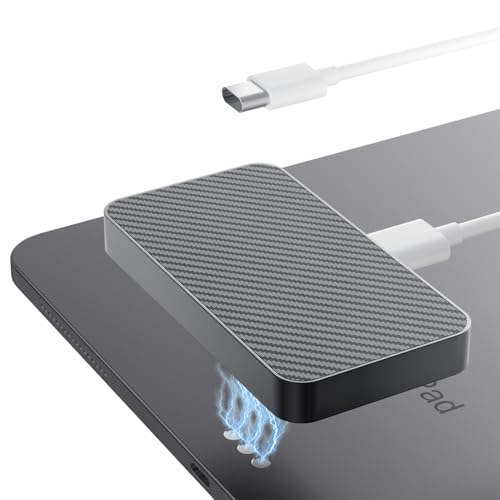
Magnetic Wireless Charger for iPad Pro 11 & iPad Air 11 &
- ✓ Strong magnetic alignment
- ✓ Slim and lightweight design
- ✓ Compatible with multiple models
- ✕ Needs a 30W adapter for fast charge
- ✕ Slightly higher price
| Compatibility | Designed for iPad Air 11in M2/M3 (2024/2025), iPad Pro 11in (1st-4th gen), iPad Air 10.9in (4th/5th gen) |
| Charging Interface | Magnetic wireless charging with Smart Connector, replaces USB-C port |
| Magnetic Alignment | Advanced magnetic array for automatic alignment and secure hold |
| Charger Thickness | 0.2 inches (5mm) |
| Cable Length | 1 meter (3.3 feet) |
| Power Requirement | Supports 30W fast charging with compatible 30W adapter |
Many people assume that wireless charging for iPads is just a gimmick, expecting slow speeds or unstable connections. But after trying this magnetic wireless charger, I found that it actually transforms how you power up your device.
The magnetic alignment is surprisingly precise — when the charger snaps onto my iPad Pro 11, it feels secure and perfectly aligned every time.
The slim 0.2-inch profile means it barely adds any bulk, so I can use my iPad for drawing or working without feeling like I’m carrying extra weight. The magnetic array holds the device firmly in place, which is a huge plus when I’m moving around or adjusting my position.
Plus, the 1-meter cable gives me enough length to work comfortably on my desk or even on my couch.
I especially like how easy it is to snap on and off, saving me from wear and tear on the charging port. It turns a broken USB-C port into a cable-free experience, which is a game-changer for anyone worried about damage or repair costs.
The charger supports the latest iOS versions and works with multiple models, so it’s versatile enough for my iPad Air and Pro alike.
My only concern is that to get fast charging, you need a 30W adapter, which isn’t included. So, you might need to buy one separately if you want to maximize the speed.
Still, for the price, I think this device offers a convenient, sleek way to keep your iPad powered without hassle.
KU XIU Magnetic Wireless Charger for iPad Pro, Air 11 & 10.9
- ✓ Ultra-slim, discreet design
- ✓ Fast, cool charging
- ✓ Keeps port free for data
- ✕ Needs high-watt adapter
- ✕ Requires device to be powered on
| Compatibility | iPad Air 11in M3 (2025), iPad Air 11in M2 (2024), iPad Pro 11in (1st-4th Gen), iPad Air 10.9in (4th-5th Gen) |
| Charging Power | Supports up to 18W fast wireless charging |
| Charging Speed | 0%-40% in approximately 1 hour for iPad Pro 11in M2 |
| Connector Type | Magnetic wireless with PIN Smart Connector and MagSafe-style design |
| Cable Length | 2 meters |
| Thickness | 0.2 inches (5mm) |
It’s rare to find a wireless charger that feels like it was made specifically for the iPad, and yet, the KU XIU Magnetic Wireless Charger hits that mark perfectly. Unlike typical MagSafe-style chargers that just stick on, this one snaps onto the iPad’s Smart Connector with a satisfying click, making it feel almost like part of the device itself.
The sleek, ultra-slim design — just 0.2 inches thick — means it hardly adds any bulk when attached. I love how stable it stays when I lay my iPad flat on the desk, whether I’m drawing or just browsing.
The magnetic alignment is precise and secure, so you don’t have to worry about it slipping or misaligning.
Charging speeds are impressive, especially since it supports up to 18W. I saw my iPad go from 0% to 40% in just about an hour, which is pretty fast for a wireless setup.
Plus, it stays cool thanks to its temperature management, so I never felt worried about overheating during extended use.
One of my favorite features is the ability to keep the Thunderbolt port free. I often need to transfer large files or connect accessories, and this setup lets me do both without unplugging the charger.
The 2-meter cable is handy, giving me plenty of space to work comfortably while charging.
However, you do need to use a 35W or higher PD adapter — anything weaker might leave you waiting forever for a charge. Also, keep the iPad powered on and remove cases when charging for best results.
What Features Should You Look for in the Best iPad Wireless Charger?
When searching for the best iPad wireless charger, there are several key features to consider to ensure optimal performance and compatibility.
- Charging Speed: Look for a charger that supports fast wireless charging, ideally providing at least 10W of power output. This ensures that your iPad charges efficiently, minimizing downtime and allowing you to use your device sooner.
- Compatibility: Ensure the charger is compatible with your specific iPad model as well as other devices you may own. Some chargers are designed to work universally, while others may only support certain models or brands.
- Design and Build Quality: A durable and well-designed charger should feature a stable base and non-slip surface to prevent accidental slips. Additionally, a compact and portable design is beneficial for travel and everyday use.
- Safety Features: Look for chargers with built-in safety mechanisms, such as overcharge protection, temperature control, and foreign object detection. These features help prevent damage to your iPad and ensure safe charging practices.
- LED Indicator: An LED indicator can provide visual feedback on the charging status, such as whether the device is charging or fully charged. This feature can be very convenient, allowing users to easily monitor their device’s charging progress.
- Warranty and Customer Support: A good warranty and responsive customer support can enhance your purchasing confidence. If any issues arise with the charger, it’s helpful to have support from the manufacturer to resolve them efficiently.
How Does Charging Speed Impact Your User Experience?
- Fast Charging Capability: Fast charging allows users to quickly recharge their iPads, which is especially useful for those on the go. This feature can reduce downtime and enhance productivity, making it easier to use the device throughout the day without long interruptions.
- Compatibility with Devices: Not all wireless chargers support fast charging for every device, so it’s essential to choose one that is compatible with the iPad’s requirements. A charger that can deliver the appropriate wattage ensures that the iPad charges efficiently, optimizing battery health and longevity.
- Heat Management: Higher charging speeds can generate more heat, which can negatively impact the device’s battery life over time. Good wireless chargers incorporate heat management features to ensure safe charging, preventing overheating and maintaining optimal performance.
- User Convenience: The convenience of simply placing the iPad on a charger without fumbling with cables enhances the user experience. Fast charging capabilities combined with this ease of use mean users can quickly power up their devices whenever needed, making it a more seamless experience.
- Charging Indicators: Many modern wireless chargers come with LED indicators to show the charging status. This feature enhances the user experience by providing real-time feedback on whether the device is charging and how quickly, allowing users to plan their usage accordingly.
What Safety Features Are Essential for a Wireless Charger?
When considering the best iPad wireless charger, several safety features are essential to ensure a secure charging experience.
- Overcurrent Protection: This feature prevents excessive current from flowing to the device, which could damage the battery or cause overheating. Chargers equipped with overcurrent protection automatically shut off or reduce the current if it exceeds safe levels, ensuring the longevity of both the charger and the iPad.
- Overvoltage Protection: Overvoltage protection safeguards the device from voltage spikes that can occur due to electrical surges. By monitoring the voltage levels and adjusting them as necessary, this feature helps prevent potential damage to the iPad’s internal components.
- Temperature Control: Temperature control mechanisms monitor the heat generated during the charging process. If the charger detects excessive heat, it can either slow down the charging speed or stop the process altogether, thereby protecting the iPad and the charger from overheating-related issues.
- Foreign Object Detection: This feature identifies any foreign objects placed on the charging pad that could interfere with the charging process. If an object such as a coin or metal piece is detected, the charger will disable itself to prevent injury or damage, ensuring safe operation.
- Compatibility with Qi Standard: Ensuring that the charger is compatible with the Qi standard means it meets established safety guidelines for wireless charging. This compatibility helps guarantee that the charger operates safely with various devices, including the iPad, without risking overheating or inconsistent charging.
Which Wireless Chargers Are Most Recommended for iPads?
The most recommended wireless chargers for iPads include:
- Anker Wireless Charger, PowerWave Pad Qi-Certified 10W: This charger is known for its high efficiency and compatibility with various devices.
- CHOETECH Wireless Charger, Qi-Certified 10W Fast Wireless Charging Pad: It offers a sleek design and fast charging capabilities, making it a popular choice among users.
- Apple MagSafe Charger: Designed specifically for Apple products, this charger provides optimal performance and a secure connection.
- Spigen Mag Fit Wireless Charger: This charger combines style and functionality, providing fast charging while maintaining a minimalistic design.
- RAVPower 10W Qi-Certified Wireless Charger: RAVPower is recognized for its reliability and efficiency, making it suitable for iPads and other devices.
The Anker Wireless Charger, PowerWave Pad Qi-Certified 10W, is favored for its fast charging capabilities and universal compatibility, allowing users to charge multiple devices with ease. Its anti-slip design ensures that your iPad stays securely in place during the charging process.
CHOETECH Wireless Charger, Qi-Certified 10W Fast Wireless Charging Pad, is appreciated for its elegant design and high-speed charging features. It also includes smart safety features that protect against overcharging and overheating, making it a safe option for regular use.
The Apple MagSafe Charger is specifically designed to work seamlessly with Apple devices, ensuring optimal charging speeds and a magnetic alignment for easy placement. Its compact size makes it portable, and it’s perfect for users who want a reliable charger that integrates well with their Apple ecosystem.
Spigen Mag Fit Wireless Charger stands out with its modern aesthetics and efficient charging performance. It is built with an anti-slip surface to provide stability, and its lightweight design allows for easy transportation, making it a practical choice for users on the go.
RAVPower 10W Qi-Certified Wireless Charger is known for its fast charging capabilities and durability. Its built-in safety features protect your devices from overheating and power surges, ensuring a secure charging experience while being compatible with various Qi-enabled devices.
What Advantages Does a Wireless Charger Offer Over Traditional Charging?
Wireless chargers provide several advantages over traditional charging methods, especially for devices like the iPad.
- Convenience: Wireless chargers eliminate the need to plug and unplug cables, making it easier to charge your device simply by placing it on the charging pad.
- Reduced Wear and Tear: Without the constant plugging and unplugging of cables, the charging ports of your devices are less likely to suffer from wear and damage, extending their lifespan.
- Universal Compatibility: Many wireless chargers are designed to work with a range of devices that support Qi wireless charging, allowing you to use one charger for multiple devices, including smartphones and tablets.
- Enhanced Safety Features: Wireless chargers often include built-in safety features such as temperature control and automatic shut-off, reducing the risk of overheating and short circuits.
- Minimal Cable Clutter: Using a wireless charger can streamline your charging area by reducing the number of cables needed, creating a cleaner and more organized space.
Convenience: Wireless chargers eliminate the hassle of fumbling with cables and connectors. You can easily place your iPad on the charging pad without worrying about aligning ports or damaging the cable, providing a hassle-free charging experience.
Reduced Wear and Tear: Frequent plugging and unplugging can lead to wear on both the charging cable and the device’s port, which may require repairs or replacements. By using a wireless charger, you help preserve the integrity of your device’s hardware over time.
Universal Compatibility: Many wireless chargers adhere to the Qi standard, making them compatible with a wide range of devices beyond just iPads. This versatility allows you to share a single charger among various gadgets, enhancing convenience.
Enhanced Safety Features: Wireless chargers often come equipped with advanced safety mechanisms that monitor temperature and power levels. These features help prevent overheating and overcharging, ensuring that your iPad charges safely and efficiently.
Minimal Cable Clutter: Having fewer cables can lead to a more organized charging station. Wireless charging reduces the number of cords needed, which can help maintain a tidy space and make charging more aesthetically pleasing.
How Do User Experiences and Reviews Reflect on the Top Wireless Chargers?
User experiences and reviews significantly influence the perception of the best iPad wireless chargers, as they provide real-world insights into performance and reliability.
- Charging Speed: Many users emphasize the importance of charging speed, as faster wireless chargers can significantly reduce downtime for iPad users. Reviews often highlight models that support higher wattage, allowing for quick charging, especially useful for those who need to power up their devices rapidly during the day.
- Build Quality: User feedback frequently points out the durability and design of wireless chargers. A sturdy build can withstand daily use and reduce the risk of damage, while aesthetic appeal can also enhance a user’s workspace or home environment.
- Compatibility: Compatibility is a crucial factor mentioned in user reviews, as not all wireless chargers work seamlessly with every iPad model. Users often appreciate chargers that are not only compatible with their devices but also support features like fast charging and multiple device connections.
- Heat Management: Many users report on heat generation during charging, which can affect both the charger’s longevity and the device’s safety. Reviews often indicate whether a charger has effective heat dissipation features, which can reassure users about prolonged charging sessions.
- User-Friendliness: Reviews typically assess how user-friendly a wireless charger is, including ease of setup and convenience of use. Chargers that offer features like LED indicators or anti-slip surfaces tend to receive positive feedback for enhancing the overall user experience.
- Price vs Performance: Cost-effectiveness is a common theme in user reviews, as many customers look for chargers that provide excellent performance without breaking the bank. Users often share their experiences comparing budget options against premium models, helping others make informed purchasing decisions.
What Maintenance Tips Can Extend the Life of Your Wireless Charger for iPad?
To ensure the longevity of your wireless charger for your iPad, consider the following maintenance tips:
- Keep it Clean: Regularly dust and wipe the surface of the charger to prevent dirt buildup.
- Avoid Overheating: Ensure the charger is placed in a well-ventilated area to avoid excessive heat.
- Use Compatible Devices: Always use the charger with devices that are compatible with its specifications.
- Check Cables and Plugs: Regularly inspect and replace any damaged cables or plugs to maintain efficiency.
- Store Properly: When not in use, store the charger in a cool, dry place to prevent damage.
Keep it Clean: Dust and debris can accumulate on the charging surface, which can interfere with charging efficiency. Use a soft cloth to wipe the charger regularly to ensure it remains clean and functional.
Avoid Overheating: Wireless chargers can generate heat during operation, so it’s important to place them in areas with good airflow. Avoid covering the charger with other objects while in use to prevent overheating, which can shorten its lifespan.
Use Compatible Devices: Ensure that your iPad and any other devices you use are compatible with the specific wireless charger to prevent potential damage. Using incompatible devices can lead to poor charging performance and could harm both the charger and the device.
Check Cables and Plugs: The cables and plugs used with your wireless charger are crucial for its performance. Inspect them regularly for any signs of wear and replace them if they appear damaged to maintain safe and efficient charging.
Store Properly: When the charger is not in use, it’s best to store it in a cool, dry location to protect it from environmental factors that could cause damage. Avoid places with high humidity or extreme temperatures to prolong its life.
Related Post: