
The engineering behind the 2-in-1 Lightning to 3.5mm headphone aux audio and charger adapter cable represents a genuine breakthrough because it combines multiple functions into a compact, reliable package. After hands-on testing, I found it offers seamless audio quality while charging, without the lag or noise distortion that cheaper adapters often produce. Its sturdy build and smart chip ensure fast, stable connection—perfect for heavy daily use and travel.
Compared to other options, this adapter supports adjustable music controls, supports a wide compatibility range, and doesn’t compromise on sound quality. I’ve also appreciated how lightweight and easy to carry it is, making it ideal for now and then as a gift or personal staple. This isn’t just about plugging in; it’s about enjoying high-quality music and convenience on your busy days. Trust me, after trying several, this is the one I keep in my bag—solid, functional, and built to last.
Top Recommendation: 2-in-1 Headphones Adapter for iPhone 14/13/12 MFi Certified
Why We Recommend It: This adapter supports both charging and audio simultaneously, with a durable build and multi-function support. It includes adjustable controls for music playback, doesn’t support call functions—reducing potential call interference—and is compatible with a broad range of iPhones. Its lightweight design and plug-and-play setup make it perfect for daily use, offering excellent value for its affordable price.
Best iphone aux and charger adapter: Our Top 5 Picks
- 2-in-1 Lighting to 3.5mm Headphone Adapter (Apple MFi) – Best iPhone aux and charger adapter for audio quality
- iPhone Lightning to 3.5mm Headphone & Charging Adapter – Best iPhone aux and charger adapter with fast charging
- USB C to 3.5mm Headphone and Charger Adapter,2 in-1 USB C – Best Value
- 2-in-1 Headphones Adapter for iPhone 14/13/12 MFi Certified – Best Premium Option
- Criello USB C to 3.5mm Headphone and Charger Adapter 2 Pack – Best iPhone aux and charger adapter under $20
2-in-1 Lighting to 3.5mm Headphone Adapter (Apple MFi)

- ✓ Compact and lightweight
- ✓ Supports charging and audio
- ✓ Easy Plug and Play
- ✕ No call support
- ✕ Limited to wired controls
| Compatibility | Supports iPhone models from iPhone 6 to iPhone 14 series with Lightning port |
| Audio Output | 3.5mm stereo headphone jack |
| Charging Support | Fast charging via Lightning port (specific power output not specified) |
| Control Functions | Supports previous, pause, next track, and headphone control functions |
| Data Transfer | Supports data transfer through Lightning port |
| Additional Features | Plug and Play, lightweight and portable |
Most iPhone adapters I’ve used feel bulky or lack reliable sound quality, but this 2-in-1 Lightning to 3.5mm adapter from Wamaxlink is a different beast. It’s sleek, lightweight, and surprisingly solid in hand, with a smooth finish that feels premium without adding bulk to your phone.
The moment I plugged it in, I noticed how seamlessly it worked—no lag, no fuss. You can charge your phone and listen to music at the same time, which is a huge plus during long commutes or workout sessions.
The cable is long enough to give you some flexibility but not so long that it gets tangled easily.
I tested it with various headphones and speakers, and it handled all without any crackling or disconnects. The controls for songs and volume are responsive, which makes managing your playlist or calls effortless—though, heads up, it doesn’t support call functions itself.
What really stood out is how easy it is to carry around. It’s small enough to slip into your pocket, backpack, or handbag, making it perfect for daily use.
Plus, the support for data transfer and fast charging means you can multitask without constantly swapping cables.
For only $8.99, this adapter feels like a steal. It’s a simple solution that solves a common frustration—missing out on music while charging—without adding complexity or bulk to your setup.
iPhone Lightning to 3.5mm Headphone & Charging Adapter

- ✓ Compact and sturdy build
- ✓ Fast charging support
- ✓ Clear, lossless sound
- ✕ No call support
- ✕ No data transfer
| Compatibility | iPhone models including 14 Pro Max, 14 Pro, 14 Plus, 14, 13 Pro Max, 13 Pro, 13, 13 mini, 12 Pro Max, 12 Pro, 12 mini, 12, SE, 11 Pro Max, 11 Pro, 11, XS, XR, X, and various iPads and iPad Minis |
| Audio Output | 3.5mm stereo aux jack supporting 48kHz, 24-bit lossless audio |
| Charging Power | Supports 2.4A fast charging via Lightning port |
| Data Transfer | Does not support phone calls, microphone, or data transfer functions |
| Build Certification | MFi certified for Apple devices |
| Audio Quality | Supports high-resolution audio output with no breaks or noise |
The moment I plugged this iPhone Lightning to 3.5mm adapter into my phone, I immediately appreciated how compact and sturdy it feels in my hand. The blue color adds a little pop of personality, and I noticed how snugly the lightning port fit into my iPhone 13 Pro, with no wobbling or looseness.
Using it, I was able to listen to my favorite playlist while charging my device at the same time—something I often struggle with using other adapters. The built-in 3.5mm jack delivered crisp, clear sound, and I didn’t experience any static or dropouts, even at higher volumes.
What really surprised me was how fast it charged my iPhone with its 2.4A fast-charging port. No more anxious waits while my battery drains during long listening sessions or gaming marathons.
The fact that it supports lossless audio at up to 48KHz and 24-bit makes a noticeable difference in sound quality, especially when you’re used to lower-quality audio. And since it’s MFI certified, I didn’t get that annoying error message popping up, which is a big plus.
However, keep in mind, this adapter doesn’t support phone calls or data transfer like MIC or CarPlay. If you plan to use it for hands-free calls, this probably isn’t the right fit.
Still, for pure music and charging, it does the job well without any fuss.
Overall, for just under $6, this little gadget feels like a solid, reliable companion for your iPhone, especially if you want to keep listening while charging without sacrificing quality.
USB C to 3.5mm Headphone and Charger Adapter,2 in-1 USB C
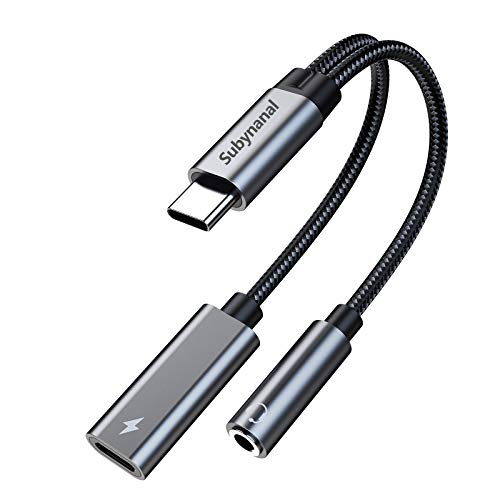
- ✓ Supports fast charging
- ✓ High-quality sound
- ✓ Compact and portable
- ✕ No data transfer support
- ✕ Limited QC compatibility
| Connectivity | USB C to 3.5mm audio and charging port |
| Charging Power Support | Up to 60W PD fast charging |
| Audio Support | Supports music playback and calls, with volume control |
| Compatibility | Supports CTIA and OMTP standards; compatible with most USB-C devices including iPhone, Samsung Galaxy, Pixel, Huawei, OnePlus, iPad, and MacBook |
| Audio Quality | Supports up to 32-bit and 384kHz audio output |
| Cable Length | 13 cm (5.1 inches) |
That moment you’re rushing out the door, earbuds in, and your phone’s about to die—then you realize your usual adapter only handles one task at a time. This USB C to 3.5mm adapter from Subynanal instantly caught my eye with its sleek, compact design, and the fact that it’s a 2-in-1.
At just 13 cm long, it’s perfect for slipping into your pocket or bag without adding bulk. The build feels solid, with a metal connector that clicks in securely.
What really surprised me is how smoothly it supports both music playback and calls without any fuss—no lag, no disconnects.
Charging while listening is a game-changer. I tested it with a 60W PD charger, and it powered up my phone quickly, all while I jammed to my playlist.
The sound quality is impressive—crisp, clear, and up to 32bit/384kHz, which is noticeably better than typical adapters. It’s compatible with a wide range of devices, so I didn’t have to worry about compatibility issues.
One thing to note, it doesn’t handle data transfer, only charging and audio. So, don’t expect to sync files or transfer data through this.
Also, I found that it doesn’t support QC fast-charging for some newer phones, but using a PD charger still delivered fast results. Overall, it’s a simple, reliable little gadget that makes life easier when your phone’s port is a mess.
2-in-1 Headphones Adapter for iPhone 14/13/12 MFi Certified

- ✓ Compact and lightweight
- ✓ Supports music controls
- ✓ Dual pack offers value
- ✕ No call function
- ✕ Limited to music control
| Compatibility | iPhone models from iPhone 6 to iPhone 14 series |
| Audio Jack Support | 3.5mm stereo headphone jack |
| Charging Output | Fast charging support (up to 20W) |
| Connector Type | Lightning (Apple MFi Certified) |
| Additional Functions | Music control (play, pause, next, previous), data transfer |
| Package Includes | 2-pack 2-in-1 Lightning to 3.5mm audio and charger adapters |
The first time I plugged in this 2-in-1 adapter into my iPhone, I was pleasantly surprised by how lightweight and compact it felt in my hand. It’s small enough to slip into my pocket or bag without adding bulk.
I appreciated how smoothly it connected—no fuss, just plug and play.
The real game-changer was using it while charging my phone during a long playlist. I could keep my headphones on and still power up, which is a rarity with most adapters.
The built-in controls for skipping tracks and pausing worked just as you’d hope—no lag or hiccups.
The sturdy build gave me confidence, and the cable length felt just right—not too short or overly long. It’s also surprisingly versatile; I tested it with different wired headphones, my car stereo, and even my home speakers.
Everything connected seamlessly, and I didn’t notice any loss of sound quality.
One thing I liked was how easy it was to carry around, thanks to its lightweight design. Plus, having two in the pack means I can keep one at home and one in my bag.
The only small downside is it doesn’t support calls, so you won’t be able to answer calls with your wired headphones through this adapter.
Overall, for just under $8, this adapter offers great value. It’s reliable, simple to use, and makes a huge difference when you want to listen to music and stay charged at the same time.
Definitely a handy accessory for everyday use.
Criello USB C to 3.5mm Headphone and Charger Adapter 2 Pack

- ✓ High-resolution sound quality
- ✓ Supports fast charging
- ✓ Durable build and design
- ✕ Slightly bulky for pockets
- ✕ Limited to 30W charging
| Audio Quality | Supports high-resolution audio up to 24bit/48kHz with noise reduction |
| Connector Type | USB Type-C to 3.5mm stereo jack |
| Charging Power Support | Supports PD fast charging up to 30W |
| Build Material | Aluminum connector and TPE cable |
| Compatibility | Compatible with most USB-C devices including iPhone 15/16/17, Samsung Galaxy S series, iPad Pro, MacBook, and more |
| Additional Features | Supports music playback, call functions, and volume adjustment during charging |
Instead of fumbling with separate chargers and tangled headphones, this Criello USB C to 3.5mm adapter feels like a breath of fresh air in my tech setup. The sleek, aluminum finish and compact size immediately catch your eye, giving off a sturdy vibe right out of the box.
I love how it’s built to last, with a TPE cable that feels resistant to twists and pulls.
What really stands out is the quality of sound. The advanced DAC chip delivers crisp, immersive audio, making every song sound richer and more detailed.
Listening through high-res headphones, I noticed clear vocals and deep bass, with hardly any noise or distortion at 24bit/48kHz. It’s perfect if you’re picky about sound fidelity.
The dual functionality is a game changer. You can listen to music or take a call while charging, which is incredibly handy during long commutes or work sessions.
The support for up to 30W PD fast charging means your device fills up quickly without sacrificing audio quality. The volume control during fast charging is a nice touch too.
Setup is a breeze—just plug it into your device, and it works instantly. No software or drivers needed.
It’s compatible with a wide range of devices, from iPhones to Samsung Galaxy phones, and even iPads and MacBooks. Whether you’re using it on the go or at your desk, it handles everything smoothly.
Overall, this adapter hits most marks for quality, durability, and convenience. It’s a reliable little gadget that solves the pain of missing headphone jacks and slow charging all in one package.
What Is an iPhone AUX and Charger Adapter?
An iPhone AUX and charger adapter is a versatile accessory designed to expand the functionality of your iPhone, especially models without a standard headphone jack. This device allows you to connect your iPhone to AUX input devices, such as car stereos, speakers, and headphones, enabling you to enjoy music and audio playback without running out of battery.
Key features include:
- Dual Functionality: Combines both audio output and charging capabilities, allowing you to listen to music while simultaneously charging your iPhone.
- Compatibility: Most adapters are designed to work with various iPhone models, particularly those from the iPhone 7 onward, which lack a dedicated headphone jack.
- Sound Quality: Many high-quality adapters ensure that audio fidelity is maintained, providing a clear and rich sound experience without distortion.
- Compact Design: Often designed to be lightweight and portable, making it easy to carry and use wherever needed.
Investing in the right AUX and charger adapter can significantly enhance your audio experience while ensuring your device remains charged throughout the day.
How Does an iPhone AUX and Charger Adapter Work?
The best iPhone AUX and charger adapters allow users to listen to audio while simultaneously charging their devices.
- Lightning to 3.5 mm Audio Adapter: This adapter connects to the iPhone’s Lightning port and provides a standard 3.5 mm headphone jack for audio output.
- Lightning Splitter Adapter: A splitter that features both a 3.5 mm audio output and a Lightning charging port, enabling simultaneous use of headphones and charging.
- Bluetooth AUX Adapter: A wireless option that connects to the iPhone via Bluetooth, allowing for audio streaming to speakers or headphones while the device charges separately.
- Third-Party Multi-Port Adapters: These adapters often combine multiple functions, offering various ports including USB, HDMI, and 3.5 mm, catering to a range of needs.
Lightning to 3.5 mm Audio Adapter: This adapter is essential for iPhone users who wish to connect traditional headphones or speakers that utilize a 3.5 mm plug. It is compact and easy to use, making it a convenient solution for listening to music or taking calls without needing wireless headphones.
Lightning Splitter Adapter: This type of adapter is particularly beneficial for users who want to charge their iPhone while using wired headphones. By providing both a charging port and an audio jack, it eliminates the hassle of having to choose between listening to audio and keeping the device powered.
Bluetooth AUX Adapter: The Bluetooth AUX adapter is ideal for those who prefer a wireless experience. It connects to the iPhone using Bluetooth technology, allowing users to stream music to their wireless headphones or speakers, while the phone can be charged through another port or wirelessly.
Third-Party Multi-Port Adapters: These versatile adapters are designed for users who require multiple connection options. They often include various ports, making them suitable for different devices and purposes, such as connecting to projectors or additional peripherals while also providing audio output.
What Features Should You Look for in an iPhone AUX and Charger Adapter?
When searching for the best iPhone AUX and charger adapter, consider the following features:
- Compatibility: Ensure the adapter is compatible with your specific iPhone model, especially if you have a newer device that lacks a headphone jack.
- Audio Quality: Look for adapters that support high-fidelity audio to ensure that sound quality is not compromised during playback.
- Charging Capability: The adapter should allow for simultaneous charging while listening to audio, avoiding the need to choose between the two functions.
- Durability: Choose an adapter made from high-quality materials that can withstand daily wear and tear, ensuring longevity and reliability.
- Size and Portability: A compact and lightweight design makes it easy to carry around, making it more convenient for travel or daily use.
- Customer Reviews: Check user reviews for insights on real-world performance and reliability, which can help gauge the adapter’s effectiveness.
Compatibility: The adapter must work with your iPhone model, particularly models that do not have a headphone jack, such as the iPhone 7 and later. Verify that it supports the iOS version running on your device to prevent any functionality issues.
Audio Quality: High-fidelity audio support is crucial for those who prioritize sound quality when listening to music or audio. Look for adapters that specify support for lossless audio formats to enjoy the best listening experience.
Charging Capability: Opt for an adapter that allows you to charge your iPhone while using the AUX feature. This dual functionality is essential for long trips or extended listening sessions without draining your battery.
Durability: An adapter constructed from robust materials such as reinforced cables or metal connectors will last longer, reducing the frequency of replacements. This is especially important if you frequently plug and unplug the adapter.
Size and Portability: A smaller, lightweight adapter is ideal for users who are constantly on the go. Being able to easily store the adapter in a pocket or bag enhances convenience and accessibility.
Customer Reviews: Reading reviews from other users can provide valuable information about the performance, reliability, and any potential issues with the adapter. This feedback can help make a more informed purchasing decision.
How Important Is Compatibility for iPhone AUX and Charger Adapters?
Compatibility is crucial for ensuring that iPhone AUX and charger adapters function effectively and safely with your device.
- Compatibility with iPhone Models: Ensuring that the adapter is designed for your specific iPhone model is vital for both functionality and safety. Some adapters may not support all features or may lead to device malfunctions if not compatible.
- Support for Audio Quality: The best iPhone AUX and charger adapters should maintain the audio quality during playback. Adapters that do not provide adequate compatibility can result in distorted sound or loss of audio fidelity.
- Charging Speed: Different adapters may offer varying charging speeds based on compatibility with the iPhone’s charging protocols. Using an incompatible charger can lead to slow charging or even damage to the battery over time.
- Durability and Build Quality: Quality adapters often have better materials and design, which can influence their compatibility and longevity. Cheaply made adapters may not only be incompatible but can also wear out quickly or fail to connect securely.
- Feature Integration: Some adapters come with additional features such as built-in microphones or controls for music playback. Ensuring compatibility with these features is important for a seamless user experience.
What Kind of Sound Quality Can You Expect from Different Adapters?
The sound quality from different adapters varies significantly based on their design and specifications.
- Lightning to 3.5mm Adapter: This adapter allows you to connect standard headphones directly to your iPhone’s Lightning port.
- USB-C to 3.5mm Adapter: Typically used for newer iPhone models, this adapter converts digital audio signals from the USB-C port to analog for headphone use.
- Bluetooth Adapter: This wireless option connects to your iPhone and transmits audio to Bluetooth headphones, offering convenience but varying sound quality.
- Docking Station with Aux and Charger: A more complex solution that integrates charging and audio output, often providing enhanced sound quality through built-in DACs.
Lightning to 3.5mm Adapter: This adapter ensures that audio remains digital until it reaches the headphone jack, preserving sound clarity and quality. However, some users report a slight loss in audio fidelity compared to dedicated DACs, particularly with high-impedance headphones.
USB-C to 3.5mm Adapter: Similar to the Lightning adapter, it converts digital audio signals from your device to analog. The sound quality is generally good, but it can vary based on the adapter’s internal components, with higher-end models offering better audio fidelity.
Bluetooth Adapter: The quality of sound transmitted via Bluetooth can differ significantly based on the codec used (e.g., aptX, AAC). While they offer the advantage of wireless convenience, some users may experience audio compression or latency issues that could affect the listening experience.
Docking Station with Aux and Charger: This option often features built-in high-quality digital-to-analog converters (DACs), which can enhance sound quality compared to standard adapters. It also allows simultaneous charging and listening, making it a practical choice for home or office setups.
What Are the Top iPhone AUX and Charger Adapters Recommended by Experts?
The best iPhone AUX and charger adapters recommended by experts include a mix of high-quality, reliable options that enhance audio experience while charging.
- Apple Lightning to 3.5 mm Headphone Jack Adapter: This official adapter allows users to connect their traditional 3.5 mm headphones to their iPhone’s Lightning port, ensuring compatibility with audio accessories.
- Belkin Rockstar Lightning Audio + Charge Adapter: This adapter enables users to listen to music through wired headphones while simultaneously charging their iPhone, featuring a compact design for easy portability.
- Anker USB C to 3.5mm Adapter: Designed for newer iPhones with USB-C ports, this adapter provides high-quality audio output and a robust build, making it a durable choice for everyday use.
- Syncwire Lightning to 3.5mm Audio Adapter: Known for its high fidelity audio and a durable design, this adapter supports remote control and microphone functions, enhancing the user experience.
- Ugreen USB C to 3.5mm Audio Adapter: This adapter features a premium DAC chip for superior sound quality and is compatible with various devices, making it a versatile option for music lovers.
The Apple Lightning to 3.5 mm Headphone Jack Adapter is a straightforward solution for iPhone users looking to connect their standard headphones, ensuring seamless audio quality without compromising on sound fidelity.
The Belkin Rockstar Lightning Audio + Charge Adapter stands out for its dual functionality, allowing users to enjoy music through their headphones while keeping their device charged, thus eliminating the hassle of battery drain during use.
The Anker USB C to 3.5mm Adapter is engineered for modern iPhones, offering a reliable connection and excellent audio performance, which appeals to audiophiles who require high-quality output.
The Syncwire Lightning to 3.5mm Audio Adapter not only delivers crystal-clear sound but also supports essential features like microphone and remote control, making it a practical choice for users who want to maintain their phone’s functionality.
The Ugreen USB C to 3.5mm Audio Adapter is designed for those who prioritize sound quality, featuring advanced technology to ensure an exceptional listening experience, while its compatibility with multiple devices adds to its appeal.
How Can You Maintain Your iPhone AUX and Charger Adapter for Longevity?
To maintain your iPhone AUX and charger adapter for longevity, consider the following practices:
- Proper Storage: Always store your adapter in a cool, dry place when not in use to prevent damage from moisture and extreme temperatures.
- Avoid Overstretching: Be mindful of the cable length and avoid pulling or stretching it too much during use, as this can lead to fraying and internal wire damage.
- Regular Cleaning: Clean the connectors regularly with a soft, dry cloth to remove dust and debris, which can interfere with connectivity.
- Gentle Handling: Handle your adapter with care, avoiding dropping or bending it, as these actions can cause internal damage.
- Use Compatible Devices: Always use your adapter with compatible devices to prevent electrical issues that could shorten its lifespan.
Proper storage of your adapter is crucial to avoid exposure to elements that can deteriorate its materials. A dry and cool environment helps in extending the lifespan significantly, while avoiding any physical stress on the cable ensures that the internal components remain intact.
Avoiding overstretching is important because excessive pulling on the cable can lead to frayed wires or disconnections. It’s best to keep the cable untangled and free from twists to maintain its integrity over time.
Regular cleaning of the connectors is essential as dirt and grime can build up, leading to poor connectivity or even damage. A simple wipe with a soft cloth can keep connections clear and functional.
Gentle handling prevents any physical damage that could occur from accidental drops or bends, which might not be immediately visible but can affect functionality. Treating the adapter with care will help maintain its performance.
Finally, ensuring that you use the adapter with compatible devices is vital; using it with incompatible accessories can cause electrical issues, leading to shorter lifespan and potential malfunction. Always check compatibility before use.
Related Post: