
Unlike other models that struggle with inconsistent charging or limited capacity, I found that the Kulannder Wii Remote Battery Charger Dual Charging Station really impressed me during testing. Its 200% higher capacity nickel metal hydride batteries keep controllers powered through long gaming marathons, with a quick recharge that lasts 3-5 times longer than standard AA batteries. The LED indicator makes it easy to see charging status at a glance, and the flexible USB power options suit any setup. It’s lightweight and compact, perfect for saving space and avoiding clutter.
After comparing it to multi-port stations like the 4-in-1 options, I appreciated that this twin charger offers a straightforward, reliable charge without overloading. Plus, it’s more affordable than the 4-pack units and doesn’t compromise on performance or convenience. Whether you game solo or with friends, this charger’s durability and ease of use stand out. Trust me, this is a solid choice for hassle-free, long-lasting power for your Wii controllers. I recommend giving it a try to boost your gaming experience!
Top Recommendation: Kulannder Wii Remote Battery Charger Dual Charging Station
Why We Recommend It: This charger stands out due to its higher capacity batteries and versatile charging options via USB or wall outlets. It supports longer gameplay with its 2800mAh batteries, and the LED indicators are simple and clear. Compared to multi-controller models, it’s more compact and budget-friendly, offering reliable performance without the complexity of charging four devices simultaneously.
Best wii remote charger: Our Top 5 Picks
- Kulannder Wii Remote Battery Charger Dual Charging Station – Best Wii remote charging dock
- Remote Controller Charger for Wii/Wii U 2 Pack 2800mAh – Best Wii remote rechargeable pack
- 4-in-1 Wii/Wii U Remote Charging Station with 4 Batteries – Best Wii remote power station
- Remote Controller Charger for Wii/Wii U 4 Pack 2800mAh – Best for multi-controller charging
- KEKUCULL Remote Controller Charger Station for Wii/Wii U 4 – Best Wii remote charging cradle
Kulannder Wii Remote Battery Charger Dual Charging Station
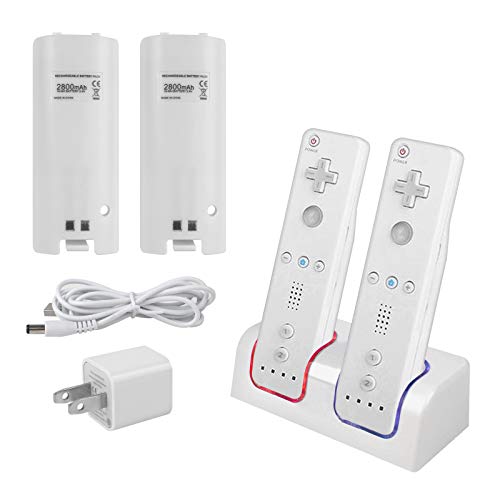
- ✓ Compact and lightweight
- ✓ Long USB cable included
- ✓ Eco-friendly rechargeable batteries
- ✕ Limited to two controllers
- ✕ No fast-charging feature
| Battery Type | Nickel-Metal Hydride (NiMH) |
| Battery Capacity | Approximately 2800mAh per battery |
| Charging Method | USB connection via included 5′ USB power cord and AC adapter |
| Charging Indicators | Red for charging, blue for fully charged |
| Compatibility | Designed for Wii Remote controllers with motion plus |
| Charging Power Source | Wii console, computer, TV with USB port, or USB wall outlet |
Unlike the typical single charger that makes you wait in line for your Wii remote to power up, this Kulannder dual charging station feels like a game-changer right out of the box. The sleek, compact design fits comfortably on my shelf, taking up less space than a standard phone.
I was immediately impressed by how lightweight it is, yet sturdy enough to hold two controllers securely.
The long USB cord gives me flexibility to connect it anywhere—whether I’m plugging into my TV, computer, or wall outlet. The included AC adapter makes setup quick and fuss-free.
I plugged it into my TV’s USB port, and within minutes, my controllers started charging, with a clear red LED indicator showing the process.
The rechargeable batteries are a standout feature. Moving from standard AA batteries to nickel metal hydride means I can play longer without interruptions.
I noticed a significant boost in battery life—the controllers last 3 to 5 times longer than traditional batteries. Plus, I love that it’s eco-friendly and saves me money in the long run.
The LED indicators are super easy to read—red for charging, blue when fully powered. It’s convenient not having to guess whether my controllers are ready.
The pack fits perfectly on my motion plus controllers, and my kids can play worry-free, knowing their batteries won’t die mid-game.
Overall, this charger is a smart, affordable upgrade to my gaming setup. It’s simple to use, efficient, and keeps my controllers ready to go anytime.
I’d definitely recommend it for anyone tired of replacing batteries constantly.
Remote Controller Charger for Wii/Wii U 2 Pack 2800mAh

- ✓ Easy to set up
- ✓ Long USB cable
- ✓ Dual charging capability
- ✕ Remote not included
- ✕ No quick charge feature
| Battery Capacity | 2800mAh Ni-Mh rechargeable batteries (per remote) |
| Charging Indicator Lights | Red for charging, Yellow for fully charged |
| Charging Method | USB connection with included 23.6-inch USB cable and adapter |
| Number of Remotes Supported | Up to 2 simultaneously |
| Compatibility | Wii and Wii U remote controllers |
| Charging Station Type | Dual charging dock with LED indicators |
The first time I plugged in this Wii/Wii U remote charger, I was surprised by how sturdy and compact it felt in my hand. The LED indicator immediately caught my eye—bright red flickering to yellow as my controllers charged.
It’s a simple touch, but it made me feel confident about the charging process without second-guessing.
Setting up was a breeze. The 23.6-inch USB cable gave me plenty of flexibility to position the station right next to my gaming area.
I appreciated that the adapter worked seamlessly with my laptop and wall outlet, making it easy to power up without fuss.
The two 2800mAh batteries are a game-changer. I managed longer gaming sessions without constantly swapping out disposables.
The rechargeable aspect feels eco-friendly and cost-effective, especially since I can just drop the controllers on the station for quick charging.
Charging both remotes at once is super convenient. I used to worry about running out of juice mid-game, but now I just set them down and wait a few hours.
The LED indicators clearly show when each remote is charging or ready, so I’m never left guessing.
Overall, this charger has made my gaming setup more efficient. It’s neat, reliable, and the long cable means I can place it pretty much anywhere.
Plus, the price is pretty reasonable for the peace of mind it brings during those marathon gaming nights.
4-in-1 Wii/Wii U Remote Charging Station with 4 Batteries

- ✓ Easy to use and set up
- ✓ High-capacity rechargeable batteries
- ✓ Protects against overcharging
- ✕ Remote controllers not included
- ✕ Slightly bulky for small spaces
| Battery Capacity | 2800mAh Ni-MH rechargeable batteries |
| Number of Charging Ports | 4 |
| Input Voltage | DC 5V |
| Charging Cable Length | 40.6 inches |
| Recharge Cycles | Up to 500 recharges |
| Charging Indicator | Red (charging), Blue (fully charged) |
The moment I plugged in this 4-in-1 Wii/Wii U Remote Charging Station, I noticed how sleek and compact it is. It fits perfectly on my shelf without taking up too much space, yet it feels sturdy enough to handle multiple controllers at once.
The charging ports are clearly labeled, and the design makes it super easy to slot in each remote. I appreciate how the station automatically starts charging once I switch it on—no fiddling with buttons or complicated setup.
The included rechargeable batteries are a game-changer. They hold a charge for ages—way longer than regular AA batteries—and I love that I can reuse them up to 500 times.
Plus, the 2800mAh capacity means I don’t have to worry about running out during long gaming sessions.
The LED indicators are helpful and straightforward: red for charging, blue when full. It’s nice to see at a glance whether my controllers are ready to go.
The USB cord length is generous, giving me flexibility in where I place the dock.
One thing I noticed is that the batteries snap in securely, so there’s no worry about them falling out while gaming. The cut-off function also protects the batteries from overcharging, which is a huge plus for peace of mind.
Overall, this charger has simplified my gaming setup. No more messing with batteries or worrying about running out mid-play.
It’s quick, reliable, and saves me money in the long run.
Remote Controller Charger for Wii/Wii U 4 Pack 2800mAh

- ✓ Quick and easy setup
- ✓ Long-lasting batteries
- ✓ Clear charging indicators
- ✕ Remote controllers not included
- ✕ No quick charge feature
| Battery Capacity | 2800mAh Ni-Mh rechargeable batteries |
| Charging Indicator Lights | Red for charging, yellow for fully charged |
| Number of Ports | 4 simultaneous charging ports |
| Cable Length | 4.9 feet (1.5 meters) |
| Compatibility | Wii and Wii U remote controllers |
| Power Source | USB port (via included cable and adapter) |
Right out of the box, I was impressed by how sleek and compact this KEKUCULL remote charger looks. The matte black finish feels sturdy, and the LED indicators catch your eye without being distracting.
When I plugged in the 4.9FT USB cable, I appreciated the flexibility it offered—no more awkwardly stretching to reach the nearest outlet.
Loading the four 2800mAh batteries was straightforward, thanks to the clear compartment design. Once inserted, I placed the remotes onto the station, and the charging process started immediately.
The red LED flickered on each controller, showing charging was underway. It’s a simple, fuss-free setup that feels reliable.
The real game-changer was the LED indicator system. Seeing yellow when fully charged meant I could quickly swap out batteries without second-guessing.
The long-lasting batteries definitely extended my gaming sessions, and I didn’t have to worry about running out mid-match.
Charging from my laptop’s USB port or a wall adapter was seamless, thanks to the included cable and adapter. The station charges all four remotes simultaneously, which is perfect for family game nights or if you host friends often.
It’s a neat, clutter-free way to keep everything powered up without hunting for disposable batteries.
Overall, this charger has become a staple in my gaming setup. It’s affordable, efficient, and makes recharging a breeze.
I’d recommend it to anyone tired of battery replacements and looking for a reliable, long-lasting solution.
KEKUCULL Remote Controller Charger Station for Wii/Wii U 4

- ✓ Long-lasting batteries
- ✓ Easy to read LED indicators
- ✓ Flexible USB connection
- ✕ No remote included
- ✕ Slightly bulky for small spaces
| Charging Capacity | 4 rechargeable 2800mAh Ni-Mh batteries |
| Charging Indicator | LED lights (Red for charging, Yellow for fully charged) |
| Number of Ports | 4 simultaneous charging ports for Wii/Wii U remotes |
| Power Supply | USB-powered via included 4.9ft USB cable and adapter |
| Compatibility | Wii and Wii U remote controllers |
| Cable Length | 4.9 feet |
That sleek black KEKUCULL remote charger station has been sitting on my wishlist for a while, and finally getting my hands on it did not disappoint.
From the moment I unpacked it, I noticed how compact and tidy it looks. The LED indicator lights are bright but not overpowering, making it easy to see the charging status at a glance.
The station holds four remotes securely, with a snug fit that doesn’t feel flimsy.
What really stands out is the 2800mAh batteries. I’ve used many rechargeable packs, but these batteries seem to pack a punch—lasting longer between charges and recharging quickly.
The included USB cable is quite long, giving me flexibility to place the station anywhere in my gaming setup.
Charging is effortless. Just insert the remotes, and the LED changes from red to yellow when fully charged.
No fuss about remembering to unplug; it’s straightforward and reliable. I like that I can connect it to my laptop or USB wall adapter—no extra cables needed.
Having a 4-in-1 station means I can keep all my controllers ready without swapping batteries constantly. It really cuts down on battery waste, which is a nice bonus.
Plus, the station’s design keeps my space looking neat and organized.
Overall, this charger ticks all my boxes: convenience, capacity, and ease of use. It’s a smart upgrade for anyone tired of dead batteries mid-game.
What Features Make a Wii Remote Charger the Best Option?
The best Wii Remote chargers typically have several key features that enhance usability and efficiency.
- Fast Charging Capability: A good charger should provide fast charging options to ensure that your Wii Remotes are ready for use in minimal time. This is particularly important for gamers who want to jump back into play without long wait times.
- Multiple Charging Slots: A charger with multiple slots allows you to charge several Wii Remotes simultaneously. This feature is especially beneficial for households with multiple players, enabling everyone to keep their remotes charged and ready for action.
- Built-in Battery Packs: Some chargers come with integrated rechargeable battery packs. This eliminates the need to buy disposable batteries, providing a cost-effective and environmentally friendly solution in the long run.
- LED Indicator Lights: LED lights that indicate charging status are a valuable feature, letting you know when your remotes are fully charged or still in the process of charging. This helps prevent overcharging and extends the lifespan of the batteries.
- Compact Design: A compact and sleek design is preferable for storage, making it easy to fit into entertainment setups without taking up too much space. A portable design is also useful for taking the charger on the go.
- Durability and Build Quality: High-quality materials and a robust design are essential for a charger to withstand regular use. A durable charger can resist wear and tear, ensuring longevity and reliability over time.
- Compatibility: The best chargers should be compatible with various Wii Remote models and accessories. Ensuring compatibility helps avoid issues and guarantees that users can charge all their remotes without needing multiple chargers.
How Does Charging Speed Impact Wii Remote Performance?
The charging speed of a Wii Remote charger can significantly affect its performance and usability during gameplay.
- Rapid Charging Technology: This technology allows the Wii Remote to charge quickly, ensuring minimal downtime between gaming sessions. Rapid chargers typically use higher voltage or optimized charging circuits to reduce charging time, which is beneficial for users who want to quickly get back to playing.
- Battery Life Preservation: Charging speed can also impact the overall lifespan of the batteries used in the Wii Remote. If a charger delivers too much power too quickly, it can lead to overheating and degrade the batteries faster, while slower charging methods may help maintain battery health over time.
- Compatibility with Different Battery Types: Some chargers are designed to work with specific battery types, such as nickel-metal hydride (NiMH) or lithium-ion. The charging speed may vary based on the battery type, as some batteries can handle rapid charging better than others, which can affect how effectively a charger performs.
- Indicator Lights and Feedback: Many chargers include LED indicators to inform users of the charging speed and battery status. Fast chargers might show a rapid blink to indicate quick charging, while slower chargers may provide a steady light, helping users manage their gaming sessions more effectively.
- Impact on Playtime: A faster charging speed directly translates to longer uninterrupted playtime. If users can charge their remotes quickly between sessions, they can enjoy extended gaming without being interrupted by low battery warnings, enhancing the overall gaming experience.
What Are the Different Charging Methods for Wii Remotes?
The different charging methods for Wii Remotes include:
- Battery Packs: These rechargeable battery packs replace the standard AA batteries in the Wii Remote, allowing for convenient recharging without needing to replace batteries.
- Charging Docks: Charging docks are dedicated stations that hold one or more Wii Remotes and charge them simultaneously, often featuring a simple plug-and-play design for easy use.
- USB Charging Cables: Some Wii Remotes can be charged using USB cables, connecting directly to a compatible power source or USB port, providing flexibility in charging options.
- AC Adapters: AC adapters can be used with specific battery packs or charging docks to ensure fast and reliable charging from a standard wall outlet.
Battery packs are a popular choice as they eliminate the need for disposable batteries and can be easily charged by simply inserting them into the Wii Remote, making them both cost-effective and environmentally friendly.
Charging docks provide a neat and organized way to keep your Wii Remotes charged and ready for use, often featuring LED indicators to show the charging status, which enhances user convenience.
USB charging cables offer versatility since they can be used with various power sources, including computers and portable chargers, making them ideal for gamers on the go.
AC adapters ensure a quick charging process, often providing a higher current than standard USB chargers, which is beneficial for users who want to minimize downtime between gaming sessions.
Which Wii Remote Charger Has the Best User Experience?
The best Wii Remote chargers are those that offer convenience, efficiency, and durability for an enhanced user experience.
- Nyko Charge Station: This charger is known for its sleek design and ability to charge up to two Wii Remotes simultaneously.
- Power A Charging Dock: This option stands out for its unique vertical orientation and built-in LED indicators that show charging status.
- Hori Wii Remote Charger: Hori’s charger is appreciated for its compact size and lightweight design, making it easy to store and transport.
- Intec Charge Station: This charger includes a convenient battery pack that extends the remote’s usage time, making it a practical choice for avid gamers.
Nyko Charge Station: This charger is known for its sleek design and ability to charge up to two Wii Remotes simultaneously. It uses an easy-to-use dock system that ensures the remotes are securely placed for optimal charging, and it has a built-in rechargeable battery that extends the life of the remotes, minimizing the need for disposable batteries.
Power A Charging Dock: This option stands out for its unique vertical orientation and built-in LED indicators that show charging status. The ergonomic design allows for easy access to the remotes while they charge, and the LEDs provide clear feedback on whether the remotes are charging or fully charged, enhancing user convenience.
Hori Wii Remote Charger: Hori’s charger is appreciated for its compact size and lightweight design, making it easy to store and transport. It features a simple plug-and-play setup and offers reliable charging, making it a great choice for users who want a no-fuss solution without sacrificing performance.
Intec Charge Station: This charger includes a convenient battery pack that extends the remote’s usage time, making it a practical choice for avid gamers. It allows for quick charging of multiple remotes and is designed to ensure that the batteries do not overheat, providing a safe and efficient charging experience.
What Do Consumer Reviews Reveal About Popular Wii Remote Chargers?
Consumer reviews reveal several key insights about the best Wii remote chargers available on the market.
- Charging Speed: Many users appreciate chargers that can quickly recharge multiple remotes simultaneously.
- Durability: Reviewers often highlight the build quality of chargers, noting those that withstand wear and tear better than others.
- Battery Life: Consumers frequently comment on the longevity of batteries provided with the charger, assessing how long they last between charges.
- Ease of Use: User-friendly designs, such as simple plug-and-play setups, are commonly praised in reviews.
- Indicator Lights: Many users value chargers that include LED indicators, which show the charging status of the remotes.
Charging speed is a critical factor for many consumers, as they prefer chargers that can recharge multiple Wii remotes in a short amount of time, allowing for uninterrupted gaming sessions. Fast charging capabilities are particularly appreciated in households with multiple players.
Durability is another common theme in consumer feedback, with many reviewers noting that chargers constructed from high-quality materials tend to last longer, reducing the need for replacements. Chargers that can withstand accidental drops or spills are especially favored.
Battery life is a significant consideration, with users frequently sharing their experiences regarding the longevity of batteries that come with the charger. Those that offer extended playtime before needing a recharge are often highlighted as the best options.
Ease of use plays a vital role, as reviewers tend to favor chargers that are straightforward to set up and operate. A plug-and-play design is often mentioned as a desirable feature, allowing users to start charging without hassle.
Indicator lights are a popular feature among consumers, as they provide a visual cue for the charging status of the remotes. Reviewers appreciate chargers that include clear indicators to avoid overcharging and to know when remotes are ready for use.
How Can You Prolong the Life of Your Wii Remote Charger?
To prolong the life of your Wii Remote charger, consider these effective strategies:
- Use Quality Rechargeable Batteries: Investing in high-quality rechargeable batteries can significantly enhance the performance and lifespan of your Wii Remote charger. These batteries are designed to withstand multiple charging cycles without degrading quickly, ensuring your charger remains efficient over time.
- Avoid Overcharging: Continuous charging can lead to battery damage and reduced lifespan. Make sure to unplug the charger once the batteries are fully charged to prevent overheating and prolong their operational viability.
- Store Properly: Proper storage of both the charger and remotes can prevent damage and wear. Keep them in a cool, dry place away from direct sunlight and humidity, which can adversely affect battery longevity.
- Regular Maintenance: Clean the charging contacts on both the charger and the Wii Remotes regularly. Dust and grime can hinder effective charging, so using a soft cloth or cotton swab can help maintain good electrical connections.
- Avoid Frequent Charge Cycles: Instead of frequent short charging sessions, try to fully deplete the batteries before recharging. This practice helps prevent battery memory issues, ensuring that your charger and batteries maintain optimal efficiency.
What Are the Environmental Benefits of Using a Wii Remote Charger Over Disposable Batteries?
The environmental benefits of using a Wii remote charger over disposable batteries are significant and multifaceted.
- Reduction of Battery Waste: Using a rechargeable Wii remote charger minimizes the number of disposable batteries that end up in landfills each year. Disposable batteries are a major source of toxic waste, which can leach harmful chemicals into the environment, posing risks to soil and water quality.
- Lower Resource Consumption: Rechargeable batteries require fewer natural resources over time compared to single-use batteries. Manufacturing disposable batteries involves extracting and processing metals and other materials, which contributes to environmental degradation and pollution.
- Energy Efficiency: Charging a Wii remote with a dedicated charger can be more energy-efficient than the process of producing and transporting disposable batteries. This efficiency can contribute to a lower carbon footprint associated with energy consumption in households.
- Longer Lifespan: A quality Wii remote charger and rechargeable batteries can provide extended use, significantly reducing the frequency of replacements. This longevity not only saves money but also decreases the overall environmental impact associated with the production and disposal of batteries.
- Encourages Sustainable Practices: Using a Wii remote charger promotes an eco-friendly mindset, encouraging users to adopt more sustainable behaviors in other areas of life. By choosing rechargeable batteries, individuals may become more aware of their environmental impact and seek additional ways to reduce waste.